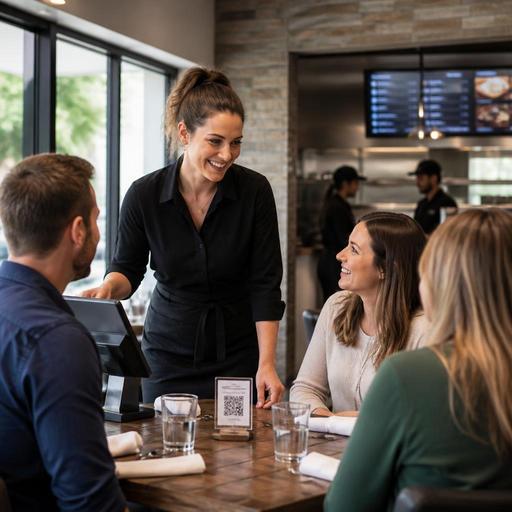
How U.S. Restaurants Can Automate Service Without Losing Hospitality
For many operators, restaurant automation without losing hospitality feels like a contradiction. In practice, the best U.S. restaurants use automation to remove friction, not personality. A neighborhood diner can speed up takeout with a pickup shelf and text alerts while keeping a server focused on regulars. A fast-casual salad shop can route digital orders straight to the kitchen display system so the line moves faster at lunch. A hotel restaurant can automate reservations and waitlist updates while the host still greets guests by name. The goal is not to replace human service. It is to protect it.
Start by Automating Friction, Not the Guest Relationship
A useful rule for U.S. restaurant operators is simple: automate the steps guests do not value, then reinvest labor into the moments they remember. Most guests do not visit a cafe because they love waiting to close out a tab, repeating an order over a noisy counter, or calling to ask whether curbside pickup is ready. They remember whether your team was attentive, whether the order was right, and whether the experience felt easy.
That means the first automation targets are usually operational:
- Order intake: QR ordering, direct online ordering, and synced delivery app order flow into one POS stack.
- Kitchen routing: kitchen display workflows that send dine-in, takeout, curbside pickup, and third-party delivery tickets to the right prep station.
- Guest notifications: automated messages for reservations, waitlist status, and pickup readiness.
- Payment flow: mobile pay-at-table, digital receipts, and cleaner check-close steps for busy shifts.
For example, a suburban pizza restaurant might automate online ordering, prep timing, and pickup notifications so the front counter is not buried during Friday night rush. That frees one employee to manage handoff accuracy, answer allergy questions, and fix issues before they become refunds. The tech handles the queue; the staff handles the relationship.
Choose Touchpoints Where Speed Helps Hospitality
Not every part of service should be digitized equally. A sports bar, food truck, airport concession, and full-service steakhouse all have different pressure points. The best automation strategy matches the format.
Full-service restaurants
In a full-service setting, automation works best when it supports the server rather than replacing the server. QR menus can help guests browse cocktails, modifiers, and dessert photos, but many operators still want staff to guide pairings and pacing. Mobile payment can reduce the awkward wait for the check presenter, especially during busy brunch or pre-theater turns, while servers stay focused on table maintenance and upselling.
Tipping workflows matter here. If you use digital payment, make sure tip prompts are clear, consistent with your service model, and easy for guests to understand. Operators should also align payment setup with their POS reporting and verify tip reporting, service charge treatment, and local wage rules with qualified advisors and current official guidance.
Fast-casual and QSR
In fast-casual and QSR, guests usually value speed and accuracy first. Self-order kiosks, QR ordering, and direct online ordering can reduce line pressure, but hospitality still shows up in expo, food handoff, and problem resolution. A burrito shop in Chicago might let guests order ahead on their phones, then use a pickup shelf for standard takeout and a separate handoff area for delivery drivers. Staff can then spend less time shouting names and more time catching missing sides before orders leave the store.
Cafes, food trucks, and bars
A cafe can automate loyalty-linked receipts and order-ahead for morning commuters. A food truck can use a simple QR menu and text-based order readiness to avoid a crowd around the window. A bar can use QR tabs in a patio section while bartenders focus on conversation and pace of service. In alcohol service, age verification and local rules still need human attention, and operators should confirm current state and local requirements.
Protect the Human Moments Guests Actually Notice
Automation feels cold when owners digitize the visible parts of hospitality and ignore the emotional ones. Guests rarely complain that your kitchen printer was too manual. They do notice when nobody makes eye contact, no one can answer a menu question, or a problem gets bounced between a device and an employee.
To avoid that, create a short list of human-only moments:
- Greeting: every dine-in guest gets acknowledged quickly, even if they are asked to wait.
- Guidance: someone can explain the menu, point out popular items, and handle dietary questions.
- Recovery: if an order is wrong, a person owns the fix immediately.
- Farewell: guests leave with a thank-you, not just an automated receipt.
An American diner is a good example. You can automate online waitlist updates and card payments, but regulars still expect the host to recognize them and the server to remember coffee preferences. A hotel breakfast outlet can automate buffet counts, reservation pacing, and POS syncing to room charges where available, but the guest still wants a warm welcome at 7 a.m. before a flight or conference.
Build Workflows That Help Staff, Not Just Owners
If automation only improves reporting, staff may see it as surveillance or extra work. If it removes repetitive tasks, they will use it better. Before adding any tool, ask what it changes during a real shift.
- Does it reduce duplicate entry between delivery apps, direct ordering, and the POS?
- Does it help the kitchen prioritize on-premise guests versus delivery rushes?
- Does it shorten the time a server spends running cards back and forth?
- Does it make labor scheduling easier by showing daypart demand more clearly?
- Does it simplify multi-location menu updates, 86ing items, or price changes?
Consider a three-unit fast-casual brand with lunch-heavy traffic. If one store uses tablets for third-party delivery, another uses paper tickets, and a third has no synced inventory visibility, the guest experience will feel inconsistent. Automation becomes more valuable when it standardizes core workflows across locations: same menu logic, same modifier structure, same pickup process, same check-close flow.
Training matters just as much as setup. Teach staff what the tool is doing, when to step in, and how to speak naturally around it. For example, instead of pointing at a QR card and walking away, a server can say, You can browse the menu there anytime, and I’m happy to help with recommendations if you want a quick overview. The technology stays in the background while hospitality stays front and center.
Keep Access, Compliance, and Brand Experience in View
Automation should not create barriers. If you use QR menus or mobile ordering, think about ADA-minded access in practical terms: readable menu design, clear contrast, logical navigation, and a staff-assisted alternative for guests who do not want to order by phone. Operators should review accessibility expectations and verify current federal, state, and local guidance for their situation.
For larger chains, digital systems can also support cleaner menu data management for nutrition disclosures where menu labeling rules apply. The exact legal requirements depend on the business model and current guidance, so use your system to centralize item data and verify obligations with qualified counsel or official sources.
The same principle applies to sales tax, service charges, payment processing, and labor workflows. A restaurant group may automate gratuity prompts, banquet deposits, or large-party service charges, but the operational setup should be reviewed carefully with accountants, payroll partners, and legal advisors based on state and local requirements.
Above all, keep your brand voice intact. A Texas barbecue restaurant, a Brooklyn coffee shop, and an airport burger concession should not all sound the same just because they use similar tools. Your digital ordering flow, reservation messages, and pickup instructions should feel like your operation, not a generic software template.
Used well, automation gives your team more time for eye contact, better pacing, cleaner handoffs, and fewer errors. That is what guests remember. Restomas helps operators connect menus, ordering, payments, and kitchen workflows in ways that support smoother service without stripping out the human side of hospitality.
