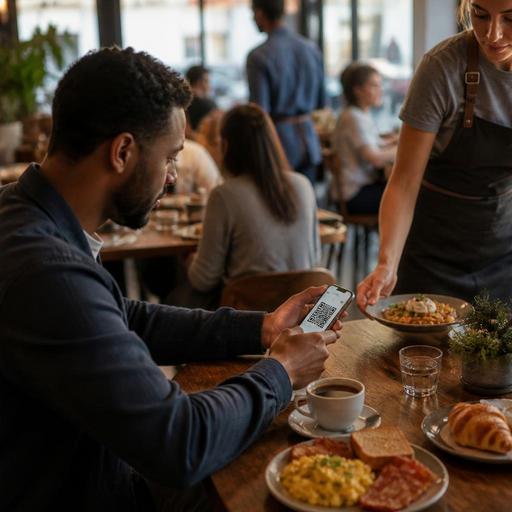
How Breakfast Restaurants Can Optimize QR Menus for Peak Morning Rush
The main challenge in QR menu optimization for breakfast restaurants during peak hours is simple: guests want to decide fast, order fast, and eat fast, while your team needs to keep tables turning without creating confusion. Breakfast service is different from lunch and dinner because the pace is compressed. Many guests are on their way to work, meeting friends before the day starts, or managing family schedules. A QR menu that works well at 2 p.m. can feel slow and frustrating at 8:15 a.m. For breakfast operators, the digital menu should reduce friction, highlight high-demand items, and support staff during the busiest window of the day.
A well-optimized QR menu is not only a digital version of a printed menu. It becomes an operational tool. It can guide traffic toward your most efficient dishes, make modifications clearer, reduce repeated guest questions, and help the front-of-house team spend more time serving instead of explaining basic menu details. For breakfast restaurants, that matters because even small delays can create a queue at the door, slower table turnover, and pressure on the kitchen.
Design the QR menu for fast morning decisions
Breakfast guests do not usually browse with the same patience as dinner guests. Your menu structure should reflect that reality. The goal is to help a guest find the right item in seconds, not minutes. That starts with category design.
Instead of long, mixed sections, use short, practical groups such as quick breakfast, eggs and plates, bakery and pastries, coffee and hot drinks, and fresh juices. If your concept includes regional dishes, place them where they are easy to find rather than hiding them under a vague category. A commuter who wants a filling plate and a parent ordering for two children should both be able to scan and navigate without effort.
Item names should be clear first and creative second. During peak hours, guests need to understand what they are ordering immediately. For example, Two-Egg Breakfast Plate with Toast and Potatoes is more useful in a rush than a branded internal product name. Descriptions should answer common questions quickly: what comes with the dish, whether bread is included, whether the item is vegetarian, and whether substitutions are possible.
Photos can help, but only if they are selective. A breakfast QR menu overloaded with images can become visually heavy and slower to scan. Feature photos on high-margin signatures, combo meals, or unfamiliar regional items. Keep the rest clean and readable.
Build the menu around peak-hour operational reality
The best breakfast QR menus are shaped by what the kitchen and service team can execute under pressure. This means the menu should not only sell what guests want; it should also steer demand toward items that move efficiently during the rush.
For example, if omelets with multiple modifications slow down the line, but breakfast sandwiches, granola bowls, and fixed plates move faster, your QR menu should make those quick-execution items more prominent. That does not mean hiding customizable dishes. It means presenting them in a way that protects flow. Place fast, reliable sellers at the top of categories. Use combo logic where appropriate, such as coffee plus pastry or a fixed breakfast set, to simplify decisions and reduce back-and-forth.
You can also use the QR menu to control complexity. If guests frequently ask whether they can swap sides, choose bread types, or add extras, build those options into the menu clearly. Structured modifiers are faster than verbal clarification. A server should not need to explain the same three choices at every table during the busiest hour.
Practical examples include:
- Mark best-for-speed items: Use labels such as morning favorite or quick pick for dishes that are easy for the kitchen to produce fast.
- Group beverage add-ons logically: Put milk options, extra shots, and syrup choices in one clean sequence instead of scattered notes.
- Separate build-your-own items from fixed plates: This helps guests who want speed choose quickly while still serving those who want customization.
- Temporarily hide unavailable items: If a pastry batch sells out at 9 a.m., removing it quickly from the QR menu avoids disappointment and repeated explanations.
This is where digital menu management becomes especially valuable. A breakfast restaurant often starts the day with one reality and reaches 10 a.m. with another. Inventory changes fast, and the menu should keep up.
Use QR menus to reduce service bottlenecks at the table
Peak breakfast service often creates the same bottlenecks: guests waiting to ask what comes with a dish, staff returning to clarify coffee options, and tables pausing because one person still has not decided. A well-structured QR menu can remove many of these interruptions before they happen.
Start with the most common friction points. If guests often ask whether jam, butter, or salad is included, state it clearly. If your avocado toast can add poached eggs, smoked salmon, or feta, show those choices directly. If pancakes are available only until a certain time, mention that in the item listing rather than relying on staff to remember the explanation.
Another useful tactic is to create a short top section for popular breakfast combinations. Many guests do not want to build a meal item by item. They want a reliable complete option. A section with combinations such as coffee plus croissant, classic Turkish-style breakfast set, or eggs plus juice can accelerate ordering while increasing average ticket naturally.
For dine-in service, QR menus can also support better pacing. If guests can review the menu while waiting to be greeted, the first staff interaction becomes more productive. The team can answer specific questions or confirm the order instead of starting from zero. In operations with integrated ordering flows, this can further reduce wait time and lighten pressure on the service team during the rush.
Make menu updates part of the breakfast opening routine
Breakfast restaurants should treat QR menu updates as part of the opening checklist, not as an occasional marketing task. The morning menu is highly sensitive to stock, prep completion, staffing, and expected demand. If the digital menu is not aligned with actual readiness, the first hour of service becomes harder than it needs to be.
A practical opening workflow might include:
- Confirm which baked goods, breads, and fresh items are available.
- Check whether any ingredients are limited and decide early whether to hide or de-prioritize certain dishes.
- Review prices, combo availability, and add-on logic.
- Make sure featured items match what the kitchen wants to push that morning.
- Verify that seasonal or weekend-only items are displayed correctly.
This routine is especially important for multi-location breakfast brands or cafes with changing daily specials. Centralized digital control helps maintain consistency while still allowing each branch to reflect local stock conditions. A platform such as Restomas can support this kind of menu agility by making updates faster and easier to manage across service periods.
Train staff to work with the QR menu, not around it
Even the best QR menu will underperform if the team treats it as separate from service. Staff should understand how the menu is organized, where key modifiers appear, which items are intentionally promoted, and how to guide guests who are less comfortable scanning or ordering digitally.
For example, hosts can prompt waiting guests to scan while they are being seated. Servers can recommend the quick-pick section to time-sensitive customers. Cashiers can use the same category language as the QR menu to keep communication consistent. Managers should also collect recurring guest questions and use them to improve menu descriptions over time.
It helps to coach the team around a few specific habits:
- Point guests to combinations or bestsellers during peak periods.
- Report confusing item descriptions that create repeated questions.
- Flag unavailable items immediately so the digital menu can be updated.
- Use the QR menu as a service aid, not as a replacement for hospitality.
The goal is balance. Guests should feel that the digital menu makes breakfast easier, not colder. In a strong breakfast operation, QR technology supports speed and clarity while staff still provide warmth, recommendations, and problem-solving.
Measure what actually improves the morning rush
Optimization is not a one-time redesign. Breakfast operators should review how guests behave during the morning rush and adjust the QR menu accordingly. Which categories are opened first? Which items create frequent modifications? Which dishes sell well but slow down production? Which combinations help move lines faster?
You do not need complicated analysis to make useful improvements. Start by watching where service friction appears and matching that to menu structure. If guests keep asking for drink options, simplify the beverage path. If premium add-ons are ignored, present them more clearly. If a signature plate sells well but creates confusion because sides are unclear, rewrite the description.
Over time, the strongest breakfast QR menus become sharper, shorter, and more operationally intelligent. They reflect both guest behavior and kitchen rhythm. That is the real opportunity: not just digitizing the menu, but turning it into a tool that protects speed, improves the guest experience, and helps the team stay in control during the busiest hour of the day.
If your breakfast service depends on fast updates, clear digital menus, and smoother ordering flow, Restomas can help you manage that process more efficiently.
