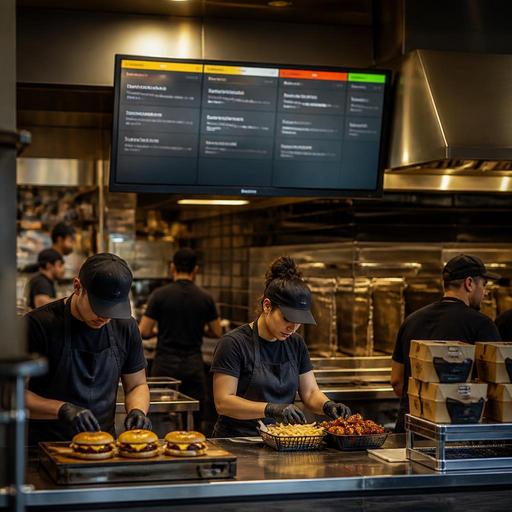
Kitchen Display System Setup for U.S. Burger, Pizza, and Wing Shops
A kitchen display system for burger, pizza, and wing shops can do far more than replace paper tickets. In a busy U.S. operation, it becomes the control point for dine-in, takeout, curbside pickup, direct online ordering, and delivery apps all hitting the line at once. For operators running a neighborhood burger joint, a college-town pizza store, or a wing-heavy sports bar, the real value is not just screen visibility. It is routing, pacing, and clearer handoffs between the POS, expo, fry station, make line, and pickup shelf.
Many American operators feel the pressure most during peak windows: lunch rush at a fast-casual burger counter, Friday night carryout at a pizza shop, or game-day wing volume at a bar. If third-party delivery orders, phone orders, QR table ordering, and in-person checks all enter the kitchen without structure, ticket times slip and mistakes rise. A well-configured kitchen display system helps organize that flow so staff can fire items in the right sequence and guests get more accurate orders.
Map the kitchen by production station, not by menu category alone
The most common setup mistake is building screens around a broad menu instead of actual production steps. In a burger shop, burgers, fries, shakes, and kids meals may all be sold together, but they do not move through the kitchen the same way. Your KDS should reflect the real line.
For example, a fast-casual burger restaurant in Texas may need one screen for grill, one for fry, and one for expo. A pizza store in New Jersey may split dough and topping assembly from ovens and cut table. A wing concept in Georgia may route boneless wings, traditional wings, fries, and sides to separate prep points before expo consolidates the order.
- Burger operations: Separate grill, fry, and expo so fries are not buried under burger modifiers.
- Pizza operations: Route build tickets to the make line, then hand off to oven management and cut/box.
- Wing operations: Distinguish fry station from sauce toss and final packing, especially when guests choose multiple sauces or dry rubs.
This matters even more when you serve several channels at once. A dine-in table ordering through a server, a guest scanning a QR code to order another round, and a delivery app order should all end up on the right production screen with clear timing priority. The operator goal is simple: reduce line confusion without creating duplicate work.
Build order logic around modifiers, holds, and combo complexity
Burger, pizza, and wing menus create heavy modifier traffic. No pickles, extra cheese, gluten-sensitive crust requests, split sauces, all flats, ranch on the side, well-done wings, half-and-half toppings, and combo substitutions can break a kitchen when the display is not structured well.
Instead of showing long, cluttered tickets, configure your KDS so the most important production details appear first. Grill cooks should see patty count, temperature or doneness workflow if used operationally, cheese type, and major holds. Fry cooks should see side quantities and timing cues. Pizza makers should see crust, size, sauce, cheese level, and topping sequence. Expo should see packaging notes, drink count, and whether the order is dine-in, takeout, curbside pickup, or delivery.
A Chicago pizza operator, for instance, may need different timing rules for thin crust versus deep dish. A Buffalo-style wing shop may want well-done wings flagged automatically because they affect fry times. A California burger concept offering lettuce wraps and plant-based patties may need allergen-awareness notes separated visually from standard modifiers. These are operational workflows, not legal conclusions, and operators should verify any food allergy, ADA, labor, or local compliance requirements with qualified advisors and official guidance.
Useful configuration priorities
- Put critical modifiers at the top of each item.
- Group related add-ons under the base item rather than scattering them across the ticket.
- Use color or status cues carefully so rush orders stand out without overwhelming the screen.
- Show channel labels clearly: dine-in, takeout, direct online order, delivery app, or curbside.
- Keep packaging instructions visible at expo, not necessarily at every production station.
Control timing for off-premise orders and pickup handoff
For many U.S. operators, the KDS is where off-premise profitability is won or lost. A wing order that sits ten minutes before a driver arrives loses texture. A burger and fries order fired too early for curbside pickup may disappoint the guest before they even open the bag. A pizza cut and boxed too soon can create avoidable quality issues during delivery.
Your kitchen display system should support timing rules that match order source and promise time. If your direct online ordering channel allows scheduled pickup, the order should not hit the make line the same way as a walk-in order. If delivery app tickets flood in during dinner, staff should be able to pace production instead of letting every order print or display at once with equal urgency.
Consider a sports bar in Ohio on Sunday afternoon. Wing trays for dine-in tables, family takeout bundles, and delivery app orders may all peak at the same time. The operator may choose to prioritize in-house guest recovery differently from long-quoted third-party deliveries. That is not about ignoring any channel. It is about controlling throughput so the kitchen does not fail every channel at once.
- Use promise-time logic for scheduled pickup and curbside pickup.
- Keep a clear expo stage for bagging, sealing, and labeling.
- Match KDS completion steps to the pickup shelf or handoff counter workflow.
- Separate “cooking complete” from “ready for guest or driver” so timing data is more useful.
If your location handles alcohol, service charges, tips, or delivery fees through different channels, keep those details managed in the ordering and payment workflow while the kitchen focuses on production. Operators should confirm current state and local rules around tipped staff, tip reporting, alcohol service, and tax treatment with qualified professionals.
Use KDS data to staff smarter and fix bottlenecks
Many operators install a KDS but never use the data beyond live order tracking. The better use is reviewing recurring bottlenecks by daypart, channel, and station. If your fry screen backs up every Friday from 6 p.m. to 8 p.m., that may be a labor scheduling issue, a menu engineering issue, or a station layout issue. If your pizza cut table gets jammed when large game-day orders hit, the screen data can confirm whether the problem starts at oven output, boxing, or delivery staging.
A multi-location burger chain might compare lunch ticket flow across suburban drive-up heavy stores versus urban takeout-heavy stores. A pizza franchise may discover one store is slower only on app orders because prep instructions are inconsistent between the POS and the kitchen display. A hotel restaurant serving burgers and wings through room service and lobby pickup may need different routing than a street-facing fast-casual location.
Look at patterns such as:
- Average backlog by station during peak periods
- Frequent modifier-related remakes
- Long handoff times between kitchen completion and pickup
- Differences between direct online orders and marketplace delivery orders
- Recurring delays tied to limited-time offers or combo meals
These insights help with staffing, prep planning, and menu simplification. They can also support clearer training for new cooks and expo staff.
Create one operational playbook across POS, KDS, online ordering, and expo
The strongest results come when the kitchen display system is not treated as a standalone screen. It should connect cleanly with your POS stack, direct online ordering, QR ordering, payment flow, and order handoff process. That is especially important for multi-location operators trying to standardize ticket naming, modifier logic, item availability, and prep timing.
For example, if one wing location calls a sauce “hot” and another calls the same build “buffalo hot,” your KDS data and staff training become messy. If one burger store manually enters curbside notes while another uses a structured handoff flow, guest experience becomes inconsistent. If one pizza unit 86s items in the POS but the online menu stays live, the kitchen absorbs the fallout.
A practical playbook should include:
- Standard item names and modifier rules across all channels
- Defined station routing for every core menu category
- Clear expo procedures for dine-in, takeout, delivery, and curbside
- Daily checks for item availability and 86 updates
- Weekly review of missed times, remakes, and station bottlenecks
Also remember accessibility and guest communication. If QR ordering or digital pickup updates are part of the experience, operators should make sure guests still have a practical way to access menus and complete orders. ADA-related expectations can vary by situation, so verify current requirements with qualified advisors and official guidance.
For U.S. burger, pizza, and wing shops, the best kitchen display system is the one that reflects how your line really works, not how your menu looks on paper. When routing, timing, modifiers, and handoff are set up correctly, the result is faster production, fewer errors, and a calmer shift for the whole team. Restomas can help operators connect ordering, kitchen workflows, and service handoff in one practical system.
