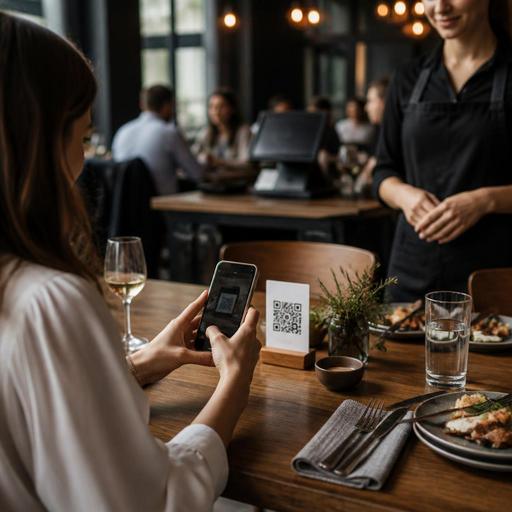
QR Code Contactless Payments for Restaurants: Setup and Staff Guide
QR code contactless payments for restaurants are no longer just a convenience feature. They affect table turns, service flow, guest trust, and how smoothly the front-of-house team handles peak hours. For restaurant owners, the real question is not whether guests can scan and pay, but what needs to be prepared behind the scenes so the payment experience feels simple, accurate, and reliable.
A QR payment setup touches more than the checkout screen. It connects menu structure, order timing, bill accuracy, staff communication, and exception handling. A cafe with counter pickup, a casual dining restaurant with shared tables, and a full-service venue with split checks will each need a slightly different approach. The best systems reduce friction for guests while giving operators better control over service.
Start with the payment journey, not the technology
Many restaurants begin by choosing a payment tool first. A better approach is to map the guest journey from seating to payment completion. This helps you see where QR code contactless payments fit naturally and where they may create confusion if the process is not clearly designed.
For example, a quick-service cafe may place a QR code on the table so guests can open the menu, place an order, and pay before preparation starts. In a full-service restaurant, the QR code may be used only at the end of the meal to review the bill and pay without waiting for a card machine. Both are valid, but the staffing, timing, and guest messaging are different.
Ask practical questions before rollout:
- Will guests pay before ordering, during ordering, or after service?
- Can a table have multiple payers and split items easily?
- How will tips or service charges appear?
- What happens if a guest wants to pay partly by cash and partly digitally?
- How will staff confirm that payment is complete before guests leave?
These decisions shape the workflow more than the QR code itself. If the journey is unclear, even a well-designed interface can create extra staff work.
Prepare the menu and bill structure for mobile payment
QR payment works best when the digital menu and bill are clean, current, and easy to understand on a phone screen. If item names are vague, modifiers are inconsistent, or add-ons are not clearly priced, guests may hesitate before paying or call staff over for clarification.
Start by reviewing the menu from a mobile-first perspective. A guest scanning a code at the table should quickly understand what they ordered, what was added, and what they are paying for. This matters especially for restaurants with customizable dishes, tasting add-ons, combo meals, or rotating daily items.
Here are a few examples:
- A burger restaurant should show patty upgrades, cheese options, and extra toppings as separate line items when relevant.
- A cafe should clearly distinguish dine-in and takeaway packaging charges if they differ.
- A seafood restaurant with daily market items should make sure unavailable products disappear immediately from the payment flow.
- A family-style restaurant should label shared dishes in a way that helps guests split the bill without debate.
Bill presentation matters too. The final payment page should show ordered items, taxes or fees where applicable, discounts, and the total in a way that does not surprise the guest. Confusion at the last step can erase the convenience benefit.
Platforms that connect QR menus, ordering, and payment in one flow can reduce manual mismatches. If your digital menu updates in real time and ties directly to orders, staff spend less time correcting item disputes or explaining why a dish on the screen is not actually available.
Train staff for exceptions, not just the ideal scenario
The most common rollout mistake is assuming contactless payment removes the need for staff involvement. In reality, it changes where staff add value. Team members no longer need to carry every bill to the table, but they do need to manage exceptions quickly and confidently.
Training should cover the moments when the process breaks from the ideal path:
- A guest scans the code but the page does not load because of weak signal or an older phone.
- A table wants to split the check unevenly rather than paying equal shares.
- One item is disputed because the guest believes it was canceled.
- A payment is attempted twice because the guest is unsure whether the first tap worked.
- A guest prefers human assistance and does not want to complete payment on a phone.
Staff should know exactly what to say and what to do in each case. For example, if a payment appears pending, the team should know whether to refresh the table status, check the POS, or verify through the payment dashboard. If a guest wants help, staff should be trained to assist without making the guest feel uncomfortable for not using the digital option.
It is also useful to assign ownership. During each shift, decide who monitors digital payment status, who handles payment disputes, and who can override or close a table if needed. Without clear ownership, issues can bounce between servers, cashiers, and managers.
Protect guest trust with simple security and clarity
Guests will only adopt QR payments comfortably if the experience feels trustworthy. Restaurant owners do not need to overwhelm guests with technical language, but they do need visible signs of care.
First, make sure QR codes are placed professionally and checked regularly. Damaged table stickers, codes covered by old promotional material, or printed sheets that can be easily swapped create doubt. Use durable placements and inspect them as part of opening routines.
Second, keep the payment page consistent with your restaurant identity. If the guest scans a code from your table and lands on a page that looks generic or confusing, they may hesitate. The transition from menu to order to payment should feel coherent.
Third, explain the flow in one short sentence where appropriate. Something as simple as Scan to view your bill and pay securely reduces uncertainty. Staff can reinforce this by introducing the option naturally when presenting the meal or checking on the table.
Finally, prepare for fraud-prevention basics operationally. If a table has paid, your team should be able to confirm that clearly in the system. If a payment link expires, the guest should not be left guessing. If a code is missing or damaged, staff should replace it quickly rather than improvising with verbal instructions.
Build QR payments into daily operations and service goals
Contactless payment should support hospitality, not compete with it. The goal is not to push every guest to self-serve every step. The goal is to remove unnecessary waiting while keeping service warm and responsive.
Operationally, this means reviewing where QR payments improve speed and where they need support. In lunch rushes, faster payment can free tables sooner and reduce queues at the counter. In evening service, it can help guests leave on their own timing instead of waiting for a card terminal. In both cases, managers should watch whether the system reduces interruptions or simply moves them elsewhere.
Create a simple weekly review using observations from the floor:
- Which tables needed manual payment help most often?
- Were there repeated questions about the bill layout?
- Did staff trust the payment status indicators?
- Were any menu items causing confusion at checkout?
- Did guests respond positively when the option was introduced verbally?
Use that feedback to improve code placement, menu wording, bill structure, and staff scripts. Small changes can make a large difference in adoption.
For multi-unit operators, standardization matters even more. If one branch uses QR payment only for bills and another uses it for ordering and payment, staff training and guest expectations can drift. Document the intended flow for each service model and keep it consistent.
Restaurants using digital tools such as QR menus, order management, reservation flows, and POS-connected operations are in a better position to make contactless payments feel seamless because the guest experience is already linked across touchpoints. When the menu, order, and payment data work together, operators can spend less time fixing process gaps and more time improving service.
Done well, QR code contactless payments are not just a payment feature but a service design decision. If you are refining your restaurant's digital guest journey, Restomas can help connect QR menus, ordering, and operational workflows in a way that stays practical for both staff and guests.
