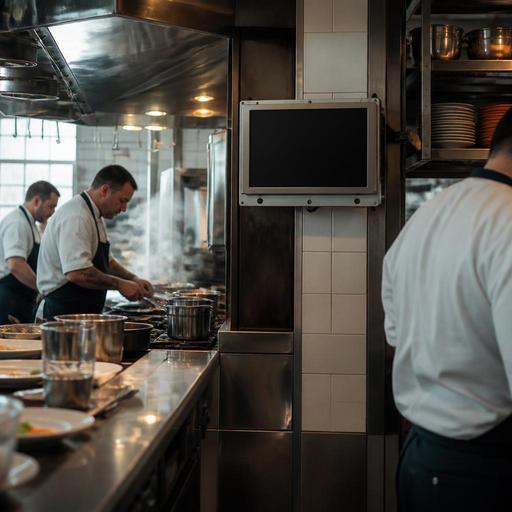
Choosing Kitchen Screens for Hot, Steamy, High-Volume Kitchens
Choosing kitchen screens for heat, steam, and heavy use is not just a hardware decision. In a busy restaurant, the wrong screen can slow down prep, create cleaning problems, and fail at the worst possible moment during service. The right setup helps cooks read tickets quickly, coordinate stations, and keep orders moving even in environments with grease, humidity, and constant touch input. For restaurant owners and operators, that means looking beyond screen size and price to focus on durability, placement, workflow, and integration.
Start with the kitchen environment, not the product brochure
Many operators begin by comparing screen models, but the better starting point is the actual kitchen line. A screen mounted near a fryer faces different conditions than one used in a cold prep area or pass station. Heat, steam, airborne oil, splashes, vibration, and constant wiping all affect performance over time.
Walk through each station and ask practical questions. Is the screen close to an oven door that releases bursts of heat? Will staff use it with dry fingers, wet hands, or gloves? Is there enough wall or shelf space for safe mounting? Will the surface need frequent wipe-downs during service? A pizza kitchen, for example, may deal with flour dust and high ambient heat, while a grill line may create more grease in the air. A cafe with a compact hot line may need a smaller screen with a tighter mounting footprint.
This environment-first approach prevents a common mistake: buying consumer-style displays that look acceptable in an office but struggle in a commercial kitchen. In a restaurant, reliability under pressure matters more than appearance.
What to look for in a screen built for heavy kitchen use
Once you understand the environment, evaluate screens based on restaurant realities. A kitchen display should be easy to read at a glance, simple to clean, and physically stable during a rush. Touch response also matters. If cooks have to tap multiple times to bump an order, frustration builds quickly.
- Brightness and readability: The display should remain easy to read under strong overhead lighting, reflections from stainless steel, and fast glances from different angles.
- Touch performance: Staff should be able to interact quickly even during busy service. If gloves are common, test compatibility before rollout.
- Durable enclosure: Commercial-grade construction is preferable where grease, moisture, and repeated cleaning are part of daily operations.
- Mounting flexibility: Wall mounts, articulated arms, and under-shelf options can make a big difference in tight kitchens.
- Cable protection: Loose or exposed cables become cleaning hazards and failure points in hot, wet environments.
- Serviceability: If a unit fails, replacement and support should be straightforward. Restaurants need practical uptime, not complicated repair cycles.
For example, a fast-casual bowl concept may need one screen at assembly and another at expo, both visible from a short distance. A full-service restaurant with separate grill, saute, and dessert stations may need multiple smaller screens rather than one large display. The goal is to match visibility and interaction to how work actually moves through the kitchen.
Placement decisions that reduce heat stress and improve workflow
Even a strong screen can underperform if it is installed in the wrong place. Placement affects lifespan and speed. A display mounted directly above a steam source may become harder to read and more difficult to keep clean. One placed too far from the action may force extra steps or awkward body movement during service.
Good placement keeps the screen close enough for fast interaction but far enough from direct heat, splashing, and collision risk. Avoid mounting where pan handles, doors, or stacked trays can strike the screen. If possible, keep displays out of direct steam release paths from dish areas, combi ovens, or boiling stations.
Think in terms of station behavior. At a fry station, cooks may only need to see item counts and timing cues. At garnish or expo, staff may need a broader order view with modifiers and completion status. That means placement and screen size can differ by role.
- Map where each role stands during peak service.
- Identify heat, steam, splash, and impact zones.
- Choose a viewing distance for each station.
- Test whether a cook can tap the screen without leaving the work area.
- Confirm that cleaning staff can wipe around the mount and cables safely.
A short real-world test helps. Tape a paper mockup where the screen might go and run one service shift mentally or physically through that station. Operators often spot issues immediately, such as blocked sightlines, awkward arm reach, or proximity to a salamander.
Software fit matters as much as hardware durability
A rugged screen alone will not improve kitchen performance if the display workflow is confusing. The best kitchen screen setup combines durable hardware with order logic that matches your menu and service style. Cooks should see only what they need, in the order they need it, with clear status changes.
That is especially important in restaurants with complex modifiers, dine-in and delivery orders moving at the same time, or separate prep and finishing stations. If the software view is cluttered, staff spend more time interpreting tickets than cooking. If the screen organizes orders by station, priority, and timing, service becomes calmer and more predictable.
For example, a brunch restaurant might route egg dishes, pastry items, and bar drinks differently. A burger shop may want grill items held at one screen while sides appear at another. A cafe may need online orders separated from in-store orders during morning rushes. This is where a platform approach becomes useful: menu management, order routing, and kitchen visibility should support each other instead of operating as isolated tools.
With a system like Restomas, operators can connect digital ordering flow, menu updates, and kitchen coordination more cleanly, which helps screens stay useful as menus change and service patterns evolve.
How to choose well and avoid expensive replacement cycles
Restaurant owners often focus on the purchase price, but the more important question is total operating fit. A cheaper screen that fails early, slows cleaning, or causes missed bumps can cost more in disruption than a better-suited commercial option. The smartest buying process includes both technical review and live kitchen input.
Questions to ask before you buy
- What are the hottest and steamiest points in the kitchen, and can the screen be positioned away from them?
- Which staff members will use the screen most often, and what do they need to see instantly?
- Will the unit be cleaned many times a day, and is the surface suitable for that routine?
- How easy is it to replace or swap a unit if service support is needed?
- Does the screen work well with your kitchen display workflow, POS setup, and menu structure?
- Can the mounting method survive vibration, frequent movement nearby, and accidental contact?
It is also wise to test one station before full rollout. Pilot the screen at the busiest or harshest station, then collect feedback from cooks, expo staff, and managers. Ask where visibility failed, where touch response slowed people down, and whether the mount interfered with cleaning or movement. Small issues discovered early can save a great deal of rework later.
The best kitchen screens for demanding restaurants are not simply the toughest-looking models. They are the ones that remain readable, responsive, and easy to maintain in the exact conditions of your kitchen. When paired with clear order routing and thoughtful menu management, they help reduce friction across the line and support faster, more accurate service. If you are reviewing your kitchen workflow, Restomas can help connect menus, orders, and back-of-house coordination in a more practical digital setup.
