13 node types
Brief, image, storyboard, clip, voiceover, music, edit and publish blocks combine into any pipeline you can imagine.
Turn a single idea into scroll-stopping vertical video for your restaurant, café or food brand: storyboards, cinematic clips, original music, voiceover and captions, built on one visual canvas and published to Instagram, YouTube and TikTok in one click.
Pay-as-you-go credits. No extra subscription.
Hover over a video or tap it to hear the sound
Every Reel is a flow of connected nodes on a canvas: images, storyboards, clips, music, voiceover, edit and publish. Wire them together, press Run all, and watch your video take shape stage by stage.
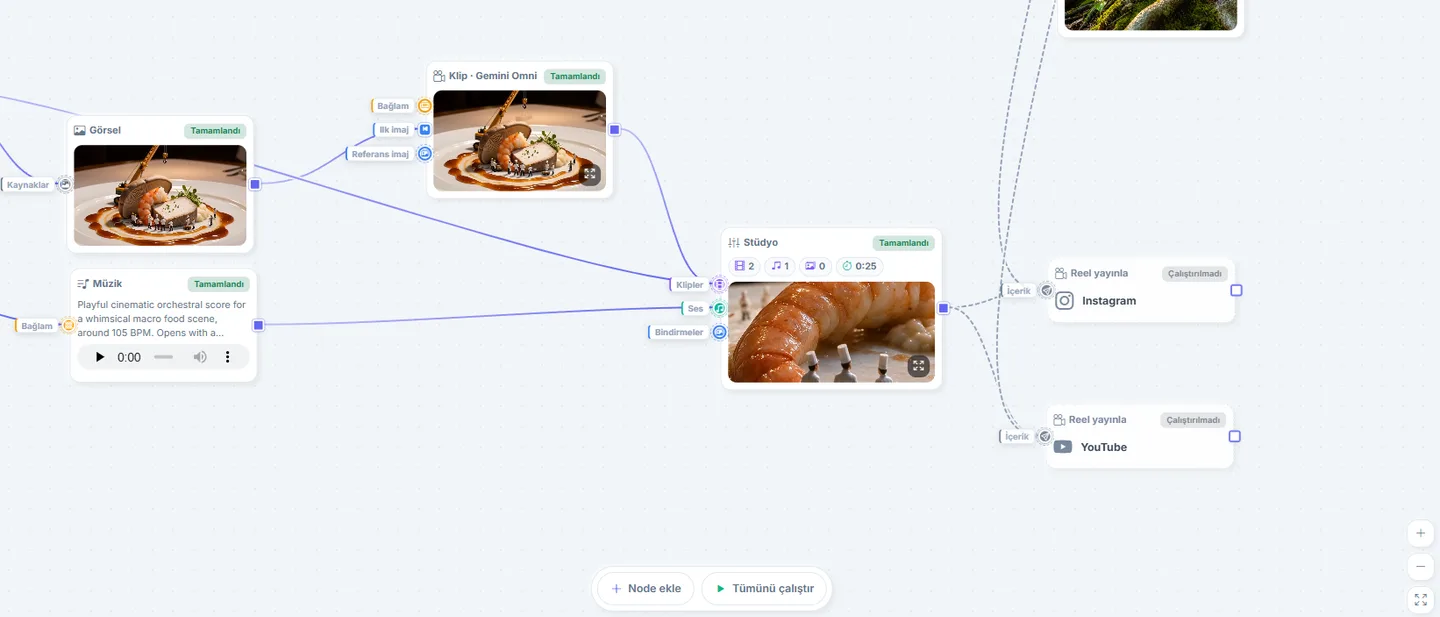
Brief, image, storyboard, clip, voiceover, music, edit and publish blocks combine into any pipeline you can imagine.
Run a single stage or the entire graph in order. Live spend and wallet chips keep the cost in sight at every step.
Typed ports only accept valid links, cycles are blocked instantly, and stale stages get a rebuild badge when something upstream changes.
The last frame of a clip becomes the first frame of the next scene. Storyboards continue into sequels and edits feed new edits, so long stories stay consistent.
Pick the right engine per clip. Every model renders vertical 9:16 video ready for Reels and Shorts; duration, quality tier and audio are simple settings on the node.
Google's Omni model with native sound. 4 to 10 second clips, great for quick brand scenes with text and logos.
Up to 15 seconds at 1080p with sound. The choice for rich, film-like food scenes.
3 to 15 second clips with Standard, Pro and Turbo tiers. Strong motion and consistent characters.
Fixed five-second silent shots from a single image, ideal for punchy product close-ups.
Bring your own API keys if you prefer: OpenAI, Gemini, fal.ai, Runware and Higgsfield are all supported.
Every asset your video needs is a node away, and anything you already have can be uploaded for free.
Vertical keyframes from a prompt. Flip one switch to blend your logo naturally into the scene, or put your AI persona in the frame.
One topic becomes a 4 to 12 panel storyboard in a single image. Connected clips follow it faithfully, and the opening frame is generated automatically from panel one.
An AI composer writes 3 to 60 seconds of custom music from a plain description. One continuous track keeps every clip in the same mood.
Natural text-to-speech narration lands straight on your timeline. Choose a voice, or let your persona speak with the same voice in every video.
Upload your images and music. They plug into any flow and never cost credits.
Describe a persona once. Their face and voice stay recognizable across every Reel, like a real brand ambassador.
Every prompt panel has a chat. Three specialists read your actual flow, suggest settings, and apply them with your approval.
Shapes the concept with you, reads connected frames, storyboards and continuity chains, then writes the final cinematic prompt and tunes engine, duration and sound.
Writes the title, description and hashtags in your brand's content language, matched to your tone of voice.
Reads the storyboard and your timeline, warns about clashing tracks, suggests instrumental when a voiceover exists, and writes the composition brief.
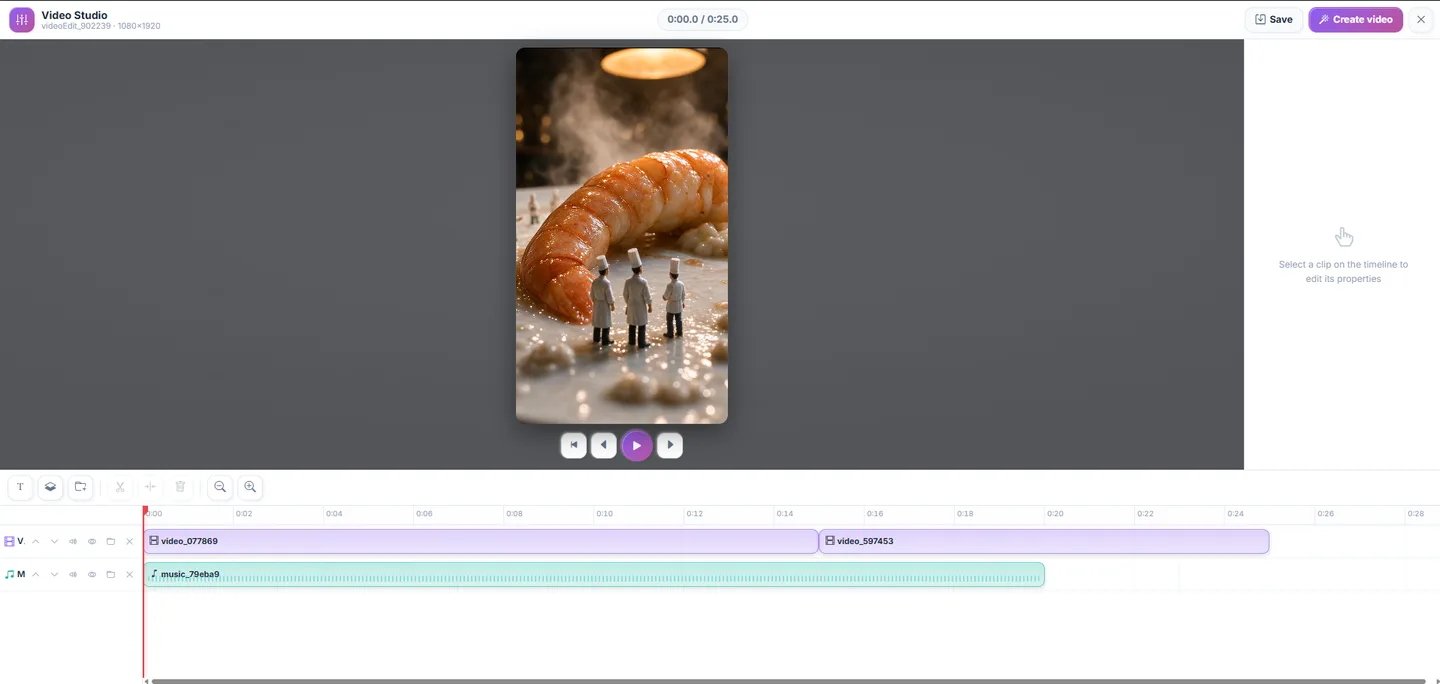
Open any edit node into a full-screen studio. Your clips, voiceover and music arrive already laid out on the timeline; polish the cut and press Create video.
Connect your accounts once. Publish nodes run preflight checks, require a caption, and track every post from Ready to Published, with a retry when a platform hiccups.
Reels and single-image posts for your Business account.
Shorts, published straight from the flow.
Direct publishing through the official Content Posting API.
Feed a topic pool and set a frequency: the studio generates, quality-checks, repairs and publishes on schedule. Prefer control? Every video waits as a draft and you get an email.
Type a topic or a brief, or start from an empty canvas.
Drop nodes for images, storyboard, clips, music and voice, then wire them together.
Run all. Watch each stage light up as scenes, sound and captions appear.
Fine-tune the cut on the timeline and render for free.
One click to Instagram, YouTube and TikTok, or let autopilot handle it.
Everything owners ask before their first Reel.
Creative Studio uses pay-as-you-go credits with no extra subscription. You only pay for what you generate; editing and rendering are free. AI video generation asks for a small minimum balance before it starts.
No. The visual canvas, three AI experts and automatic timeline layout do the heavy lifting. If you want control, the full Studio editor is one click away.
Your brand profile has a content language; captions and voiceover follow it. The interface itself is available in 12 languages.
Yes. Upload images and music free of charge and connect them to any node, including your own soundtrack in the final edit.
Instagram Reels and posts, YouTube Shorts and TikTok, either with one click or automatically on a schedule. You can also download every video or copy a permanent share link.
Regenerate it as a variant with any engine, keep the version history, or let the built-in quality check repair it with AI video editing.
Join food businesses creating cinematic social content with Creative Studio, no agency and no editing suite required.
Start creating free Set up in minutes. Credits only, no contracts.