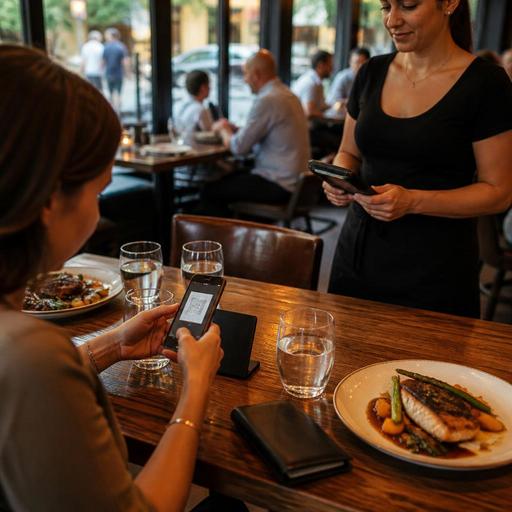
QR Payment Setup for U.S. Restaurants: Checks, Tabs, Tips, and Receipts
QR payment setup for U.S. restaurants is not just about letting guests scan a code and close out faster. It affects how servers open and transfer checks, how bar tabs stay organized, how tips are presented, how receipts are delivered, and how your POS records the sale. For operators in the United States, the best setup is the one that fits your service model, protects the guest experience, and keeps front-of-house, kitchen, and accounting workflows clean.
Start with the payment moments that actually happen in your restaurant
Many operators think of QR payment as a simple table feature, but the real question is where payment friction happens during service. A neighborhood diner may need faster breakfast table turns. A sports bar may need cleaner management of open tabs during a game. A fast-casual salad shop may want guests to order and pay from a QR code, then pick up from a shelf. A hotel restaurant may need room-charge coordination alongside card payments. The operational design should match those moments.
Map your current guest journey before turning anything on. In a full-service restaurant, the common path is greeting, drink order, food order, check drop, tip, and receipt. In a bar, it may be card capture, open tab, multiple rounds, split payment, and closeout. In a food truck, it may be line busting, quick pay, and text or digital receipt. Each flow creates different needs for your POS, payment processor, and staff training.
- Full-service dining: QR pay after the meal can reduce wait time for the check and card return.
- Bars and taprooms: Open tab controls matter more than speed alone.
- Fast-casual and QSR: QR ordering plus payment may work better than QR pay only.
- Cafes: Counter payment may stay primary, while QR can support repeat orders or patio seating.
- Multi-location brands: Standardize the guest flow so reporting and training stay consistent.
Build QR payments around checks, tabs, and split-pay reality
In U.S. restaurants, guests rarely pay in a perfectly simple way. Two guests may split appetizers evenly, one person may leave early, a bar guest may add another round after asking to close, or a family may want separate checks for alcohol and food. Your QR payment process should support these common situations instead of forcing staff to work around them.
For table-service restaurants, decide whether the QR experience starts from a printed check presenter, a table tent, or a guest-facing screen on the receipt. The easiest setup is often a code tied to the active check in the POS, so the guest sees the exact items, subtotal, tax, tip options, and final amount before paying. That reduces disputes and helps servers avoid repeated trips back to the table.
For bars, think carefully about open tabs. If your operation preauthorizes cards at the start of a tab, make sure your QR flow matches that process and that staff know how to explain it. If guests can close a tab from their phone, define what happens when a bartender has already added another drink or transferred the tab to another seat. Clear rules prevent duplicate charges, abandoned tabs, and end-of-night confusion.
Concrete example: a busy downtown sports bar may let guests scan a QR code on the receipt to close an existing tab, but keep new tab opens with a bartender or server. That keeps age-verification and alcohol service workflows in staff hands while still speeding up closeout during the rush. Operators should verify alcohol-service and payment workflow requirements with current state and local guidance where needed.
Set up tip prompts and receipts with guest trust in mind
Tipping is one of the most sensitive parts of any U.S. payment flow. If your QR payment screen feels confusing or pushy, guests may abandon the process, ask for a traditional card run, or leave frustrated. Tip options should be easy to understand, visually clear, and consistent with the type of service provided.
For a full-service restaurant, guests usually expect a tip prompt after reviewing the check. For a coffee shop or bakery, operators should decide whether the tip prompt appears before or after payment and whether the language matches the service model. For takeout and curbside pickup, the experience should feel optional and respectful, not forced.
Receipts matter too. Some guests want an emailed receipt, others want a text receipt, and some still want paper. A practical U.S. setup gives guests a digital option without removing staff ability to print when needed. This is especially useful for business travelers in hotel restaurants, airport concessions, and weekday lunch spots where guests may need receipts for expense reporting.
From an operations standpoint, make sure your reporting separates sales, tips, service charges if used, and taxes in a way your accounting team can reconcile. Service charges and tips are not the same thing operationally, and treatment can differ by jurisdiction and setup. Avoid assumptions, and have your accountant, payroll provider, or other qualified advisor confirm how your current workflow should be handled.
Connect QR payments to your POS, kitchen, and pickup workflows
QR payment works best when it is part of a connected system, not an isolated feature. If a guest pays at the table but the POS does not update the check status instantly, servers may waste time trying to collect a payment that already happened. If online orders paid through a QR menu do not route cleanly to the kitchen display system, speed at the front can create chaos in the back.
For fast-casual operators, direct QR ordering can support a cleaner handoff to prep stations, expo, and pickup shelves. A bowl shop, for example, might let office workers scan from a patio table, pay, and receive a pickup name or order status without waiting at the register. A burger shop can use QR ordering for dine-in and takeout while still routing third-party delivery app orders into a unified order queue.
For multi-location brands, standardization matters. Use the same receipt logic, tip settings, and check-close rules across stores where possible. If one location emails receipts automatically and another requires a printed slip, support calls and guest confusion increase. The same applies to server training: one playbook is easier to audit than five different local habits.
- Confirm that paid checks close immediately in the POS.
- Test split checks, voids, discounts, and comp workflows.
- Verify that kitchen display tickets reflect paid versus unpaid order states when relevant.
- Check how direct online orders, QR table orders, and delivery apps appear in reporting.
- Review whether pickup shelf and curbside pickup orders have clear guest identifiers.
Train for accessibility, exceptions, and daily reconciliation
Not every guest wants to scan a code, and not every phone camera works well in low light. ADA-minded access means operators should think beyond the ideal digital path and maintain a practical alternative. Staff should be ready to offer a printed check, traditional card processing, verbal help, or another accessible option. Operators should review current federal, state, and local accessibility expectations with qualified advisors when updating guest-facing technology.
Training should also cover the exceptions that create the most friction during a shift. What if a guest pays by QR after the server already ran the card? What if the Wi-Fi drops? What if a table pays but still wants dessert added later? What if a manager comps one item after the guest has opened the payment screen? These are not edge cases in a busy U.S. restaurant; they are normal service moments.
- Create a one-page shift guide for servers, bartenders, hosts, and managers.
- Run live tests during slow periods using real menu items and split-check scenarios.
- Set a clear rule for when staff should recommend QR pay and when they should not.
- Review end-of-day reconciliation for digital receipts, closed checks, and tip reporting inputs.
- Monitor guest feedback by daypart, especially brunch, happy hour, and late night.
For chains subject to menu labeling rules or operators managing taxes, service charges, payroll, or tip reporting across states, the safest approach is to keep payment workflows operationally clean and verify the legal details with official guidance and qualified advisors. The technology should support compliance, not guess at it.
When QR payments are designed around real U.S. service patterns, they can shorten closeout time, reduce check friction, and improve visibility across dine-in, takeout, and direct ordering. Restomas helps operators connect QR menus, ordering, payment flow, and POS-friendly restaurant operations in one practical system.
