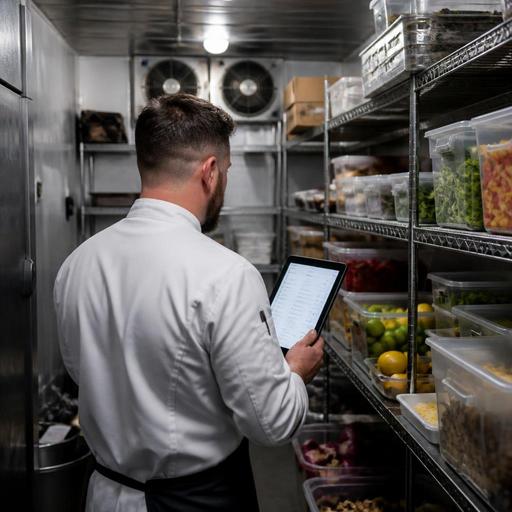
Cold Storage Alerts and Digital Inventory Habits for U.S. Restaurants
Cold storage alerts and digital inventory habits for U.S. restaurants can make the difference between a controlled kitchen and a costly surprise at 7 a.m. When a walk-in runs warm overnight, a reach-in door stays cracked during a rush, or prep counts live on paper that nobody updates, operators lose product, labor time, and confidence. For U.S. restaurants juggling dine-in, takeout, delivery apps, catering, and multi-location reporting, better cold storage visibility is not just a back-of-house upgrade. It is a practical operating system for protecting food quality and keeping service steady.
Why cold storage visibility matters in real restaurant operations
In a busy American restaurant, refrigeration problems rarely show up at a convenient time. A neighborhood diner may discover pooled water and soft produce before the breakfast rush. A fast-casual salad concept may find proteins temping high right before the lunch line forms. A hotel restaurant may have banquet prep, room service mise en place, and bar garnishes all sharing cold storage, which makes one issue spread operationally across several revenue streams.
The problem is not only equipment failure. It is also workflow failure. Staff may stack hot prep too quickly in a cooler, leave doors open during repeated line pulls, or miss rotation because labels are inconsistent. A food truck commissary setup may rely on handwritten counts that never match what was actually loaded for service. A sports bar may over-order wings before a playoff weekend and then discover that older cases were pushed to the back of the walk-in.
Cold storage alerts help operators spot risk sooner. Digital inventory habits help teams respond in a consistent way. Together, they create a repeatable process: detect, verify, isolate, count, adjust, and reorder. Operators should always verify current food safety and health department requirements with official guidance or qualified advisors in their state or city, but from an operations standpoint, the goal is simple: know what happened, know what product is affected, and know what the next shift needs to do.
Set up alert workflows that match your kitchen reality
An alert is only useful if someone knows what to do next. Many restaurants make the mistake of treating cold storage notifications as technical messages instead of shift tasks. The better approach is to map each alert to a practical response.
- Walk-in cooler running warm: assign a manager to verify the reading, check door seals and airflow, review what product was stored inside, and pause new prep storage until the unit is stable.
- Reach-in door left open: have line leads confirm which station was affected, inspect top-use items like dairy, sauces, sliced tomatoes, and cooked proteins, and re-stage the station before the next rush.
- Freezer temperature fluctuation: review high-value items first, such as seafood, desserts, and batch proteins, and document any product moved to backup storage.
- Repeated overnight alert at one location: check whether the issue is equipment, cleaning routine, loading pattern, or staff closeout behavior.
For a three-unit burger group, this may mean alerts go to the GM, kitchen manager, and opening prep lead. For a cafe with one owner-operator, it may mean a text alert plus a morning checklist in the POS or operations app. For an airport concession or stadium stand, where access windows and vendor rules can complicate service, the response plan may also include backup product movement and communication with on-site facilities teams.
Keep the workflow short enough to use during real service. If staff need to search through binders, the process will fail. If the response steps are visible in the same digital system where inventory, prep, and ordering already live, the team is far more likely to act quickly.
Build digital inventory habits that reduce spoilage and prep confusion
Cold storage monitoring works best when paired with disciplined inventory habits. That does not mean turning every independent restaurant into a spreadsheet factory. It means creating a few repeatable behaviors that make counts more accurate and decisions faster.
1. Count by storage zone, not just by vendor category
Instead of only listing items as produce, dairy, meat, or dry goods, break counts into walk-in shelves, line reach-ins, undercounter units, and freezer sections. A pizza shop can track mozzarella in the walk-in separately from line-bin cheese. A coffee shop can count milk in the back cooler separately from grab-and-go cases. This makes it easier to investigate losses when an alert hits one specific unit.
2. Tie prep batches to usable shelf life
Digital prep logs should show when items were made, where they were stored, and how much remains. Think pico de gallo for a taco counter, cut lettuce for a sandwich shop, or house dressing for a suburban grill. When staff can see both quantity and prep timing, they make better pull decisions and reduce the chance of over-prepping for slower weekdays.
3. Use exception counts during busy weeks
You do not always need a full inventory count to stay in control. Before a holiday weekend, a college game day, or a delivery promo on third-party apps, count high-risk and high-value items only: chicken, steak, seafood, berries, cream, shredded cheese, and prepared sauces. This is especially useful for bars with perishable garnishes and hotel restaurants balancing banquet and a la carte business.
4. Record waste with a reason code
Do not just mark an item as discarded. Note whether it was due to temp exposure, over-prep, expired rotation, delivery issue, or line mishandling. Over time, this helps operators see whether spoilage is really an equipment problem or a training problem.
Connect storage alerts to ordering, prep, and service channels
The biggest operational win comes when cold storage data is not isolated. If a cooler issue affects available product, that should influence ordering, menu availability, and station prep. A modern restaurant stack might include a POS, online ordering, delivery app integrations, a kitchen display system, and inventory tools. These systems do not need to be overly complex, but they should help the team make aligned decisions.
For example, if a fast-casual bowl shop loses a batch of cooked chicken after a storage problem, the team may need to 86 one menu item, shift guests toward steak or tofu, update direct online ordering, and adjust delivery marketplace menus so customers do not order unavailable items. If a diner loses pie slices or dessert components, servers should know before opening tabs, and hosts should not promise items that the kitchen cannot sell.
In multi-location operations, standardization matters even more. If one location logs waste in ounces, another in cases, and a third in vague notes, leadership cannot compare trends. Use one method across stores for counts, unit naming, and alert follow-up. This is especially valuable for franchise teams, regional QSR groups, and hotel food-service operators with several outlets on one property.
Accessibility matters here too. If your team relies on digital checklists or QR-based internal workflows, make sure they are easy to use on common devices and readable during a fast shift. For guest-facing QR ordering or menu updates tied to inventory changes, operators should also consider ADA-minded access and verify current accessibility expectations with qualified advisors.
A simple weekly routine for owners and managers
- Review alerts: look for repeated issues by unit, daypart, or location.
- Match alerts to waste: identify whether losses followed a temperature event or came from overproduction.
- Audit top perishables: spot-check a short list of expensive or fast-moving items.
- Adjust prep pars: lower or raise batch sizes based on actual sales mix from dine-in, takeout, curbside pickup, and delivery apps.
- Update ordering: avoid replacing spoilage with panic buying that creates next week’s waste problem.
- Coach the team: focus on one behavior at a time, such as door discipline, labeling, first-in-first-out rotation, or end-of-night line consolidation.
A practical example: a two-location Mediterranean concept notices repeated overnight cooler alerts at one store and elevated hummus and grilled chicken waste. The fix may not be buying more product or blaming the opener. It may be changing closeout so hot prep cools correctly before storage, reducing late-night overproduction from online order forecasting, and requiring a digital end-of-shift confirmation that walk-in doors are fully shut.
Cold storage control is not glamorous, but it directly affects food quality, labor efficiency, and guest trust. When alerts are tied to clear actions and inventory habits become part of daily operations, restaurants waste less, react faster, and make better decisions across the whole service day. Restomas can help operators connect inventory visibility, ordering workflows, and day-to-day kitchen execution in one practical digital system.
