Designing a Digital Guest Journey for Omakase and Chef's Tasting Menus
Digital guest journey for omakase and chef's tasting menus is not about making a highly personal dining format feel automated. It is about removing friction before, during, and after service so the chef, front-of-house team, and guest can focus on the experience itself. For restaurants running omakase counters, tasting menus, chef's tables, or limited-seat culinary concepts, good digital experience design supports clarity, pacing, dietary communication, and operational control without diluting hospitality.
Unlike a large casual menu, an omakase or tasting format depends on trust. Guests often book with limited information, commit to a fixed price, and surrender some choice in exchange for craft and surprise. That means every digital touchpoint matters. A vague reservation page, unclear allergy process, or last-minute menu confusion can damage confidence before the first course arrives. On the other hand, a well-designed digital flow can set expectations, reduce repetitive staff work, and help the kitchen deliver a smoother service.
Start the experience before the reservation is confirmed
For omakase and chef's tasting menus, the reservation process is part of the product. Guests need enough information to feel secure, but not so much that the sense of discovery disappears. The goal is to answer the practical questions that affect purchasing decisions and service readiness.
Your booking flow should clearly communicate the structure of the experience: seating times, duration, price format, beverage pairing options, cancellation policy, and the level of flexibility for dietary restrictions. If the menu is seafood-led, alcohol-paired, fire-driven, or built around seasonal ingredients, say so directly. This helps guests self-select appropriately and reduces awkward conversations later.
A practical reservation setup often includes:
- Experience description: Explain the style of meal, not every course.
- Timing details: State whether seating is synchronized or staggered.
- Dietary intake form: Ask about allergies, aversions, religious restrictions, pregnancy-related limitations, and severe intolerances.
- Prepayment or card guarantee: Protect limited inventory and reduce no-show risk.
- Optional add-ons: Beverage pairing, premium supplements, or celebratory items.
For example, a 10-seat omakase counter may only run two seatings each night. If one party arrives expecting vegetarian substitutions that the chef cannot accommodate, the problem is not only culinary. It affects timing, prep, and the experience of every other guest. A digital reservation form that asks the right questions early prevents this kind of operational stress.
Use digital menus to guide, not overwhelm
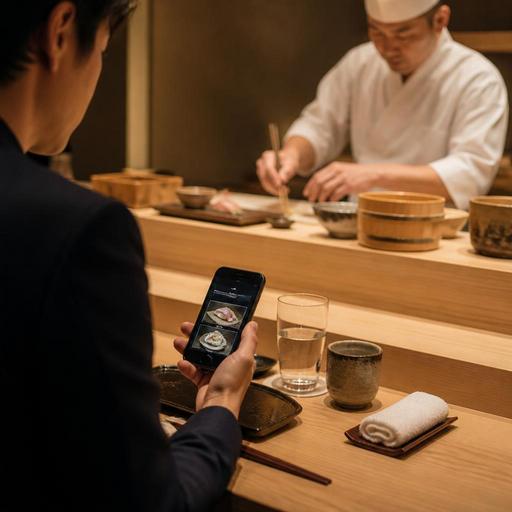
Many tasting-menu restaurants hesitate to use digital menus because they worry screens will cheapen the atmosphere. In reality, the issue is not whether the menu is digital, but how it is presented. A QR menu or mobile-accessible menu should act as a quiet support tool, not a replacement for the chef's narrative.
For omakase and tasting concepts, the best digital menus are usually concise and contextual. Instead of listing every future course in advance, they can present the format, ingredient philosophy, pairing options, and house notes. During or after service, they can also help guests revisit what they ate, especially when dishes include unfamiliar fish, regional ingredients, fermentation techniques, or changing garnishes.
Useful digital menu elements include:
- Format overview: Number of courses or approximate progression.
- Ingredient transparency: Origins, seasonal focus, or sourcing notes where relevant.
- Pairing details: Wine, sake, tea, or non-alcoholic pairing descriptions.
- Allergen markers: Clear but discreet communication for key ingredients.
- Post-service recall: A way for guests to view the courses after the meal.
Consider a chef's tasting menu built around micro-seasonal produce. Printed menus become outdated quickly if a garnish changes or a course is replaced because a supplier delivery shifts. A digital menu management system lets the restaurant update details in minutes without reprinting, crossing out text, or briefing every staff member on tiny wording changes. That matters when precision is part of the brand.
Design service-side workflows around pacing and communication
The most overlooked part of digital experience design is what happens behind the scenes. Omakase and tasting menus are highly choreographed. Guests may see elegance, but staff feel the pressure of timing, synchronization, and course-specific communication. Digital tools should support that rhythm.
At minimum, the team needs one reliable source for guest notes, seating status, pacing signals, and special requests. If dietary notes live in one reservation inbox, pairing selections in another spreadsheet, and VIP details in a server's memory, mistakes become more likely. A centralized operational view helps service stay calm and consistent.
Restaurants can improve execution by digitizing these workflows:
- Pre-service review: Confirm guest names, allergies, celebrations, return visits, and pairings before doors open.
- Seat-level tracking: Mark arrivals, late guests, skipped pairings, and course progress.
- Course release coordination: Keep front-of-house and kitchen aligned on when each round should move.
- Exception handling: Flag substitutions, no-alcohol guests, shellfish restrictions, or birthday moments clearly.
- Post-service notes: Record preferences for future visits, such as favorite pairings or ingredient dislikes.
A concrete example: if one guest at the counter does not drink alcohol and another has a raw shellfish restriction, the team should not rely on verbal reminders alone across a two-hour service. Digital notes connected to the reservation and visible to the right staff reduce the chance of an avoidable error. This is where platforms that connect reservations, menu updates, and order or service notes can quietly improve both hospitality and kitchen confidence.
Make the experience feel personal after the meal too
For tasting-menu concepts, post-dining communication is more valuable than many operators realize. Guests often want to remember the progression, share the experience, or book again for a new seasonal menu. A thoughtful digital follow-up extends the memory of the meal and supports repeat business without feeling promotional.
One simple tactic is to send a thank-you message with a recap of the experience: the menu theme, optional pairing highlights, and a link to reserve the next seasonal seating. Another is to give guests access to a digital menu archive showing the courses they had that evening. This is especially useful for restaurants whose dishes change daily and whose guests may later ask, “What was that aged fish course?” or “Which tea was served with dessert?”
There is also a practical business benefit. Post-visit feedback gathered through a short digital form can reveal issues that guests might never mention in the room. Maybe the reservation language was unclear about seating duration. Maybe guests loved the food but found pairing explanations too technical. These are not generic service problems; they are design problems, and digital feedback loops help refine them.
Practical steps to improve your digital experience design now
If you operate an omakase bar, chef's counter, or tasting-menu restaurant, you do not need a massive tech stack to improve the guest journey. Start by auditing the moments where confusion, repetition, or inconsistency happen most often.
- Review your reservation page: Does it explain format, price, timing, and dietary boundaries clearly?
- Simplify guest forms: Ask only the questions your team truly uses in service.
- Create a living digital menu: Keep core information current without depending on reprints.
- Centralize guest notes: Make allergies, celebrations, and pairing choices visible in one place.
- Standardize pre-service checks: Give staff a repeatable workflow before each seating.
- Build a post-meal follow-up: Share menu memory, gather feedback, and invite return visits naturally.
The best digital systems do not compete with the intimacy of omakase or chef's tasting menus. They protect it. When guests know what to expect, staff have the right information, and menu details stay accurate as ingredients change, the dining room feels more human, not less. Technology should handle the friction so the restaurant can deliver what guests came for: attention, craftsmanship, and a memorable meal.
Restomas can help restaurants organize digital menus, reservations, and service information in a way that supports refined guest experiences without adding unnecessary complexity.
