How Fast-Casual Digital Menus Keep U.S. Lunch Rushes Moving
Digital menus for fast-casual restaurants during lunch rushes can do much more than replace printed boards. In a busy U.S. lunch window, the menu is part of the line-management system, the upsell system, and the order-accuracy system. If your guests are office workers with 30 minutes, hospital staff between shifts, airport travelers, or parents grabbing takeout after school pickup, your menu has to help them decide fast, customize clearly, and pay without friction.
For U.S. operators, that means thinking beyond design. A digital menu should connect with your POS, direct online ordering, kitchen display system, pickup shelf flow, and curbside pickup process. It should also present modifiers in a way that does not overwhelm guests or create avoidable errors for cashiers, expediters, and line cooks. The goal is simple: shorter decision time, cleaner tickets, and a smoother lunch rush.
Design the menu for speed, not just appearance
The biggest lunch-rush problem in fast-casual is often hesitation at the point of ordering. Guests step up to the counter, stare at a long menu, ask several questions, and slow down the line behind them. A digital menu works best when it reduces those pauses.
Start by organizing your top-selling lunch items first. A burrito bowl shop in downtown Chicago, for example, may lead with the most common bowl builds and clearly show protein choices, add-ons, and combo options. A salad-and-sandwich concept near a college campus in Texas might highlight a fast lunch section with items that can be ordered in under a minute. During peak periods, operators often benefit from featuring the items that are easiest for the kitchen to execute consistently.
Keep category names plain and familiar. Use terms guests already expect in the U.S., such as bowls, combos, sides, kids meals, fountain drinks, and family packs when relevant. Limit excessive scrolling or crowded layouts on QR menus. If guests need several taps to find a turkey club, grilled chicken wrap, or side of mac and cheese, the menu is creating friction.
- Lead with best-sellers that move fast in the kitchen.
- Group modifiers logically such as protein, side, sauce, and drink.
- Show popular add-ons without burying the main item.
- Use clear item names instead of internal kitchen shorthand.
- Trim low-volume options from lunch-only menus if they slow production.
If your operation is subject to chain menu labeling rules or local disclosure requirements, build those details into the workflow carefully and verify current obligations with official guidance and qualified advisors. The key operational point is consistency across in-store boards, QR menus, kiosks, and online ordering so guests are not seeing conflicting information.
Use digital menus to reduce line congestion at the counter
During lunch, every bottleneck matters. In many U.S. fast-casual restaurants, the front counter becomes crowded because ordering, payment, and pickup happen in the same small zone. A digital menu can help separate those steps.
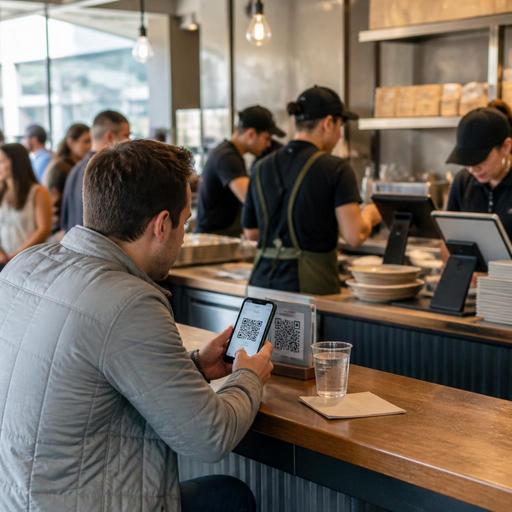
Consider a suburban Mediterranean fast-casual restaurant with a lunch line out the door from 11:45 a.m. to 1:15 p.m. QR ordering at tables or while guests wait in line allows some customers to place orders before reaching the cashier. A pickup shelf for completed orders can keep the handoff area from blocking new orders. If the POS and kitchen display system are synced, the team can route dine-in, takeout, third-party delivery, and direct online orders without relying on shouted updates.
For urban stores with a heavy office lunch crowd, direct online ordering can be just as important as in-store digital menus. Guests often want to reorder a favorite meal quickly, save a payment method, and grab their order from a pickup shelf without waiting behind first-time customers. In that environment, digital menus should support repeat behavior: saved favorites, easy modifier selection, and a clear promised pickup time.
Operators should also think carefully about ADA-minded access. QR menus should not be the only path to ordering. Keep an accessible alternative available, whether that is a staffed counter, printed backup, or another guest-friendly option. Accessibility expectations can vary by situation, so review your setup with qualified advisors and current official guidance.
Make customization easier for guests and cleaner for the kitchen
Lunch rushes expose weak modifier design fast. If your menu lets guests stack too many confusing choices, your kitchen gets messy tickets and your line slows down. If you oversimplify, guests feel boxed in and staff spend time fixing orders at the register.
The answer is structured customization. A build-your-own grain bowl concept in Los Angeles might present choices in a fixed sequence: base, protein, toppings, dressing, then extras. A chicken tender fast-casual brand in Florida might ask sauce selection before premium add-ons, because that reflects the assembly line. The right sequence mirrors how the kitchen actually builds the item.
Digital menus also help standardize how upcharges appear. Instead of cashiers explaining every extra avocado, double protein, or gluten-free bun charge verbally, the menu can show it clearly before checkout. That improves transparency and reduces disputes at the register. For restaurants using service charges, tipping prompts, or integrated payment flows, make sure guests understand what they are paying for and how it is presented on the check. Rules and disclosure expectations differ by state and city, so operators should confirm current local requirements with qualified payroll, tax, and legal advisors.
From an operations standpoint, the goal is to send the kitchen fewer ambiguous tickets. Strong modifier logic helps the expo station, cuts remakes, and keeps lunch moving.
Align the digital menu with your real lunch-day operations
A digital menu is only effective if it matches how your restaurant actually runs between late morning and mid-afternoon. If your fry station is the bottleneck, promoting too many fried add-ons at noon may hurt ticket times. If your sandwich line can handle high volume but your smoothie station cannot, your menu placement should reflect that reality.
Review lunch performance by daypart and channel:
- Identify which items create the longest prep times during lunch.
- Separate dine-in, takeout, curbside pickup, and delivery app demand.
- Adjust featured items based on station capacity, not just food cost.
- Limit sold-out frustration by syncing availability with the POS and online menu.
- Train staff on how digital orders appear on the kitchen display system and expo screens.
A fast-casual burger shop near a highway exit may need different lunch logic than a food hall rice bowl concept or a hotel lobby cafe. The burger shop may prioritize combo clarity and curbside pickup timing. The food hall stall may need very fast QR ordering because guests are ordering from shared seating. The hotel cafe may need digital menus that support both business travelers and local takeout guests while keeping tabs separate from room-charge workflows.
For multi-location operators, standardization matters even more. You want one approved menu structure, but you may still need location-level controls for inventory, pricing, or limited-time lunch bundles. A system that lets operators update items once and push changes across stores can save a lot of midday confusion.
What to fix first this week
If your lunch rush still feels chaotic, start small. You do not need a complete brand redesign to improve digital menu performance. Focus on the decisions that slow guests down and the order details that create kitchen friction.
- Cut unnecessary lunch modifiers from your top 10 items.
- Move your fastest, most profitable lunch combinations to the top of the menu.
- Test QR ordering in the queue, at tables, or near the entrance.
- Set up a cleaner pickup shelf and separate it from the cashier line.
- Make sure out-of-stock items disappear quickly from guest-facing menus.
- Check that online ordering, POS tickets, and kitchen display names match exactly.
- Review whether payment prompts, tip options, and service charge language are clear to guests.
Lunch rush success in U.S. fast-casual is rarely about one screen or one QR code. It comes from connecting menu clarity, order flow, kitchen execution, and pickup handoff into one system. When your digital menu reflects how your team actually works, guests order faster, staff answer fewer repetitive questions, and the whole line feels calmer.
Restomas helps restaurant operators connect digital menus with ordering, POS workflows, and service operations in a way that fits real lunch-rush demands.
