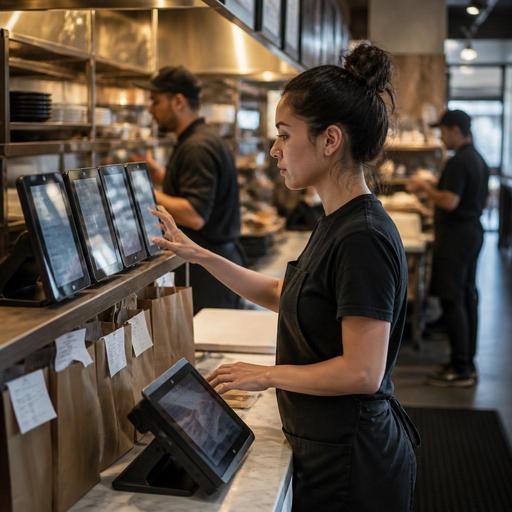
How U.S. Restaurants Can Streamline Delivery Marketplace Tablet Workflows
For many operators, delivery marketplace tablet workflows have become one of the most frustrating parts of daily service. A burger shop may have one tablet for a major delivery app, another for a local marketplace, and a third device for direct online ordering alerts. During a Friday night rush, that can mean missed tickets, delayed prep, confused pickup drivers, and a flooded expo line. For U.S. restaurants, the goal is not just accepting more off-premise orders. It is building a reliable order flow that fits your POS, kitchen display system, staffing model, and guest experience without hurting dine-in, takeout, or curbside pickup.
Why Multiple Tablets Break Down During U.S. Service Rushes
Most tablet chaos is not caused by the hardware itself. It comes from fragmented workflows. In a fast-casual chicken bowl concept, one cashier may be watching the front counter, ringing up in-store checks, answering the phone, and listening for delivery app alerts at the same time. In a neighborhood pizza shop, a manager might manually re-enter every marketplace order into the POS while drivers crowd the pickup shelf. In a hotel restaurant, staff may juggle room service, lobby takeout, and third-party delivery from the same kitchen.
Common failure points include:
- Orders arriving on separate devices with different sounds and timing
- Manual re-entry into the POS, which creates modifier mistakes and lost time
- Prep queues that do not distinguish dine-in, takeout, curbside pickup, and delivery apps
- Driver arrivals that do not match actual kitchen readiness
- Menu mismatches across apps, especially for 86ed items, add-ons, or limited-time offers
- No single staff owner for marketplace monitoring during peak periods
When operators treat delivery tablets as side devices instead of part of the core line, they usually end up paying for it in comps, refunds, bad reviews, and stressed staff.
Build One Order Flow From Tablet to Kitchen to Handoff
The best fix is to map a single operational path for every off-premise order, even if the orders originate from different channels. A practical U.S. workflow often starts with three questions: who accepts the order, where it appears for production, and who controls handoff to the driver or guest.
1. Assign channel ownership by shift
During lunch, a fast-casual salad shop may assign the front counter lead to monitor incoming tablets and direct online ordering. During dinner, a shift manager may own marketplace acceptance and timing adjustments. In a sports bar, the expo may be the best control point because the kitchen is already balancing wings, burgers, and bar food for dine-in tabs and takeout.
Do not leave tablet responsibility vague. If everyone owns it, no one owns it.
2. Reduce manual entry whenever possible
If your stack supports POS integrations, use them to move orders automatically into the POS or kitchen display system. That reduces modifier errors on items like ranch add-ons, wing sauce choices, burger temperatures, or allergy notes. If full integration is not available, create a standard manual entry process with exact button paths and order naming conventions.
For example, a New York slice shop could require staff to enter marketplace tickets under a specific tender or source label so managers can review volume by channel later. A Texas taco concept might use order source tags on the kitchen display system to separate in-house traffic from third-party delivery.
3. Standardize handoff zones
Use a defined pickup shelf or counter zone for completed marketplace orders. If your restaurant also offers curbside pickup and direct takeout, separate those handoff points clearly in the workflow, even if they share a lobby. This prevents drivers from grabbing the wrong bag and helps staff answer pickup questions faster.
In smaller spaces, use one staging area but label the process by channel in your internal routine. For example: direct online orders go to shelf A, third-party delivery waits behind expo until driver confirmation, curbside stays hot until the guest arrival notice comes in.
Match Prep Timing to Real Kitchen Capacity
One of the biggest U.S. delivery pain points is accepting orders faster than the kitchen can actually produce them. A wing shop on game day, an airport concession with uneven rushes, or a breakfast diner on Sunday morning can quickly fall behind if tablet prep times are left on default settings.
Operators should review order throttling, prep time settings, and item availability by daypart. This is especially important for menus with bottlenecks such as fried items, pizzas, espresso drinks, or made-to-order burgers.
- Set realistic prep times by shift. Lunch and dinner may need different timing windows.
- Pause or limit channels when the line is overloaded. It is often better to slow acceptance than to send out late, low-quality food.
- 86 items immediately across channels. If you run out of brisket, avocado, or gluten-free buns, update every active ordering source fast.
- Separate high-risk modifiers. Train staff to double-check allergy notes, side choices, drink selections, and sauce counts before sealing the bag.
This is also where labor scheduling matters. If delivery volume spikes between 6 p.m. and 8 p.m., schedule an expo, packer, or dedicated off-premise lead instead of expecting servers or tipped staff to absorb the work between tables. Operators should also review how side work, tip pooling practices, service charges, and takeout handling fit their local rules and payroll processes, and verify current requirements with qualified advisors.
Control the Guest and Driver Experience at Pickup
Many delivery problems happen after the food is cooked. A Chicago burger bar may have perfect ticket times but still get complaints if drivers wait too long, drinks are missing, or hot and cold items are packed together. A suburban family restaurant may struggle because drivers crowd the host stand where dine-in guests are trying to check in.
Create a simple pickup control system:
- Keep sealed bag checks consistent before handoff
- Stage drinks, utensils, condiments, and napkins in one packing station
- Use driver confirmation steps before releasing large orders
- Keep pickup shelves visible but supervised for higher-value orders
- Route driver questions away from the main register during peak periods
If you use QR ordering or direct online ordering alongside marketplaces, make sure guests can still access pickup instructions easily. ADA-minded access matters here too. Pickup counters, waiting areas, and digital instructions should be usable for a wide range of guests. Operators should verify current accessibility expectations for their location, digital tools, and physical layout with appropriate professional guidance.
Use Reporting to Decide What Stays on Marketplaces
Not every delivery channel deserves the same menu, hours, or operational priority. A practical review process helps owners decide whether a marketplace is helping or hurting the business. Compare order accuracy issues, refund frequency, packaging strain, kitchen disruption, and average check by channel. Also compare direct online ordering performance against marketplace demand.
For instance, a multi-location Mediterranean brand may keep high-margin family meals on its direct channel while limiting complex build-your-own items on third-party apps. A coffee shop might disable delivery for blended drinks during the morning rush but keep pastries and bottled beverages available. A food truck using a commissary kitchen may only open delivery within a tight radius during slower service windows.
If you operate multiple locations, do not assume one tablet setup fits every store. A downtown unit with heavy lunch delivery may need different prep timing than a suburban location with stronger curbside pickup. Standardize your operating playbook, but allow store-level adjustments for staffing, parking, driver access, and kitchen capacity.
For chains that manage broad menu changes, nutrition displays, alcohol restrictions, service charges, or other regulated details, use a controlled update process and verify current federal, state, and local requirements with official guidance or qualified advisors. The same applies to sales tax treatment, tip reporting workflows, and local labor rules tied to off-premise operations.
Practical Next Steps for Restaurant Owners
If your team is drowning in delivery tablets, start small and fix the flow before buying more hardware.
- Document every step from tablet alert to driver handoff
- Assign one owner for marketplace orders on each shift
- Connect orders to your POS or kitchen display system where possible
- Set realistic prep times by daypart and channel
- Create one packing station with a final bag check routine
- Review menu availability and 86 procedures across all apps weekly
- Measure channel performance by errors, delays, refunds, and average check
Restaurants do not need perfect technology to improve off-premise operations. They need consistent workflow, clear staff ownership, and better visibility across ordering channels. Restomas helps operators bring tablets, menus, order flow, and kitchen coordination into a more manageable system without losing control of day-to-day service.
