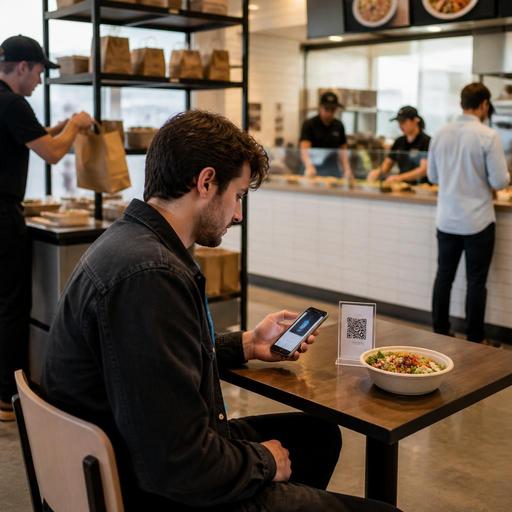
How QR Checkout and Mobile Wallets Reduce Payment Friction in U.S. Restaurants
QR checkout and mobile wallets for restaurants can shorten the last step of service, reduce line backups, and make it easier for guests to pay the way they already do everywhere else. For U.S. operators, that matters in fast-casual dining rooms, full-service checks, bar tabs, takeout counters, food trucks, hotel outlets, and stadium or airport concession environments where speed and clarity directly affect guest satisfaction and labor flow.
The goal is not to replace hospitality with screens. It is to remove avoidable friction: waiting for a card presenter, chasing a server for the check, re-keying phone orders at the POS, or creating a pickup bottleneck during the lunch rush. When QR checkout and mobile wallets are implemented well, they support faster turns, cleaner handoffs to the kitchen, and a more flexible guest experience.
Where payment friction shows up in U.S. restaurant operations
Payment friction usually appears at the busiest moments, not the slow ones. A neighborhood brunch spot may run smooth service until every table asks for the check at once. A fast-casual salad concept may prep orders quickly but lose time when guests wait in line to tap a card at one register. A sports bar may serve drinks fast yet create delays when guests need to split a large tab before a game ends.
Common friction points include:
- Guests waiting too long to close out a check at the table
- Lines at the host stand or cashier for takeout pickup payments
- Bar guests opening tabs but struggling to close them quickly during peak traffic
- Food trucks losing orders when one staff member handles both cooking and payments
- Curbside pickup confusion when the order is ready but payment confirmation is delayed
- Delivery app dependence when direct online ordering is harder to complete on mobile
In the U.S., payment flow also connects to practical issues like tipping prompts, tip reporting awareness, service charge communication, sales tax display, and the difference between ordering, paying, and closing a tab. Operators should make sure their workflows match current local and platform-specific requirements, and verify tax, labor, payment, and accessibility questions with qualified advisors or official guidance.
How QR checkout and mobile wallets improve speed without disrupting service
QR checkout works best when it removes extra steps rather than adding them. In a full-service diner, a small table marker can let guests review the check and pay from their phone once the server drops dessert or coffee. In a fast-casual burger shop, a QR code on the receipt or table can help guests reorder drinks or pay for add-ons without getting back in line. In a hotel restaurant, business travelers may prefer a fast Apple Pay or Google Pay flow so they can leave for a meeting without waiting for a printed check folder.
Mobile wallets help because many guests already trust them and use them daily. They reduce manual card entry on small screens, speed up checkout on direct ordering pages, and often lower abandonment during takeout or curbside ordering. That can be especially useful for:
- Lunch-driven fast casual brands where every second matters
- Cafes with short average tickets and repeat local traffic
- Bars handling rounds, tabs, and late-night payment volume
- Food trucks serving office parks, breweries, and events
- Multi-location operators that need a consistent guest payment experience across stores
The key is integration. If the QR flow lives outside the real order and payment stack, staff may still need to reconcile checks manually. A better setup connects QR menus, ordering, POS sync, kitchen display workflows, and payment status so the front of house and kitchen both see the same information.
Practical setup decisions for different U.S. restaurant formats
Full-service restaurants
For table service, offer QR checkout as an option, not an ultimatum. Many guests still want a server to present the check, especially for date nights, family dining, or higher-touch occasions. The best approach is flexible: printed checks remain available, while guests who want to pay fast can scan and close out on their phone. Make sure the interface clearly shows ordered items, modifiers, discounts, taxes, and tip options before payment is finalized.
Fast-casual and QSR
In fast-casual settings, mobile wallets matter most during rush periods. If guests order from a QR menu at the table or from their phone before arrival, the payment page should be fast, mobile-first, and easy to complete with a saved wallet. Pair this with a well-managed pickup shelf and clear order-ready notifications so the payment speed actually translates into a smoother handoff.
Bars and breweries
At bars, the challenge is often tab management. QR checkout can help guests close out without flagging down staff, but operators should think through partial payments, split checks, and tip prompts carefully. If your venue uses service charges for events or large parties, explain them clearly in the payment flow and verify local handling rules with your accountant, payroll provider, or legal advisor.
Food trucks and venues
For food trucks, airport concessions, and stadium stands, the biggest win is line movement. A guest scanning a QR code while waiting can review the menu, order, and pay before reaching the handoff point. That reduces verbal back-and-forth and helps kitchen staff focus on production. In high-noise or high-volume environments, that clarity can be more valuable than the payment method itself.
What to audit before you launch QR checkout and wallets
- Check POS compatibility. Confirm that mobile wallet payments, QR ordering, and online payment statuses flow cleanly into your POS and reporting stack.
- Review tipping workflows. Make sure tip prompts fit your service model and that staff understand how digital tips appear in reports and payouts.
- Keep taxes and fees transparent. Guests should see sales tax, any service charges, and order totals clearly before they pay.
- Test ADA-minded access. QR-only experiences can create barriers for some guests, so maintain practical alternatives and review accessibility with current guidance.
- Train staff on guest questions. Servers, cashiers, and hosts should know how to explain wallet options, resend a check link, and handle failed payments.
- Map the exception cases. Decide how to handle split checks, voids, refunds, offline internet moments, and age-restricted alcohol orders where applicable.
- Measure operational results. Track not just payment speed, but line length, table turn time, abandoned carts, and pickup wait times.
For larger chains, menu presentation and digital checkout may also intersect with broader labeling and guest information practices. If your brand operates at a scale where FDA menu labeling or other federal, state, or local rules may apply, confirm current requirements with official guidance and counsel before changing digital menu or checkout displays.
How to make digital payment feel easier, not colder
Technology should remove effort from the guest, not remove the human touch. A server saying, You can pay here whenever you're ready, or I can bring the check back, gives guests control without pressure. A cafe can place a QR code near the pickup shelf for quick add-on purchases while still keeping a cashier available. A family restaurant can support curbside pickup with a text link that lets the guest confirm arrival and complete payment without a confusing phone call.
Small details matter. Keep QR codes easy to scan in low light. Avoid long forms on mobile. Let guests use Apple Pay or Google Pay in one or two taps. Make sure direct ordering works just as smoothly as marketplace ordering, especially if you are trying to shift repeat takeout customers away from third-party delivery apps and into your own lower-friction channel.
For multi-location operators, standardize the checkout experience across stores, but leave room for local realities like different dining room layouts, bar service patterns, or suburban curbside habits. A consistent digital flow makes training easier, supports cleaner reporting, and helps guests know what to expect whether they visit your downtown location, airport unit, or neighborhood strip-center store.
Reducing payment friction is really about protecting momentum. If the meal, drink, or pickup experience went well, the payment step should not be the part guests remember as slow or awkward. Restomas helps operators connect QR menus, direct ordering, payments, POS workflows, and kitchen visibility into one smoother service flow.
