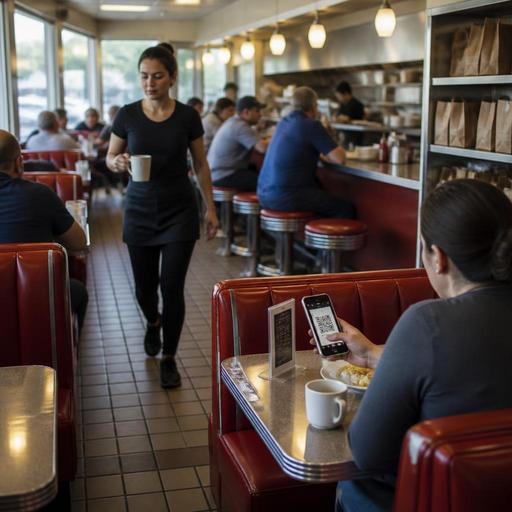
Digital Ordering for U.S. Diners With Booth, Counter, and Takeout Traffic
Digital ordering for U.S. diners with booth, counter, and takeout traffic works best when it supports the way a real American diner runs: coffee refills at booths, regulars at the counter, takeout checks stacking up during breakfast, and a kitchen trying to fire pancakes, burgers, and turkey clubs at the same time. For diner operators, the goal is not to replace hospitality. It is to reduce bottlenecks, keep tickets accurate, and give guests more than one easy way to order whether they are sitting in a booth, grabbing takeout, or stopping by for curbside pickup.
A diner has a different traffic pattern than a fast-casual bowl shop or a full-service steakhouse. You may have table service in one section, counter service in another, and a steady stream of phone orders and delivery app tickets all landing at once. That mix creates friction if your ordering channels are disconnected. A guest at a booth should not wait while a server reenters a simple pie-and-coffee order behind three takeout tabs. Likewise, a takeout customer should not have to squeeze past a breakfast line just to ask whether their order is ready.
Map the diner traffic before you add more ordering channels
Before launching QR ordering, online ordering, or kiosk-style counter flow, start with the physical reality of your diner. Watch what happens from 7:00 to 10:00 a.m., during lunch, and again at the early dinner rush. In many U.S. diners, the operational pain points are predictable: a counter line forms near the register, servers cluster at the POS, the expo window fills with mixed dine-in and takeout tickets, and the host stand becomes an unofficial pickup station.
Digital ordering works when each order type has a defined path. For example, a suburban diner in New Jersey might let booth guests scan a QR code to browse the menu and send repeat beverage orders or dessert requests, while keeping the main meal order server-led. A downtown Chicago diner with heavy office lunch traffic might prioritize direct online ordering for pickup and place a dedicated pickup shelf near the entrance. A highway-side diner in Texas may focus on curbside pickup with numbered parking spots and text-based arrival workflows.
Ask these practical questions:
- Which guests need speed most: booth diners, counter guests, takeout customers, or delivery drivers?
- Where do orders currently back up: the POS, kitchen display system, expo, payment, or pickup handoff?
- Can guests clearly tell where to order, where to pay, and where to collect takeout?
- Does your team know which tickets are dine-in, takeout, curbside, or delivery app orders at a glance?
If you answer those questions first, your digital setup becomes an operational tool instead of another screen your staff has to manage.
Set up separate workflows for booth, counter, and takeout orders
Many diners lose time because every order enters the same queue in the same way. That sounds simple, but it often slows everyone down. A better approach is to use shared menu data with separate service workflows.
Booth service
For booth guests, digital ordering should support the server, not create confusion. A QR menu can help guests browse add-ons, sides, and pie flavors without waiting for printed menus to return to the host stand. Some operators also use QR ordering for low-friction items such as coffee refills, extra ranch, or a slice of cheesecake after the check is dropped. This can reduce small interruptions during the rush while preserving the traditional diner feel.
Make sure guests who do not want to use a phone can still order comfortably. ADA-minded access is not just about technology. It is about offering alternatives, readable menu formats, and a workflow that does not exclude anyone. Operators should review current accessibility expectations with qualified advisors and official guidance when making digital changes.
Counter service
At the counter, speed and clarity matter more than novelty. If your diner has a cashier and a pastry case near the front, digital ordering can shorten lines by letting regulars order ahead for pickup or by using a simple counter QR flow for guests waiting to be seated. In a college-town diner, for example, students may prefer mobile pay and quick reordering of the same breakfast combo. Your POS should clearly flag whether a counter order is for here or to go so the kitchen and runners know where it belongs.
Takeout and pickup
Takeout needs its own lane. A direct online ordering page should show pickup timing, modifier limits, and packaging notes clearly. If your diner sells breakfast all day but stops certain items during peak periods, reflect that in the menu rather than relying on staff to call customers back. Place a pickup shelf or pickup counter away from the main register if possible. In a busy Phoenix diner, a separate pickup area can keep delivery drivers from crowding dine-in guests waiting to pay their check.
If you use delivery marketplaces along with direct online ordering, align prep times and menu availability across channels. Otherwise, your grill station may get flooded by marketplace burgers just as your own regulars place direct takeout orders. Many operators route all off-premise tickets to a kitchen display system with clear labels by source and promised time.
Build the menu for diner ordering speed, not just for appearance
Diner menus are often large, which is part of the appeal, but digital ordering can become messy if the menu structure mirrors a giant laminated booklet without adjustment. The best digital diner menus reduce decision fatigue.
- Group by ordering occasion. Use sections like breakfast plates, lunch sandwiches, blue-plate specials, kids meals, pie and dessert, and sides.
- Keep modifiers practical. Let guests choose toast type, egg style, side, cheese, or dressing, but avoid endless option trees that slow the line.
- Use kitchen-friendly item names. The language on the guest side should still translate cleanly to the kitchen display or printed ticket.
- Control item availability by daypart. If your airport concession diner serves a reduced late-night menu, the digital menu should switch automatically.
- Separate taxable and service-charge logic carefully in your systems. Guests should see a clear breakdown at checkout, and operators should verify current state and local rules with their POS provider, accountant, or tax advisor.
This is also where tip workflows matter. At a full-service diner, digital payment prompts should fit your service model and avoid awkwardness for servers and guests. If your operation includes tipped staff, managers should make sure tip reporting and payout workflows match your actual ordering channels and should confirm current federal, state, and local requirements with qualified advisors.
Connect ordering to kitchen timing, staffing, and guest communication
Digital ordering only helps if the back of house can absorb the volume. In diners, one of the biggest issues is that the same line may produce omelets, patty melts, milkshakes, and takeout salads at once. The answer is not just more orders. It is better pacing.
Use kitchen display workflows or ticket routing rules to separate stations where possible. Breakfast tickets should not bury takeout dessert packaging, and curbside pickup orders should not sit unmarked in the same pile as booth checks waiting for a runner. If your diner operates multiple dayparts, labor scheduling should reflect when digital orders spike. For example, a diner near a hospital may see strong overnight takeout, while a weekend brunch diner may need an extra expo during QR-heavy rushes.
Guest communication matters just as much. Automated order-ready messages, realistic pickup times, and clear curbside instructions can reduce front-counter interruptions. A family diner in Ohio might text: Park in the side lot and tap here when you arrive. A hotel diner may direct room guests to order digitally for lobby pickup during late-night service. Small details like this protect staff time.
For larger operators, consistency across locations is critical. A three-unit diner group should standardize menu categories, modifier rules, and pickup handoff procedures, while still allowing each store to adjust for local traffic patterns. If your brand reaches chain scale, menu labeling and other disclosure requirements may come into play depending on your format and footprint, so verify current FDA and local guidance before changing digital menu displays.
Start with one high-friction problem and measure the result
The most successful diner operators do not digitize everything at once. They fix the most painful workflow first. That might be breakfast takeout congestion, slow check settlement at booths, or delivery drivers blocking the entrance.
A simple rollout plan could look like this:
- Week 1: map traffic and identify the top two ordering bottlenecks
- Week 2: clean up menu categories and modifier logic
- Week 3: launch direct online ordering for takeout with a dedicated pickup area
- Week 4: add QR menu access for booth guests, with staff guidance on when to use it
- Week 5: review prep times, voids, guest complaints, and ticket accuracy
Measure what your team can actually act on: average pickup wait, number of order correction calls, counter line length, server trips to the POS, and how often guests ask where to collect takeout. Those operational signals will tell you whether digital ordering is improving the diner experience or just adding noise.
Done well, digital ordering helps a U.S. diner serve regulars faster, protect hospitality, and handle booth, counter, and takeout traffic without turning the floor into chaos. Restomas can help operators connect QR menus, direct ordering, POS workflows, and kitchen coordination in a way that fits how real diners work.
