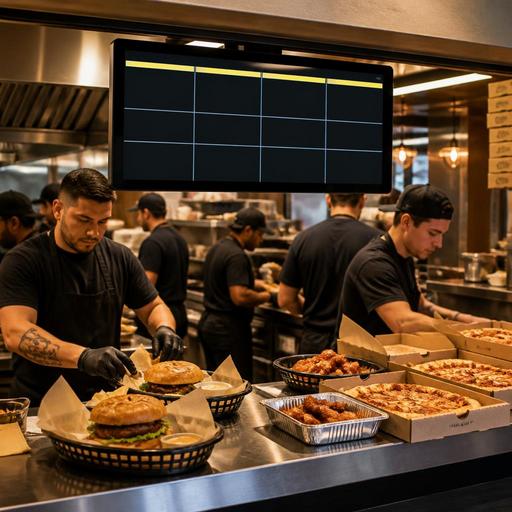
Kitchen Display Systems for U.S. Burger, Pizza, and Wing Shops
A kitchen display system for burger, pizza, and wing shops can do much more than replace paper tickets. In a busy American operation, it becomes the control center for dine-in checks, takeout, curbside pickup, direct online ordering, delivery apps, and late-night rushes. Whether you run a neighborhood burger joint, a college-town wing spot, a fast-casual pizza counter, or a multi-location sports bar, the right setup helps your line cooks see priorities clearly, reduce remake risk, and move orders from POS to expo with less confusion.
For many U.S. operators, the problem is not simply kitchen speed. It is order mix. A Friday night can bring a family dining in, a pickup shelf filling up with takeout bags, two delivery apps firing at once, and a bartender sending food from the bar POS terminal. A kitchen display system works best when it is designed around that real workflow, not treated like a screen version of a printer.
Map the line by station, not by menu category alone
Burger, pizza, and wing concepts often share one operational challenge: one guest order can touch several stations at the same time. A cheeseburger combo may involve grill, fry, and expo. A large pizza order may involve make line, oven, cut table, and boxing. A wing ticket may involve fryers, sauce toss, sides, and packing for takeout.
Instead of sending every item to one crowded screen, build the kitchen display flow around how your team actually works:
- Burger shop: separate grill items, fryer items, and assembly or expo views.
- Pizza shop: separate make line, oven queue, and finishing or boxing.
- Wing operation: separate fryer queue, sauce and toss, and packaging.
- Sports bar with mixed menu: create views by station and route bar food, dining room orders, and app orders into the same timing logic.
For example, a fast-casual burger restaurant in Texas might send patties and melts to the grill screen, fries and onion rings to the fry screen, and then hold assembly until both are close to ready. A New York slice shop with whole pies and slices may need one screen for made-to-order pies and another for reheats and counter slices so the oven is not blocked by low-value interruptions during lunch rush.
The key action for owners is simple: walk the line during your peak hour and write down every handoff. If the screen layout does not match that handoff path, cooks will create workarounds, call out constantly, or ignore the system.
Set priority rules for dine-in, takeout, and delivery
Not every ticket should be treated the same way. In U.S. restaurants, the guest experience changes by channel. A dine-in table notices long waits differently than a delivery customer waiting on a driver, and a curbside pickup order can fail if the bag is ready too early or too late. Your kitchen display system should reflect those differences.
Start by defining order channels inside your POS and ordering stack, then show those channels clearly on kitchen screens. Common channel labels include dine-in, takeout, direct online ordering, third-party delivery apps, hotel room service, and catering. This helps the kitchen and expo make better timing decisions.
Practical examples:
- Burger concept: hold fries for a direct pickup order until the burger is near completion so they do not sit and lose texture on the pickup shelf.
- Pizza shop: fire timed orders so a pie for curbside pickup comes out near the promised handoff time, not ten minutes early.
- Wing shop: identify app orders that need sealed packaging and drink checks before driver handoff.
- Hotel restaurant: mark room service separately so trays, condiments, and packaging are not missed.
Some operators also color-code order age or channel urgency. That can help, but avoid turning the screen into a visual mess. The goal is quick recognition. If every ticket is marked urgent, nothing is.
Also think about front-of-house communication. A host, cashier, or server should know when an order is delayed without walking into the kitchen. If your POS, kitchen display system, and order status tools connect well, teams can give guests better pickup estimates and reduce frustration at the counter.
Use item-level modifiers to prevent remakes
Burger, pizza, and wing menus create modifier complexity fast. No pickles, extra ranch, half pepperoni half veggie, all flats, sauce on the side, gluten-sensitive requests, add bacon, no salt fries, split check modifications from the dining room, and family meal bundles can clutter tickets and cause errors.
A strong kitchen display setup should make modifiers readable at the station where they matter. Grill needs burger temp and cheese changes. Fry needs wing quantity and side timing. Pizza make line needs crust, sauce, and topping logic. Expo needs packaging notes and add-on verification.
Actions worth taking:
- Standardize modifier names in the POS so the kitchen does not see duplicate language for the same request.
- Place the most important modifier first, especially for allergy-aware or ingredient removal requests.
- Use forced modifier groups where needed so cashiers and online guests do not skip required choices.
- Limit free-text notes when a structured modifier can do the job more clearly.
- Review the top remake reasons every week and trace whether the problem starts in menu setup, cashier entry, or kitchen execution.
If you operate in a chain or franchise setting, this matters even more. Consistent item naming across locations makes reporting, training, and support easier. For larger chains, menu labeling rules may also apply depending on concept size and structure, so operators should verify current FDA and local requirements with qualified advisors and official guidance when changing menu presentation or digital ordering flows.
Build the system around rush periods and labor reality
A kitchen display system should help your team on the worst shift, not just on a calm Tuesday afternoon. Think about Friday dinner, game day, school pickup hour, and late-night delivery spikes. In burger, pizza, and wing operations, labor scheduling and station coverage often change by daypart, so your screen workflow should flex with staffing.
For example, a lunch shift may have one person covering fries and assembly, while dinner has separate fry and expo staff. A pizza kitchen may combine oven and cut table in slower periods but split them during rush. A wing shop may add a dedicated packer once delivery apps surge after 7 p.m.
Useful questions to ask:
- Can one screen view be simplified for short-staffed shifts?
- Can orders be bumped only when the next station actually receives them?
- Can expo see what is waiting on a missing side or drink?
- Can managers identify bottlenecks by station instead of blaming the whole kitchen?
- Can multi-location operators compare ticket flow patterns across stores?
Do not overlook training. A new kitchen display system can fail if cooks are expected to learn it in the middle of service. Use pre-shift practice, side-by-side shadowing, and simple station cheat sheets. In restaurants with tipped staff, any service workflow changes can also affect pacing, table turns, and guest communication, so managers should review how servers, cashiers, and expo teams coordinate. For tip reporting, service charges, sales tax handling, labor practices, and local wage rules, operators should confirm current requirements with payroll, tax, and legal advisors or official guidance.
Connect kitchen screens to pickup, accuracy, and guest communication
The best kitchen display system is not only about cooking. It should support the last thirty feet of the order. That includes packaging, labeling, pickup shelf staging, curbside pickup timing, and handoff confirmation. This is especially important in U.S. takeout-heavy operations where guest satisfaction often depends on whether the bag is complete and still hot.
Consider a Chicago wing shop with heavy direct online ordering during football nights. If the kitchen finishes food but no one confirms sauces, napkins, drinks, and sealed containers, the guest may blame the restaurant even if the cook times were solid. Or think about an Arizona burger and shake concept where curbside runners need fast status updates so they are not making repeated trips to the line.
Look for operational benefits such as:
- clear ready-status updates for the pickup shelf or front counter
- expo checks for missing drinks, dips, and sides
- timed firing for future pickup orders
- visibility into direct orders and delivery marketplace orders in one workflow
- better coordination with QR ordering and counter ordering during rushes
Accessibility matters too. If you use QR ordering or digital status updates alongside kitchen screens, make sure guests still have practical ways to order and receive help. ADA-related expectations can vary by situation, so operators should verify current accessibility requirements and digital experience guidance with qualified advisors and official sources.
A kitchen display system works best when it connects the whole operation: POS, online ordering, kitchen stations, expo, and pickup. Restomas helps restaurants bring those pieces into one practical workflow so teams can move faster without losing control of the guest experience.
