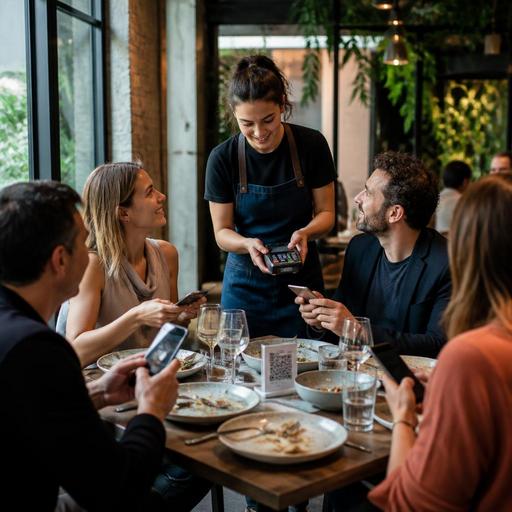
Split Bill Software for Restaurants: Faster Group Payments Without Service Delays
Group dining can be profitable, energetic, and great for repeat business, but it often slows down at the exact moment service should end smoothly: payment. Split bill software for restaurants helps teams close checks faster, reduce confusion at the table, and avoid the familiar last-minute scramble over who ordered what. For operators, the value is not only convenience. It affects table turn times, staff workload, guest satisfaction, and the accuracy of the final check.
In many restaurants, the split-bill moment still depends on memory, handwritten notes, or a server manually dividing items at the POS while a group waits. That creates pressure for front-of-house staff and frustration for guests. A better setup combines clear order entry, flexible check management, and digital payment options so groups can settle quickly without turning the end of the meal into a negotiation.
Why group payments create friction in everyday service
Splitting a bill sounds simple until a six-top shares starters, two guests leave early, one person covers wine, and another needs an itemized receipt for expenses. In a busy shift, even experienced staff can lose time rebuilding the table’s order history or correcting mistakes after guests question the total.
The problem usually starts earlier than checkout. If orders are not entered by seat, if modifiers are unclear, or if shared items are not tagged properly, the bill becomes harder to divide later. What appears to be a payment issue is often a workflow issue that begins when the first order is taken.
Common friction points include:
- Guests changing seats after ordering
- Shared dishes that need to be divided fairly
- Separate payment methods within one table
- Discounts or promotions applied unevenly
- Large groups wanting both speed and itemized accuracy
- Servers needing manager help for manual bill edits
When these moments are handled slowly, the effects spread across the floor. A table stays occupied longer, the server is tied up at the terminal, and the queue at the cashier grows. During peak hours, this can affect the pace of the entire dining room.
What effective split-bill technology should actually do
Not every payment tool solves the real operational problem. Restaurants need split-bill functionality that works naturally with service, not just at the end of it. The best systems support the whole journey from order capture to final payment.
1. Link items to seats or guests
If each order is attached to a seat number or guest profile from the start, staff can separate checks with much less effort. A server should be able to assign a burger, mocktail, or dessert to a specific guest as the order is entered. When payment time comes, the system already knows how to group those items.
2. Handle shared items cleanly
Shared plates are where manual splitting often breaks down. Good check management allows staff to divide selected items evenly, assign them to one payer, or move them between checks without starting over. This is especially useful for tapas bars, brunch spots, family-style concepts, and casual dining restaurants.
3. Support mixed payment methods
Real tables rarely pay in one format. One guest may use a card, another cash, and another mobile payment. The system should allow partial payments across methods while keeping the remaining balance visible in real time. That reduces reconciliation errors and avoids awkward back-and-forth with guests.
4. Keep receipts and records clear
Split checks should still be easy to read. Guests need to understand what they paid for, and staff need records that match the transaction history. Clear digital receipts also help when business diners request expense documentation.
5. Work smoothly with QR menus and table-side ordering
Restaurants using QR menus or digital ordering can reduce payment confusion even further. When guests browse, order, or review items through a digital interface, they can see what has been added to the table. In some setups, they may even settle their portion directly, which reduces pressure on service staff and speeds up checkout.
Practical examples from the dining room
Consider a lunch group of four office workers. Two are in a hurry, one needs a receipt, and one wants to cover all drinks. In a traditional setup, the server may need several minutes at the POS to separate food from beverages, print multiple checks, and process different cards. With a better split-bill workflow, the server assigns items by seat during ordering, moves shared starters evenly, puts drinks on one check, and closes all payments with minimal delay.
Now consider a larger birthday dinner. The table shares appetizers, orders multiple rounds, and several guests leave before dessert. Without structured check management, the final bill often becomes a source of confusion. With digital tools, staff can transfer items to the correct guest or check while service is still in progress rather than waiting until the end.
Another strong use case is a fast-casual or café environment where guests order at the table through QR menus. If each guest can review the active order and pay individually, the restaurant reduces the line at the counter and prevents staff from manually splitting bills during rush periods.
How to implement split-bill workflows without confusing staff
Technology only helps if the team uses it consistently. The key is to design a simple process that matches your service style and train staff on a few non-negotiable habits.
- Standardize seat-based order entry. Even in casual service, assigning items to seats creates a cleaner payment process later.
- Define how shared items are handled. Decide whether staff should split shared dishes evenly, assign them to a host, or confirm with the table before firing the order.
- Train for common scenarios. Practice lunch groups, family tables, business diners, and mixed cash-card payments.
- Reduce manager dependency. Servers should be able to perform routine splits and transfers without waiting for supervisor approval unless discounts or voids are involved.
- Use table-side visibility. If possible, let guests review ordered items before asking for the check. This catches mistakes earlier.
- Review end-of-shift friction. Ask staff where payment delays still happen and adjust the workflow, not just the screen layout.
It is also worth updating guest communication. A simple line from the server such as “We can split by seat, by item group, or evenly across the table” sets expectations early and makes the payment moment feel organized rather than improvised.
The wider operational payoff beyond faster checkout
Restaurants often evaluate split-bill tools as a guest convenience feature, but the operational benefits are just as important. Faster group payments can help free tables sooner, especially during lunch and evening peaks. Clearer check handling also reduces disputes, reprints, and time spent correcting transactions after guests have already left.
For staff, this means less stress at the POS and more time on the floor. Servers can focus on hospitality instead of acting as accountants at the end of each meal. For managers, better reporting around check splits and payment methods can reveal recurring service bottlenecks and inform staffing decisions.
There is also a brand-level benefit. Guests remember the last few minutes of the meal. If the experience ends with confusion over the check, it can overshadow otherwise strong food and service. If it ends quickly and clearly, group diners are more likely to return for another occasion, whether that is a team lunch, family dinner, or celebration.
Restaurants do not need overly complex systems to improve this area. They need practical digital tools that connect ordering, table management, and payment in one workflow. Platforms like Restomas can support that shift with QR menus, order flow visibility, and restaurant digitization tools that make group service easier to manage from the first order to the final payment.
Final thought: If group dining is common in your business, improving how you split checks may be one of the simplest ways to speed up service without rushing the guest experience.
