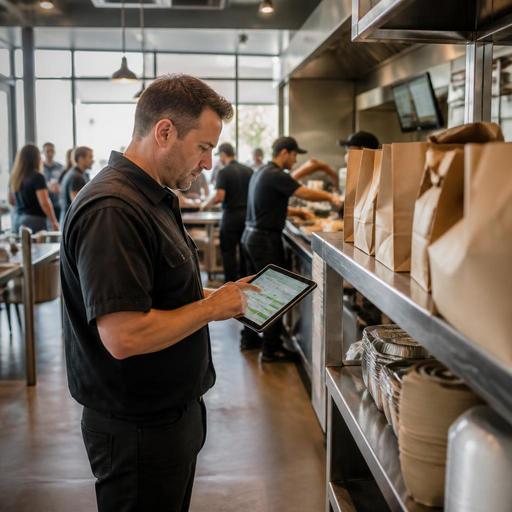
How U.S. Restaurants Use Digital Order Data to Build Smarter Labor Schedules
Restaurant labor scheduling using digital order data is becoming one of the most practical ways for U.S. operators to control labor without hurting service. If your restaurant already accepts orders through a POS, QR ordering, direct online ordering, delivery apps, or a pickup shelf workflow, you already have demand signals that can help you staff more accurately. The goal is not to chase perfect forecasting. It is to put the right people in the right stations for the right daypart, whether you run a neighborhood diner, a fast-casual salad shop, a food truck, or a multi-location burger brand.
In the U.S., labor scheduling decisions affect guest wait times, overtime risk, tipped staff coverage, curbside pickup speed, and kitchen stress. Digital orders add visibility because they show when demand actually starts, which channels create prep spikes, and which menu items slow the line. Instead of building schedules only from total sales, operators can use order timing, channel mix, and production load to make better weekly and daily staffing calls.
Start with the demand signals you already have
Most restaurants do not need a complicated forecasting project to improve scheduling. They need a cleaner view of where orders come from and when they hit the kitchen. Useful signals often include direct online ordering, delivery marketplace tickets, QR table ordering, phone orders entered into the POS, reservations, and historical check counts by daypart.
For a U.S. fast-casual bowl concept, the lunch rush may look calm at the front counter while the kitchen is buried by office takeout and delivery app orders placed within the same 20-minute window. A sports bar may have a different problem: a slower dining room at 5:30 p.m. followed by a sharp pickup surge before a local game starts. A hotel restaurant may need to watch room-service bursts, lobby traffic, and breakfast peaks tied to conference schedules. In each case, the labor issue is not just how many guests arrive, but how digital orders stack on top of in-person volume.
Signals worth reviewing every week
- Orders by 15-minute or 30-minute interval across dine-in, takeout, curbside pickup, direct online ordering, and delivery apps
- Average items per order, because a 2-item coffee order is very different from a 9-item family takeout ticket
- Menu mix by channel, especially items that create bottlenecks on fry, grill, expo, or beverage stations
- Order lead time, including how far in advance guests place pickup orders
- No-show or late pickup patterns that affect holding space, remake risk, and front counter workload
- Reservation pacing for full-service restaurants that also run takeout and bar tabs
If you can see these patterns in one place, scheduling becomes less reactive. If your systems are separate, even a simple weekly spreadsheet pulled from the POS and online ordering channels can reveal where labor is mismatched.
Schedule by production load, not just sales
Sales dollars alone can hide operational reality. Two Friday nights can ring the same top-line sales but require very different staffing. One may be driven by bar tabs and simple appetizers. The other may be driven by family takeout bundles, third-party delivery, and custom orders that flood the kitchen display system. Labor scheduling should follow production load.
A practical method is to group each daypart by how much kitchen and service effort it requires. For example, a suburban pizza shop may classify orders into low, medium, and high complexity based on ticket size, modifiers, and channel. A food truck near office buildings may staff one extra expeditor on days when pre-ordered lunch pickups exceed a set threshold. An airport concession may need an earlier prep shift when mobile orders spike before the first bank of departures.
- Review the last 6 to 8 weeks by day and daypart.
- Separate volume by channel instead of combining all sales.
- Mark operational stress points such as fryer backup, expo delays, or pickup shelf crowding.
- Match roles to the bottleneck, not just total headcount.
- Adjust start times so prep, line, and front-of-house coverage begin before the order surge hits the kitchen.
This is especially important for restaurants with pickup shelves and curbside pickup. The guest may place the order online at 11:10 a.m., expect pickup at 11:40, and arrive early. If labor only ramps up at noon because that is the traditional lunch rush, your team starts behind before the dining room even fills.
Build separate staffing rules for each order channel
Not all orders create the same labor needs. A dine-in check may require host coverage, server attention, drink refills, and table resets. A direct online pickup order may need stronger expo and packaging. A delivery app order may add tablet monitoring, driver handoff, bag sealing, and issue resolution. A QR ordering workflow can reduce some front-of-house steps, but it may increase runner and guest support needs if tables order in bursts.
For U.S. full-service restaurants, channel-based scheduling also affects tipped staff workflows. If more sales shift from servers to QR ordering or takeout, managers should review how sections, support roles, and side work are assigned. Operators should also make sure tip handling, service charges, and reporting workflows are clearly configured in their systems and verified against current federal, state, and local rules with qualified advisors or official guidance. The same caution applies to predictive scheduling laws, break rules, reporting time requirements, and other labor regulations that vary by city and state.
Here is a practical example. A three-unit taco concept in Texas may schedule:
- A dedicated packer from 11:30 a.m. to 1:30 p.m. when delivery app volume rises
- An extra cashier only on days when counter traffic, not digital traffic, exceeds normal levels
- A cross-trained runner during dinner when QR patio orders increase table touches
- An earlier prep cook on Mondays because online catering pickups create large-format orders before regular lunch service
That is more effective than adding one general labor hour everywhere.
Use daily adjustments, not just weekly schedules
The best labor plans are not frozen once the schedule is posted. Digital demand changes with weather, local events, school calendars, payroll Fridays, and delivery promotions. A diner near a hospital may see overnight takeout swings. A stadium-adjacent bar may get crushed before and after events. A college-town cafe may need different staffing during move-in week than during finals.
Managers should create a short daily review routine:
- Check pre-orders, reservations, and large pickup windows before each shift
- Review delivery marketplace promotions and expected volume spikes
- Watch staffing gaps in critical stations such as expo, fry, beverage, and curbside handoff
- Move cross-trained team members based on live order flow from the kitchen display system and POS
- Pause or throttle selected channels operationally if ticket times are slipping and guest experience is at risk
For multi-location operators, this process should be standardized. If one store interprets digital demand differently than another, labor performance will vary even with similar sales. Shared reporting definitions matter. Decide what counts as a pickup order, what counts as a production spike, and which thresholds trigger an on-call shift, a role reassignment, or temporary menu simplification.
Turn digital order patterns into better staffing decisions
The biggest win is not just reducing labor cost percentage. It is protecting service standards while using labor more intentionally. When order data is connected across POS, QR menus, online ordering, and kitchen workflows, managers can see whether the real problem is prep timing, packaging labor, server coverage, or station-specific throughput. That leads to better schedules, faster takeout, fewer missed handoffs, and less team burnout.
For U.S. operators, the next step is simple: review one high-volume daypart this week, split the orders by channel, and identify where labor arrives too early, too late, or in the wrong role. Then test one change for the next schedule. Over time, those small adjustments build a more resilient operation for dine-in, takeout, curbside pickup, and delivery.
Restomas helps restaurants connect digital ordering, POS workflows, and operational visibility so teams can make smarter scheduling decisions from real service data.
