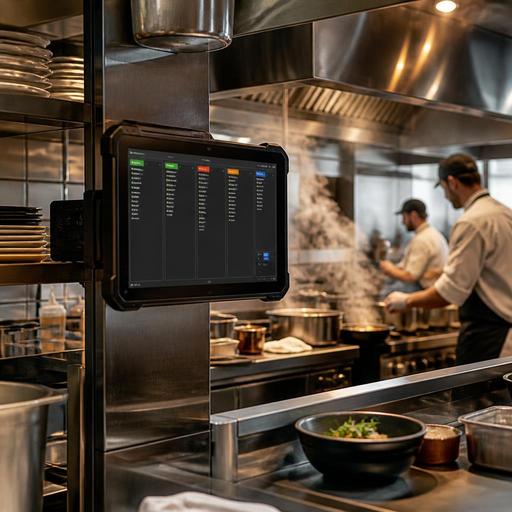
Best Kitchen Screen Specs for Heat, Steam, and Busy Service
Choosing the best kitchen screens for heat, steam, and busy service is not just an IT decision. In a working kitchen, screens sit near fryers, pass stations, dish areas, and expo counters where moisture, grease, vibration, and constant touch can quickly expose weak hardware. If you are replacing printed tickets or upgrading from consumer tablets, the right screen can improve ticket visibility, reduce downtime, and help the line keep moving during peak hours.
Restaurant owners often focus on screen size first, but durability and placement matter more. A bright, easy-to-read display is useful only if it keeps working through lunch rushes, cleaning routines, and seasonal temperature swings. The practical goal is simple: choose kitchen screens that fit your production flow, survive the environment, and stay easy for staff to use under pressure.
Start with the kitchen environment, not the product brochure
Every kitchen has different stress points. A screen above a salad station faces a different risk profile than one mounted near the grill or dish pit. Before comparing models, map where each screen will actually live and what it will face during a normal shift.
- Heat exposure: Grill lines, fry stations, pizza ovens, and hot pass areas create sustained high temperatures.
- Steam and moisture: Dishwashing zones, combi ovens, and boiling stations expose screens to humidity and condensation.
- Grease and airborne residue: Fryers and sauté lines leave films that can affect visibility and cleaning frequency.
- Heavy touch use: Expo staff and cooks may tap the screen with wet hands, gloved hands, or fast repeated motions.
- Cleaning chemicals: Daily sanitation routines can damage low-quality coatings, ports, or housings.
A practical example: a cafe may only need one compact screen near a low-heat prep area, while a high-volume burger concept may need separate displays for grill, fry, and assembly, each mounted away from direct heat but still visible from the station. That decision affects not only the screen model but also the mounting arm, cable routing, and cleaning plan.
Focus on the hardware features that matter in real kitchens
When operators compare kitchen display hardware, a few specifications have the biggest impact on reliability. These are the details worth checking carefully with your vendor or installer.
Ingress protection and enclosure quality
Look closely at how well the screen resists moisture and particles. In a kitchen, exposed ports and loose seams are long-term failure points. A better-protected enclosure is especially important near steam, splash zones, or flour-heavy prep areas. Even if the display is not directly sprayed, airborne moisture and residue build up over time.
Brightness and anti-glare visibility
Kitchen lighting is rarely ideal. Stainless steel reflections, heat lamps, and overhead fixtures can make dim screens hard to read. A display with good brightness and anti-glare treatment helps staff recognize modifiers, timing cues, and course status at a glance. This becomes more important in open kitchens where sunlight or front-of-house light spill can hit the expo area.
Touch response with gloves and moisture
Not all touchscreens behave well in real service conditions. Test whether the screen remains responsive when staff use gloves or slightly damp fingers. A screen that misses taps or registers accidental input can create more friction than paper tickets. If your process involves frequent bumping, recalling, or routing of orders, touch accuracy matters as much as image quality.
Fanless or low-maintenance design
Fans can pull grease and dust into the device. In many kitchens, simpler sealed designs are easier to maintain. Ask how the unit handles cooling, what regular maintenance is required, and whether the screen is intended for commercial food-service environments rather than office use.
Mounting flexibility and port protection
A strong display can still fail if it is mounted badly. You may need a wall mount, VESA arm, under-shelf bracket, or pass-through positioning that keeps the screen readable without placing it directly over heat. Protected cables and secure power connections are also essential in tight back-of-house spaces.
Choose screen size and layout based on workflow
Bigger is not always better. The right size depends on viewing distance, ticket volume, and whether one station handles a single task or multiple order streams. A compact screen may work well for beverage prep, while a wider display is often better at expo where staff need to scan many tickets quickly.
Use these questions to decide:
- How far away will staff stand? If cooks read from a distance, prioritize readability over compactness.
- How many orders appear at once? High-volume concepts need enough space to show active tickets without constant scrolling.
- Will one screen serve multiple roles? If a station handles dine-in, delivery, and pickup orders together, layout clarity becomes critical.
- Do staff need color cues or timing markers? Make sure the display presents status changes clearly under pressure.
For example, a ghost kitchen may want separate screens for each brand or production lane to avoid clutter. A full-service restaurant may prefer one kitchen display at hot line and another at expo so cooks focus on preparation while runners focus on completion and handoff. The right setup reduces verbal interruptions and keeps stations aligned.
Plan for service continuity, cleaning, and support
Kitchen screens should be evaluated like production equipment, not consumer electronics. Ask what happens when something goes wrong on a Saturday night. Can the unit be swapped quickly? Are replacement parts available? Is remote troubleshooting possible? Support quality matters because a failed screen during service can force the team back to manual workarounds.
Cleaning is another overlooked factor. Staff need a simple routine that fits closing procedures. If the screen surface is difficult to wipe, or if ports are exposed in a grease zone, upkeep becomes inconsistent. Build a short cleaning checklist into your SOPs so the hardware lasts longer and remains readable.
- Assign responsibility for end-of-shift wipe-downs.
- Use approved cleaning materials for the screen surface and housing.
- Inspect mounts and cable strain points weekly.
- Check visibility during peak service, not only before opening.
- Keep a fallback process ready if one station loses its screen.
If you run multiple locations, standardizing screen models and mounts can simplify training and maintenance. Staff moving between branches will adapt faster when the kitchen display logic and physical setup feel familiar.
Connect hardware choices to software and operational goals
The screen itself is only one part of the system. A reliable kitchen display works best when it connects cleanly with your ordering flow, menu updates, and station routing rules. If modifiers are unclear, if out-of-stock items still reach the line, or if all orders flood one screen without logic, even excellent hardware will not solve the core problem.
That is why operators should review a few software-side questions before buying:
- Can orders be routed by station, menu category, or service type?
- Can urgent or delayed tickets be identified clearly?
- Can menu changes reduce errors before orders reach the kitchen?
- Can front-of-house and kitchen teams see the same status logic?
Imagine a brunch restaurant that runs dine-in, takeaway, and delivery at the same time. If the kitchen screen groups orders by promised time and production station, the line can prioritize more calmly. If the digital menu also hides sold-out items immediately, staff spend less time correcting orders after they hit the kitchen. This is where restaurant digitization becomes practical rather than theoretical.
For many operators, the best approach is to pilot one or two screens in the most demanding area first, then refine placement, brightness, and workflow before a full rollout. That small test often reveals issues such as glare at noon, awkward tapping angles, or the need for a separate expo display.
Choosing kitchen screens for harsh environments is ultimately about reliability under pressure. Look beyond consumer-grade specs, study the real conditions of each station, and match the hardware to your service flow. When the display is durable, readable, and integrated into a clear digital process, it supports faster communication, fewer missed items, and a calmer line during peak hours. Restomas can help restaurants connect kitchen display workflows with menu updates, order flow, and day-to-day operational clarity.
