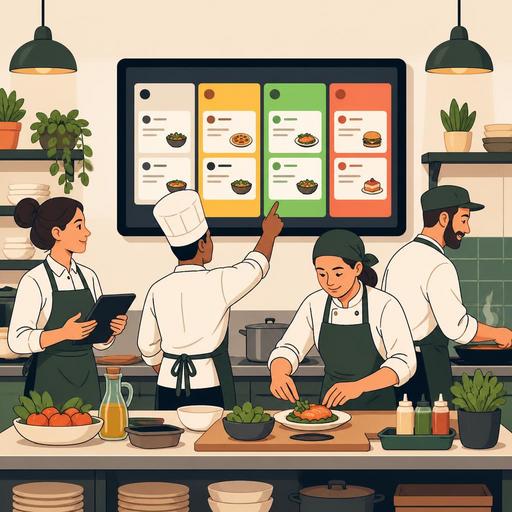
How to Reduce the Error Rate in the Kitchen with Color-Coded Order Tracking
Color-coded order tracking is a practical method that simplifies in-kitchen communication during busy service hours and makes the order flow more visible. Especially in businesses that take orders from the dining room, takeaway, and online channels at the same time, which product is waiting, which one is a priority, and which one is ready for service should be understood within a few seconds. It is precisely at this point that color-supported digital tracking reduces dependence on verbal reminders and scattered notes.
Many kitchen errors actually stem not from a lack of recipe knowledge but from visual clutter. Similar orders dropping in at the same time, special notes being missed, courier orders getting mixed up with table orders, or a ready product being delayed are typical results of this clutter. Color coding gives the kitchen team an instant answer to the question "what should I look at first?" That is why the topic is not just an aesthetic screen design but a matter of operational control.
Exactly which problem does a color-coded system solve in the kitchen?
In a standard order flow, the problem often begins not when the order is taken but at the moments it changes hands within the kitchen. An order that passes correctly from the register can be delayed in the prep area; a special note can be forgotten during the cooking stage; a product that is ready may not be relayed to the service team on time. Color codes make these transition points visible.
For example, the following structure can be used in a business: newly arrived orders are marked blue, those in preparation yellow, those carrying a risk of delay red, and those ready for service green. This way, when the team looks at the screen, they see not just a list of orders but also an action map. This structure reduces the following types of confusion in particular:
- Confusion when the same product is prepared for different tables or different channels
- Special requests being missed
- Orders with lengthening wait times going unnoticed
- Ready products waiting unnecessarily on the counter
- Repeated verbal confirmations among the dining room, takeaway, and kitchen
The important point here is that colors do not work miracles on their own. Color codes produce real benefit when they are defined together with order status, channel information, the preparation stage, and priority rules. In other words, the aim of the system is not to "color the screen" but to shorten the decision time.
The mechanism that reduces the error rate: visual prioritization and a standard language
In the kitchen, errors often arise not from a lack of information but from the inability to select the information at the right moment. The chef, the commis, the packaging lead, and the service staff look at the same order from different angles. If everyone interprets the status of the same order differently, disruption is inevitable. Color-coded tracking establishes a common language at this point.
For example, if the color red means only "delayed order," the team does not have to debate why that order is important. If the color green means only "ready to go out," the service staff does not repeatedly ask the kitchen "is it ready?" This standard language reduces the conversational load during busy moments and prevents distraction.
Let's consider a concrete example: during the lunch service, three tables ordered burgers, two takeaway orders came in for bowls, and a courier order came in for a salad, all at the same time. On a paper ticket or a flat-list screen, these all look similar. Yet the courier order has a narrow time window, one of the burgers in the dining-room order has a "no onions" note, and one of the bowl orders is a bulk office order. In a color-coded system, when the channel, priority, and special notes are distinguished together, the team sees much more clearly which order should be handled first.
This approach makes a difference especially in the following areas:
- Management of special requests: Notes such as allergens, ingredient removal, and extra sauce become prominent.
- Channel distinction: Dining-room, pickup, courier, and online orders are separated at a glance.
- Time management: Orders with increasing wait times become visible.
- Ease of handover: Order status is communicated more clearly during a shift change.
How should color-coded order tracking be designed?
To build a successful system, you first need to identify the kitchen's real bottlenecks. The same color logic does not work in every business. While the course sequence may be critical in a fine-dining restaurant, the channel and delivery time may be more decisive for a fast-service burger joint. For this reason, the first step should not be technology selection but operational analysis.
1. First identify the critical error points
Look at the errors that occurred most frequently in the last two weeks. Are dishes going out to the wrong table? Are takeaway orders being delayed? Are special notes being skipped? Colors should be defined to solve these problems.
2. Keep the number of colors limited
Using too many colors makes the system complex again. Generally, 4 or 5 clear states are enough. Each color should have a single meaning; the same color should not mean both "takeaway" and "urgent."
3. Match colors to status, not to department
Colors most often give the best result when used for order status. Because the real need in the kitchen is the answer to the question "at which stage?" rather than "who is handling it?"
4. Place the screen according to the kitchen workflow
The prep, cooking, and pass areas should all see the same information in the same way. If the information is visible only on the register side, the effect of color coding remains limited.
5. Hold a short team training
Even a five-minute pre-shift briefing makes a difference. Everyone should know by heart which color requires which action.
Why do a digital kitchen display and color coding work more powerfully together?
Color-coded tracking can be partially applied with paper tickets as well; however, the real efficiency usually emerges with a digital kitchen display, order management, and POS integration. Because for colors to be meaningful, order status needs to update automatically, channels need to be gathered on a single screen, and information needs to flow instantly between teams.
For example, when a table order coming through the POS, an additional order dropping in from the QR menu, and an online takeaway request are gathered on a single screen, the kitchen is no longer a fragmented structure. Color codes also become more functional when they work on this unified flow. When an order is ready, the service team can see it without a separate verbal confirmation; orders nearing a delay are noticed earlier; cancellations or revisions do not get lost among old tickets.
Another point to pay attention to here is reporting. A color-coded system is valuable not only for providing instant order but also for seeing recurring problems. If it can be tracked at which hours orders fall into red more often, which channel is delayed the most, or which product group creates a bottleneck in the kitchen, the business does not just react but also improves its processes.
An actionable plan for restaurant owners
If you are experiencing order confusion in the kitchen, you can start with small but clear steps without waiting for a major transformation:
- Categorize the order errors of the last 10 days.
- Define a color-based tracking rule for the 3 most recurring errors.
- Make dining-room, takeaway, and online orders visible on a single screen.
- Visually separate special notes from the normal order line.
- Create a shared screen language with the service team to reduce the wait time of a ready order.
- After a week, collect feedback from the team and simplify the meanings of the colors.
The point not to forget is this: what completely eliminates kitchen errors is not technology alone but the combination of technology with the right operational design. Color-coded order tracking, when defined correctly, becomes a visual control system that draws the team's attention to the most critical task. This means less verbal clutter, clearer prioritization, and a more consistent service experience.
Restaurant-focused digital solutions like Restomas can make the color-coded tracking setup more applicable in daily operations by making the order flow visible in a single center.
