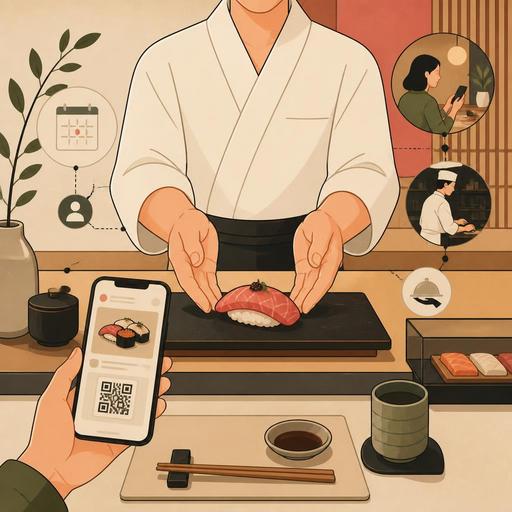
Digital Experience Design for Omakase Menus in Sushi Restaurants
Digital experience design for omakase menus in sushi restaurants is not just about bringing technology to the table; it is about bringing the chef's story, the service rhythm, and the guest's expectations together in a single flow. Omakase is by nature a personal, in-the-moment, trust-based experience. That is why a standard restaurant-digitalization approach isn't enough here on its own. Every touchpoint, from the moment of reservation to the first bite, and from allergen information to the service tempo, needs to be carefully designed.
Many businesses want to digitize the omakase experience "without breaking the mystique." In fact, when the design is done right, digital tools don't mechanize the experience; on the contrary, they take the chef's focus off operational details and direct it toward the guest. For example, explaining the service philosophy through the QR menu instead of handing over a menu card, collecting dietary preferences before the reservation, or instantly sharing table-specific notes with the service team can make omakase more refined.
Why should digital design be handled differently in the omakase experience?
An omakase menu is not a fixed "product list." It is most often shaped by daily sourcing, the season, the chef's technique, and the guest's profile. This structure creates a different need from classic menu management: a flexible but controlled flow of information.
On the guest's side, the biggest expectation is to feel special. On the business's side, the biggest need is to manage uncertainty. As much as how many people the reservation is for, information such as whether the guest eats raw fish, wasabi sensitivity, and gluten or shellfish allergies becomes critical. Managing this information by phone, through scattered notes, or via the service staff's memory alone increases the risk of error.
The aim of digital experience design here is this: to build an infrastructure that works unseen by the guest, yet raises the quality of the experience. For example, asking short but precise questions on the reservation form, dropping a special note onto the chef's screen when a table is opened, or instantly updating products that change during the day in the QR menu all suit the nature of omakase service.
Design the guest journey from reservation to seating
The omakase experience begins not at the door but at the moment of reservation. That is why your digital reservation flow shouldn't be limited to collecting just a date and time. A well-designed flow both manages expectations and strengthens kitchen planning.
Fields that must be considered in the reservation form
- Dietary preferences: Consumption of raw products, a vegetarian approach, special restrictions
- Allergen information: Critical items such as shellfish, soy, sesame, and gluten
- Experience level: The expectations of a first-time omakase guest and an experienced guest may differ
- Special-occasion note: Contexts such as a birthday, business dinner, or anniversary affect the service tone
- Seating preference: The chef's counter, a quieter table, or a group setting
Let's consider a concrete example: a sushi restaurant taking a reservation for two learns in advance, through a digital form, that one of the guests doesn't eat raw seafood. The chef reworks the nigiri sequence accordingly; the service team also prepares an explanation for the guest. That way the "I can't eat this" moment doesn't occur at the table, and the experience stays fluid.
At this stage, having the reservation system work in connection with table management and service notes provides a big advantage. In a digital flow like Restomas, when reservation information is linked to menu and operational notes, information loss between teams decreases.
How is a QR menu used correctly in the omakase experience?
In a high-touch experience like omakase, the use of a QR menu can feel cold to some businesses. But the point is not to move the entire experience onto a phone; it is to make the right information accessible at the right moment. In an omakase menu, the QR solution should not be a static list that replaces the printed menu.
A good omakase QR menu can be used for the following purposes:
- Explaining the framework of the experience: What is omakase, roughly how does the service unfold over time, and what is the logic behind the chef's selection?
- Providing content transparency: Allergen, content, cooking approach, or alcohol-pairing information
- Reflecting daily changes: The special piece that came in that day, seasonal sourcing, or an alternative service
- Guiding without applying upsell pressure: Sake pairings, tea service, or extra tasting options
For example, if the chef is using a fresh local alternative instead of a Hokkaido-sourced product that day, this can be shared with a short note in the QR menu. This both provides transparency and reduces the burden on the service staff of repeating the same explanation at every table. In addition, since the obligation to print menus is removed, managing daily changes becomes easier.
The critical point here is that the QR menu must not fragment the experience. Rather than overwhelming the guest with long texts, use short explanations, clear categories, and detail areas that expand when needed.
Build an invisible operational bridge among the chef, service, and kitchen
In omakase service, errors usually arise not from kitchen technique but from communication breakdowns. An allergen note landing late at a table, a forgotten drink pairing, or a tempo mismatch can diminish the entire impact of the experience. That is why digital experience design means not only the guest interface but in-team coordination as well.
Digital tracking provides benefits especially in the following areas:
- Table-based note management: Making each guest's sensitivity visible
- Service-sequence tracking: Which course has gone out, and which is being prepared
- Drink-pairing synchronization: The alignment of sake, wine, or tea service with the courses
- Real-time menu updates: An out-of-stock product being seen by the whole team at the same time
In a concrete scenario, imagine that at an eight-seat chef's counter, two guests don't eat shellfish. If this information stays only in the reservation note, it can be overlooked during service. But if this note is visible in the digital order and table-management flow, the chef plans the alternative pieces in advance; the service staff gives the explanation at the right point; and the tempo isn't thrown off.
This structure also makes it easier for new staff to adapt. In a service with high attention to detail like omakase, reducing dependence on team memory preserves the business's standard.
Think in terms of experience engineering, not menu engineering
Success in an omakase menu isn't only about which pieces are served; it's also determined by the order, the context, and the level of information with which they're presented. That is why digital tools should be seen not just as a means of "displaying the menu," but as a tool for designing the experience.
Clear actions you can apply right away
- Simplify your reservation form, but deepen it: Remove unnecessary fields, and add critical ones like allergens and experience expectations.
- Move the QR menu beyond a static PDF: Dynamically manage the daily product, descriptions, and pairing information.
- Collect table notes in a single center: Reduce the trio of phone, paper notes, and verbal transfer.
- Make the service flow visible to the whole team: Clarify the course sequence especially in multi-course omakase service.
- Take post-guest notes: Which pairings were liked, what sensitivities were present, and personalize for the next reservation.
Remember: in the omakase experience, technology should not be at center stage; it should work like an invisible layer that supports the chef's narrative and the guest's comfort. With the right digital setup, you can create fewer disruptions, clearer team communication, and a more personal guest experience.
If you want to make your omakase service more consistent with your reservation, QR menu, and operational flow, you can explore Restomas's digital tools suited to restaurants.
