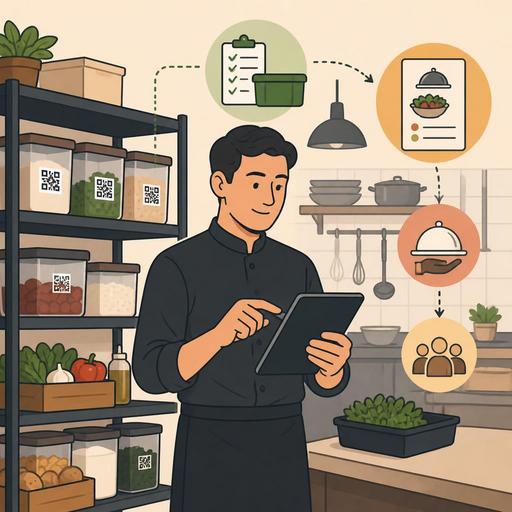
A Digital Workflow That Brings Restaurant Inventory Counts Closer to 30 Minutes
A digital workflow that shortens inventory-count time in a restaurant doesn't just mean counting faster in the storeroom; it also clarifies purchasing decisions, menu planning, portion control, and the distribution of responsibility within the team. In many businesses, inventory counting is seen as a tiring task left to the end of the day. Yet with the right digital method, this process can become shorter, more consistent, and more action-oriented. The real issue is not just speed; it is being able to count the same product with the same logic on every shift and connecting the result to the rest of the operation.
The main reason manual counting drags on is not a shortage of products but a shortage of process. Problems such as the same ingredient being kept as a case in one place, as a piece elsewhere, and as an open package on another shelf; staff using different names; the purchasing list not matching the stock list; and data being re-entered into the computer as soon as counting ends all stretch the time needlessly. For this reason, the first step toward fast inventory is to organize not the storeroom but the data structure.
The real reason inventory counts take so long: scattered data and an unclear unit structure
In a restaurant, tomatoes, cheese, beverage syrup, coffee beans, or packaged products may come from different suppliers. But at the moment of counting, everyone needs to speak the same language. If a product appears as "case" on the purchasing screen, "package" in the kitchen, and "gram" in the recipe, the counting time naturally grows. The staff member sees the physical product but has to think about what to enter into the system.
For this reason, the backbone of digital counting is standard product cards. The following information should be clear on each product card:
- A single main product name
- The base counting unit
- The conversion logic for alternative units
- The storage location
- Which menu items it is related to
- The critical minimum stock level
For example, writing just "mozzarella" for mozzarella cheese is not enough. Is it shredded or a block, by what weight is it tracked, is the main location the pizza station or the cold storage? When these details are clear, the counting staff doesn't search for products or make interpretations; they simply confirm.
How do you set up the digital method that brings 4 hours closer to 30 minutes?
Fast counting is achieved not by installing a single app but by establishing a few small, complementary rules. Especially in restaurants with heavy service, the following structure gives the most practical result:
- Classify products by sales velocity. You don't have to count every product at the same depth every day. Fast-consumed critical products can be counted daily or by shift; slow-moving products can be counted weekly.
- Organize the storeroom according to the counting route. The counting list should follow the order in which staff walk through the storeroom. If the list follows one logic and the shelf layout another, the time grows.
- Use mobile entry. Writing on paper and then transferring it into the system doubles the counting time. At the moment of counting, the data should be processed directly in digital form.
- Standardize the open-package logic. Create predefined options for intermediate states such as a half box, a quarter bottle, or an opened package.
- Link counting to recipe and sales data. The counting result is not meaningful on its own; it should be evaluated together with the questions of what was sold, what was produced, and what was wasted.
Let's consider a concrete example: at a mid-sized restaurant selling burgers, pizza, and salad, the line items that take the most time are usually cheeses, sauces, beverage syrups, and protein products. If location-based digital cards are created for these products, a single employee can check only the critical shelves before the morning opening and produce a clear picture in a short time. This picture is then connected directly to the purchasing and menu plan. This way, the sentence "we thought we had it in stock" decreases.
5 operational rules to keep the error rate from rising while shortening counting time
Being fast alone is not enough. If you lose accuracy while gaining speed, the system produces not time savings but new problems for you. For this reason, the following rules are critical:
1. Set up a single-owner, double-check logic
When everyone does the counting, ownership is lost. The best approach is to designate a primary responsible person for each location; and for critical products, to verify with a second pair of eyes.
2. Fix the counting time
Counts done sometimes before service, sometimes after delivery, and sometimes at closing don't produce comparable data. Count the same products in the same time window as much as possible.
3. Process waste and complimentary items separately
Not every product that appears missing is a loss. If staff meals, complimentary items, trial production, or spoilage are not processed in separate categories, the inventory report raises false alarms.
4. Make off-menu consumption visible
Some products are used not only in sales but also in prep processes. For example, they may be consumed in lemon juice, sauce production, or bar prep. When this flow isn't processed into the system, the counting discrepancy grows.
5. Link out-of-stock products to sales channels
The most valuable output of counting is not noticing a missing product; it is turning this information into action immediately. When a product drops below the critical level, the visibility of the relevant menu item, an alternative suggestion, or a kitchen alert should also be able to be triggered.
Why does linking digital inventory to the menu, orders, and purchasing make a difference?
In most businesses, inventory counting is handled as a separate task. Yet real efficiency emerges when counting begins to talk to the other operations. This is the approach that produces strong results in restaurant digitization: stock data doesn't just stay in a report; it becomes a live input for order management, the QR menu, kitchen flow, and the purchasing plan.
For example, let's say a certain sauce is running low. In a manual setup, this information usually stays in the mind of the person doing the counting or as a note on a piece of paper. In a digital setup, the same data can support these decisions:
- Creating a purchasing reminder for the relevant product
- Temporarily de-emphasizing the menu product that uses that sauce heavily
- Informing the service team about an alternative suggestion
- Reminding the kitchen of the portion standard again
At this point, the value of platforms that aim to gather restaurant operations in a single center, such as Restomas, is not just "keeping a count record"; it is being able to relate the data to the menu and order flow. Especially in businesses using a QR menu and order management, having stock reality align with the sales screen directly affects the customer experience.
A 7-step implementation plan you can start today
If your inventory counting still takes a long time, you don't have to change the whole system overnight. The following plan provides a small but effective start:
- Identify the 20 most-consumed products.
- Define a single name and a single main unit for these products.
- Assign each product a clear shelf or storage location.
- Drop paper counting and set up an entry system via mobile or tablet.
- Re-order the counting list according to the physical walking sequence.
- Create separate record areas for waste, complimentary items, and staff consumption.
- Predefine the menu and purchasing action for products that drop below minimum stock.
The goal of this plan is not just to reduce time. The real aim is for counting to stop being a stressful closing task in the business and to turn into a routine that raises the quality of daily decisions. Thanks to short, regular, and comparable counts, you see more clearly which product actually runs out quickly, in which line item portion deviation occurs, and which supplier strains operations.
In conclusion, what brings inventory-count time down from hours to minutes is not a miraculous shortcut; it is a standard product structure, location-based counting, real-time digital entry, and a sales-linked action logic. When this structure is in place, the team tires less, the manager makes decisions faster, and the hiccups reflected to the customer decrease.
Restomas can offer a simple digital foundation for restaurants that want to make inventory data more aligned with the menu, order, and operational flow.
