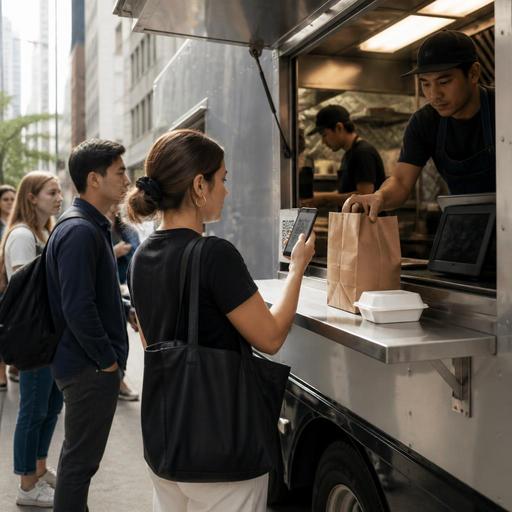
How U.S. Food Trucks Can Use QR Menus to Cut Lines and Handle Sell-Outs
For many operators, QR menus for food trucks are no longer just a convenience. They are a practical way to shorten lines, reduce repeated order questions, and keep guests informed when popular items sell out in the middle of service. In the United States, where a food truck might serve office lunch in downtown Austin, a brewery crowd in Denver, or late-night bar traffic in Nashville, speed and clarity matter just as much as food quality.
The challenge is simple: truck menus are compact, prep space is tight, and rushes hit hard. When ten guests are standing in line and three more are checking delivery apps, one sold-out protein or a delayed fryer basket can slow down the entire check flow. A well-managed QR menu system helps operators show live availability, route orders cleanly to the POS or kitchen display system, and give guests a better ordering experience without adding another staff member to the window.
Build a QR menu around real food truck ordering behavior
A food truck menu should not work like a full-service restaurant menu. Guests are usually ordering fast, often on a sidewalk, in bright sun, with limited patience. Your QR menu needs to answer the questions people ask at the window before they ask them.
- Keep categories short. Tacos, bowls, sides, drinks, and add-ons are easier to scan than long nested sections.
- Show modifier limits clearly. If guests can choose salsa, protein, and heat level, keep those choices simple and consistent.
- Display pickup instructions. Tell guests whether they should order at the window first, order from the QR code and wait by the truck, or pick up from a side shelf.
- Use mobile-friendly photos carefully. A few strong images help, but too many can slow loading on weak cell service.
- Make accessibility part of setup. Use clear item names, readable contrast, and simple navigation. Operators should also think about ADA-minded access in the real ordering environment and verify any local accessibility expectations with qualified guidance.
For example, a taco truck parked near a Houston office district might use a QR code posted near the order window and at the curbside edge of the line. Guests scan, review the menu, and decide before reaching the cashier. That cuts down on the common back-and-forth of “What comes on the combo?” or “Are you out of brisket?”
Use live availability to prevent line backups and bad handoffs
Sold-out items create more than disappointment. They create confusion, refunds, and remake decisions that can clog a small operation. The best workflow is to update availability the moment an item becomes limited, not after several more guests try to order it.
Set item status rules before service starts
Before opening, decide which menu items can be marked as:
- Available
- Low stock
- Sold out
- Temporarily paused because the grill, fryer, or prep station is backed up
This matters for trucks because one bottleneck can affect the whole menu. If your Chicago-style hot dog truck runs low on buns, you may still have sausages, but the guest-facing message needs to be immediate and clear.
Match the QR menu to every ordering channel
If you accept orders from a QR menu, a POS at the window, direct online ordering, and delivery apps, availability should stay aligned as closely as possible. Otherwise, the window says one thing, the delivery marketplace says another, and your staff has to explain the mismatch over and over.
A practical example: a fried chicken truck working a Friday night brewery stop in Charlotte may sell out of tenders first. If the team marks tenders unavailable in one place but leaves them active on a delivery app, staff may end up calling customers, offering substitutions, and delaying in-person tickets. Even basic synchronization between menu channels can save the rush.
Operators should also review how refunds, voids, and substitutions are handled in their POS and payment stack, especially when tips are added on digital orders. Payment processing, tip prompts, and tip reporting workflows can vary by setup, so confirm procedures with your provider and verify current tax and payroll treatment with qualified advisors.
Design the line so the QR menu actually speeds service
A QR code does not fix a bad physical flow by itself. Food trucks need a line strategy that fits the space, the event, and the guest mix.
- Create a visible decision point. Place the QR code where guests first join the line, not only at the service window.
- Separate ordering from pickup when possible. Even a small pickup shelf or side counter helps prevent guests waiting on food from blocking new orders.
- Use one clear pickup name or number process. If you call names, do it consistently. If you use order numbers, make sure guests can find them easily on their phones or receipts.
- Assign one staff role during peak periods. One person takes window questions and handoff, while another works production or expo.
- Pause channels when needed. If a festival rush hits, it may be smarter to pause delivery or QR ordering briefly than overload the line and miss every promised prep time.
Think about different U.S. scenarios. At a Los Angeles food truck pod, QR ordering may help guests browse while deciding between trucks. At a college football tailgate, guests may want the fastest possible reorder from a limited menu. At an airport concession cart or stadium-adjacent mobile unit, line visibility and rapid pickup handoff may matter more than deep customization.
Train staff on substitutions, taxes, and guest communication
Technology only works when the team knows what to say and what to do. For food trucks, the most important training is not complicated software training. It is fast operational communication.
Give staff simple scripts for common situations:
- Sold out: “We’re out of carne asada, but al pastor is available and the QR menu is updated now.”
- Delay: “Fryer items are running a few extra minutes, so the menu is temporarily showing those as paused.”
- Pickup: “If you ordered on your phone, please wait by the pickup side and have your order confirmation ready.”
U.S. operators should also make sure staff understand the difference between menu price, sales tax, optional tip prompts, and any service charges if those apply in their setup. Customers notice surprises quickly, especially on small-ticket orders. Rules around taxes, fees, wage practices, and service charges differ by state and city, so review your workflow with your POS provider and verify local requirements with your accountant, payroll partner, or official guidance.
For trucks with rotating crews, a short pre-shift checklist helps:
- Confirm top sellers and limited items
- Test the QR code from a customer phone
- Check that sold-out toggles work
- Confirm pickup wording
- Review who monitors the POS and who monitors the kitchen display system
- Set a plan for delivery app throttling if the line spikes
Use the data to plan smarter service windows
Once QR ordering is in place, the next benefit is visibility. You can see what guests try to order, when lines build, and which items trigger delays or sell out too early. That helps with prep, purchasing, labor scheduling, and menu trimming.
For example, a breakfast truck outside a hospital may discover that burritos drive the 7:30 a.m. rush, while coffee add-ons slow the line. A barbecue truck serving a suburban office park may learn that combo meals convert well through direct online ordering, but individual sides create the most modifications at the window. Those are operational insights you can use right away.
If you run more than one truck or also operate a brick-and-mortar location, standardized QR menu structure becomes even more valuable. It is easier to train staff, compare item performance, and keep availability rules consistent across units. For larger operators, that also supports cleaner reporting across POS integrations, pickup workflows, and kitchen display processes.
Food trucks move fast, and guests expect clear answers in seconds. A strong QR menu setup should reduce friction, not add another screen to manage. Keep the menu simple, update availability in real time, separate ordering from pickup where possible, and train the team to communicate changes clearly. If your workflow touches payments, labor, accessibility, taxes, or local vending rules, use technology to stay organized but verify current requirements with qualified local advisors and official sources.
Restomas helps food-service operators organize QR menus, ordering flows, and live menu updates in a way that fits real-world service.
