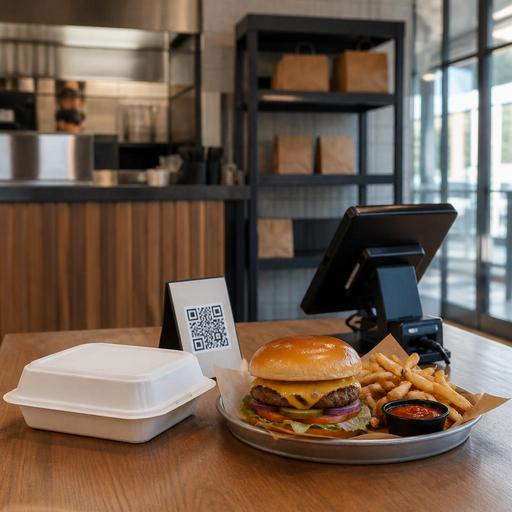
Restaurant Menu Photography for U.S. Takeout, Delivery, and Dine-In
Restaurant menu photography for U.S. takeout, delivery, and dine-in is not just a branding project. For American operators, it is an operational tool that can shape what guests order, how fast they decide, and whether the food they receive matches expectations. A sharp burger photo on a direct online ordering page, a clean salad image on a QR menu, or a clear combo shot on a fast-casual pickup screen can improve ordering confidence. But if the images do not match portion size, packaging, modifiers, or in-store presentation, they can also create refunds, remake requests, and disappointed guests.
For a neighborhood diner, a food truck, a multi-unit fast-casual brand, or a hotel restaurant balancing room service and lobby dining, the goal is not to photograph everything. The goal is to photograph the right items, in the right format, for the channels that drive revenue.
Choose photo priorities by sales channel, not by ego
Many operators start by photographing their most beautiful plates. That is understandable, but digital menu photography works best when it follows the actual buying journey. A guest ordering lunch from an office in Chicago through a mobile ordering page behaves differently from a family scanning a QR menu at a suburban Texas casual restaurant or a traveler grabbing takeout from an airport concession.
Start by dividing your menu into sales channels:
- Delivery apps: Focus on items that travel well, hold texture, and arrive looking close to the image.
- Direct online ordering: Highlight higher-margin favorites, family bundles, lunch combos, and add-on opportunities.
- QR dine-in menus: Use photos to reduce decision time on signature dishes, desserts, cocktails where allowed, and limited-time features.
- Counter service and kiosks: Prioritize combo meals, modifiers, and items that benefit from visual upselling.
- Pickup and curbside: Feature packaging-friendly meals that are easy to identify and hand off correctly.
A Nashville hot chicken shop, for example, may want different lead images for dine-in and delivery. In-house, the plated basket with pickles and fries may sell the experience. On delivery apps, a tighter shot of the sandwich in its actual wrapper setup may better match what the guest opens at home.
Photograph menu items the way guests actually receive them
One of the biggest mistakes in digital menu photography is styling food for a fantasy version of the dish instead of the real guest experience. U.S. restaurant guests notice when the loaded nachos in the photo arrive with a different container, fewer toppings, or a side cup that looks much smaller than expected. That gap creates friction for servers, managers, and support teams handling refunds or bad reviews.
Build photography around your real production standards:
- Use the current recipe and portion standard, not a one-off hero plate.
- Photograph dine-in plating and takeout packaging separately when they look different.
- Show popular modifier choices clearly, especially for bowls, pizza, burgers, wings, and combo meals.
- Keep garnishes realistic so line cooks can reproduce the look during a rush.
- Retire photos quickly when menu builds, containers, or sides change.
A California poke concept might show a bowl with salmon, avocado, crispy onions, and sauce drizzle for dine-in QR ordering, but use a flatter top-down shot for delivery because the lidded bowl presentation is what guests actually receive. A New York bagel cafe may need one image for a bacon, egg, and cheese on a plate and another for the wrapped grab-and-go version used during morning rush.
This matters operationally because photos influence expectation management. When expectation is accurate, staff spend less time explaining missing components, remake requests drop, and pickup shelf handoffs move faster.
Build a photo system that supports POS, QR menus, and multi-location consistency
Photography is often treated as a one-time creative task, but for U.S. operators it should be managed like any other digital menu asset. If your POS, direct ordering page, QR menu, kitchen display system, and third-party delivery listings are not aligned, image quality and item accuracy break down fast.
Create a simple asset workflow:
- Name files by item and channel: for example, cheeseburger-dine-in, cheeseburger-delivery, or family-pack-takeout.
- Set image rules by channel: square crops for app listings, close-up detail for mobile ordering, wider context for web menus.
- Assign one owner: usually marketing, operations, or a multi-unit menu manager.
- Review after menu changes: especially when prices, sides, packaging, or item builds shift.
- Audit franchise or multi-location usage: make sure each store is not uploading random images that weaken the brand.
For a five-unit burger brand in Ohio, consistency matters across every location. If one store uses a bright studio photo, another uses a dark phone shot, and a third still shows an old combo configuration, guests may think the menu itself is unreliable. The same problem affects hotel restaurants that serve both lobby guests and room-service orders through separate digital flows.
Platforms that centralize QR menus, ordering, and menu updates can make this easier because operators do not have to chase image changes across multiple systems manually. The key is not the technology alone; it is having a repeatable process.
Use photos to speed decisions without overwhelming guests
More images do not always mean more sales. In many U.S. restaurant settings, too many photos can clutter the menu, slow mobile loading, and bury high-margin choices. This is especially true for diners with long menus, sports bars with large appetizer sections, and fast-casual brands offering many build-your-own options.
Use photos strategically:
- Put photos on signature items, best sellers, and profitable bundles.
- Use category images sparingly for breakfast plates, tacos, wings, or dessert sections.
- Keep custom-build items visually simple so guests understand the base product first.
- Test whether photos increase add-ons such as fries, drinks, sauces, or desserts.
- Make sure mobile pages still load quickly on guest Wi-Fi and cellular connections.
A Phoenix coffee shop with online ordering may find that photos help seasonal drinks and bakery items, while standard drip coffee needs no image. A Midwest sports bar may benefit from strong visuals on sampler platters and wing sauces, but not on every bottled beverage. A food truck working lunch service near office parks may use just four strong images on its QR menu to keep lines moving.
Operators should also think about accessibility. If a guest cannot rely on the image alone, the written item name and description still need to do the work. ADA-related accessibility expectations can vary by context and platform, so it is smart to review digital access practices with qualified advisors or official guidance when needed. Operationally, that means clear item names, readable descriptions, strong contrast, and a backup path for guests who prefer staff assistance.
Plan the shoot around real restaurant operations
The best menu photo strategy is one your team can maintain without disrupting service. Schedule shoots during slower prep windows, use actual serviceware and packaging, and involve the people who know the build standards: chefs, kitchen managers, expo leads, and front-of-house managers.
A practical shoot checklist
- Pull sales reports to identify top sellers, high-margin items, and weak listings that need better visuals.
- Decide which items need separate dine-in, takeout, and delivery images.
- Verify current recipes, plating guides, and packaging before the camera comes out.
- Stage items in the actual containers used for pickup, curbside pickup, and delivery.
- Capture square and vertical crops for different ordering surfaces.
- Check that modifiers, sides, and sauces match what the guest will receive.
- Update the POS-linked menu library and remove retired images promptly.
If you operate a chain subject to menu labeling or other federal, state, or local rules, or if alcohol images appear in bar or hotel restaurant menus, treat photography updates as part of your broader menu review workflow and verify current requirements with qualified advisors and official guidance. The same principle applies if your ordering experience touches service charges, taxes, or other regulated disclosures. Photography should support clarity, not create confusion.
Strong digital menu photography is most valuable when it works across the full guest journey: discovery, ordering, production, pickup, and repeat visits. When your images match the food, fit the channel, and stay synced with your menu systems, they can help increase confidence and reduce avoidable friction. Restomas can support that workflow by helping operators keep digital menus, ordering channels, and service operations better aligned.
