A Guide to Managing Peak-Hour Order Flow in Stadium and Concert-Venue Restaurants
Peak-hour order management in stadium and concert-venue restaurants requires a different discipline from classic restaurant operations, because here demand is not steady; it is volatile and often concentrates in the very same minutes. The short window before a match, the half-time surge, the crowd right before a concert starts, or the mass exit when an event ends can strain the order flow all at once. That is why success comes not from simply adding more staff, but from designing the menu, the order channel, kitchen production, and service communication as a single flow.
For in-stadium concession stands, VIP lounge kitchens, concert-venue food points, and restaurants operating on event days, the biggest risk is not that the number of orders rises; it is an excessive load landing on similar products at the same time. For example, while drinks, quick snacks, and one-handed items peak within a few minutes, plates that take long to prepare can lock up the line. That is why peak-hour management must answer not the question "what is being sold?" but, before that, "in what order, through which channel, and with what prep logic is it being sold?"
Understanding peak-hour pressure: the problem isn't the number of orders, it's simultaneous pileup
Operations at stadiums and concert venues have sharper density windows than neighborhood restaurants. The ordering behavior 20-30 minutes before a match starts is not the same as the ordering behavior at half-time. In the first, the customer has time; in the second, they want to order within minutes and get back to their seat. This difference affects every decision, from menu design to register flow.
Let's consider a concrete example: at a concert venue, burgers, fries, bottled drinks, and beer are being sold. If a large share of customers head to the burger menu at the same time, the grill station creates a bottleneck. But if products that are pre-prepped and can come out quickly are positioned more prominently in the digital menu, the order distribution can be balanced. The aim here is not to push the customer, but to highlight the options that can carry operations during a busy moment.
That is why businesses first need to map out their own demand pattern:
- How many minutes before the event does the first surge begin?
- In which 10-15 minute window does the sharpest order pileup occur?
- Which product combinations are most often ordered together?
- Which station most frequently produces delays?
- At which stage do cancellations, refunds, or customer complaints most often arise?
Adding staff or randomly expanding the menu without clear answers to these questions usually doesn't solve the problem; it only inflates costs.
Why is redesigning the menu for peak hours critical?
In event-venue restaurants, every product must operationally earn its place on the menu. During peak hours, complex products, heavily modified items, or dishes dependent on a single piece of equipment disrupt the order flow. That is why the main menu and the peak-hour menu don't have to be the same.
For example, the detailed sauce options, extra-ingredient combinations, or long-prep plates offered on normal days can be limited on match day or a concert night. For businesses using a QR menu, this is a big advantage, because product visibility and category order can be changed quickly according to the event time. That way, instead of telling the customer "out of stock," you can naturally highlight the products that are flowing most smoothly at that moment.
An approach you can apply when creating a peak-hour menu
- Identify the core products: Separate out the products that come out fastest, produce the fewest errors, and are easy to carry.
- Limit modifications: Reduce extra options, especially in short windows like half-time.
- Change the category order: Move drinks, ready-made snacks, and quick-service products to the top.
- Label the critical products: Use directive but simple phrases like "quick service," "one-handed," or "ideal for the event."
- Grant visibility according to stock and prep capacity: Pull products the kitchen struggles with out of the most visible area.
The important point here is that shrinking the menu doesn't mean lowering sales. On the contrary, making the right products visible at the right moment can increase order-completion speed and customer satisfaction.
Splitting order channels is the most practical way to reduce the queue
In stadium and concert restaurants, a single-queue, single-screen, single-prep logic often falls short, because not every customer has the same urgency. Some only get a drink, some want hot food, and some have already chosen what they'll order in advance. That is why separating order channels makes a serious difference.
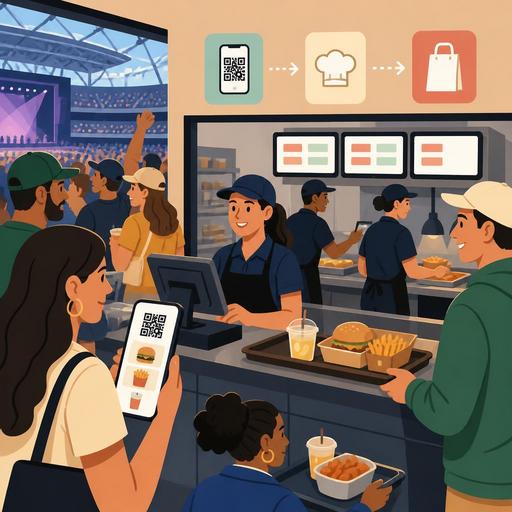
For example, having the customer order via the QR menu without joining a line reduces congestion in front of the register, especially for simple products. While the register team focuses on more complex orders, digital orders can land directly on the kitchen screen or the relevant prep flow. That way the communication loss between taking an order and preparing it diminishes.
Businesses can consider this distinction:
- Quick grab-and-go line: Options that can be handed over instantly, such as bottled drinks, ready-made sandwiches, and packaged products.
- Hot-product line: Products requiring prep, such as burgers, toasties, and fries.
- Digital order line: A separate tracking flow for requests coming from the QR menu or mobile ordering.
- VIP or reserved-area line: A prioritized process for guests with different service expectations.
This distinction doesn't have to mean a physically separate counter. Sometimes even just using a color code on the order screen, prep priority, and a division of tasks can make the rush more manageable.
Why do seconds matter in kitchen and service coordination?
Time lost during peak hours usually comes not from cooking time but from decision delay. Which order will come out first, which product can wait, which station has a pileup, which product is about to run out? If the answers to these questions aren't visible to the team in real time, small delays grow quickly.
Let's consider a concrete scenario: at half-time, 40 orders land in the system within a few minutes. The drink station is ready, the fry line is full, and the burger-bun stock is on the edge. If the floor team is still presenting all options to customers the same way, the kitchen bottleneck deepens. But if the order-management screen, real-time stock visibility, and menu updates work together, the team can pull the struggling products into the background and highlight the fast-moving ones.
At this point there are a few critical matters businesses need to standardize:
- A clear priority rule for products with a long prep time
- Who will update the menu when stock runs low
- A task boundary among drinks, hot products, and the handover point
- A single decision owner for cancellation or change requests
- A short pre-event shift briefing
The value of digitalization becomes visible exactly here: as long as information is tied to the system rather than to individuals, the flow is preserved even when the team changes.
How can event-day staff planning be done more intelligently?
At stadiums and concert venues, correct staff planning isn't just about deciding how many people will work. The real issue is placing the right person at the right bottleneck. Some businesses open extra registers during a rush, but because the kitchen line stays the same, the wait continues. Others enlarge the kitchen, but because the handover area gets tangled, orders reach the customer late.
A better approach is to plan staff by role. One person can be assigned to take orders, one to prepare only drinks, one to handle packing and delivery confirmation, and one to balance the flow between the kitchen and the front area. This role clarity is very important especially with temporary event teams.
An actionable mini checklist before the event
- Share the top 10 best-selling products and the prep sequence with the team.
- Separate the peak-hour menu from the normal menu.
- Update the visible product order in the QR menu according to the event.
- Determine critical stock levels and alternative products.
- Set up a clear call system at the handover point, based on name, number, or screen.
- Hold a 5-minute task-confirmation meeting before the event begins.
In conclusion, success in stadium and concert-venue restaurants is not just about being fast; it is about staying fast predictably. When menu management, digital order flow, kitchen visibility, and role clarity come together, peak-hour pressure becomes more controllable. Restaurant digitalization tools like Restomas can also help simplify this flow from a single center.
