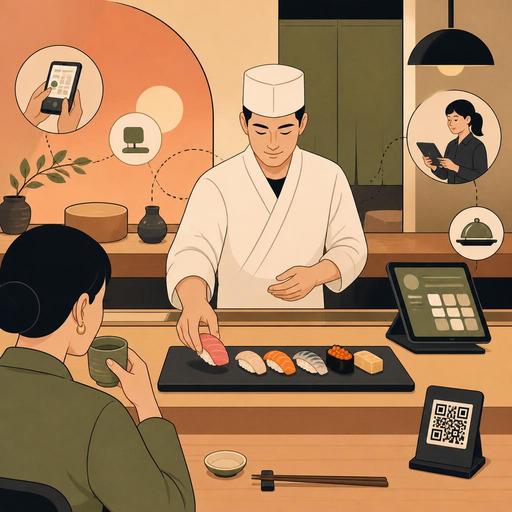
Digital Flow and Menu Design in the Omakase Sushi Experience
Why is the digital flow critical in the omakase sushi experience?
Digital flow and menu design in the omakase sushi experience require far more delicate planning than a classic à la carte service. Because omakase is not just "serving whatever the chef prepares"; it requires managing the guest's rhythm, expectations, allergen situation, service order, and kitchen pace together. For this reason, digital tools here don't only provide operational convenience; they invisibly shape the experience itself.
In a sushi restaurant, the omakase setup is most often built on limited seats, specific seating times, daily-changing product quality, and the chef's in-the-moment decisions. Paper notes, scattered messaging, or verbal information transfer easily produce errors in such a delicate flow. For example, if a guest's shellfish allergy is noted in the reservation but isn't clearly conveyed to the chef before service, this is not just an operational hiccup but a breakdown that directly undermines brand trust.
The real value of digital design emerges here: the right information reaches the right person at the right moment. Connecting the preferences taken on the reservation screen to the kitchen flow, explaining the omakase concept via the QR menu, clarifying the seating-based table plan, and making small but critical notes visible during service make the experience both more refined and safer.
From reservation to seating: the experience begins before reaching the table
The digital design of the omakase experience begins not at the entrance but at the moment of reservation. When a guest comes for omakase, they're not actually just buying a table; they enter a certain relationship of trust. That's why the reservation form shouldn't consist only of a standard "name-surname-phone" field.
In a well-structured digital reservation flow, the following information can be collected in a controlled way:
- Allergen and sensitivity information: Critical headings such as shellfish, raw fish, gluten, or soy.
- Experience level: A guest trying omakase for the first time and a regular sushi consumer don't have the same expectations.
- Special occasion or purpose: Contexts such as a celebration, a business dinner, a tourist experience, or chef's-counter curiosity affect the tone of service.
- Beverage preference: Planning for a sake pairing, a non-alcoholic pairing, or tea service.
- Seating confirmation: Because omakase seatings have low tolerance for delays, the timing information should be clear.
Let's consider a concrete example: if a restaurant running two omakase seatings in the evening tracks guests who are late for the first seating manually, the entire flow shifts. Whereas if the reservation system offers automatic reminders, a delay policy, and seating confirmation, both the front team and the chef plan the table's rhythm more securely.
Here it doesn't matter whether the digital menu or reservation infrastructure looks "technological" on its own. What matters is that the information collected from the guest becomes usable within operations. When reservations, table management, and menu updates are handled within the same frame with platforms like Restomas, the disconnect between the front of house and the kitchen decreases.
A QR menu doesn't spoil the spirit of omakase; used right, it strengthens it
When omakase is mentioned, some businesses think a digital menu will make the experience too mechanical. Yet the problem is not the digital tool, but the manner of presentation. In omakase service, the QR menu should be used not to pile up a price list, but to frame expectations correctly.
For example, the following content can appear on the QR menu:
- A short explanation of the omakase concept
- The seating duration and the structure of service
- The daily product approach: information that the menu may change according to seasonality
- Allergen and raw-product consumption warnings
- Beverage-pairing options
- Pieces open to additional ordering, or final-course alternatives
The advantage of this approach is the following: the service staff doesn't have to give the same basic explanation from scratch at every table. This way, the team devotes its energy not to memorized explanations, but to real guest communication. In addition, the daily-changing nigiri order, extra-piece options, or sake pairings can be updated instantly without waiting for a printed menu.
There is an important balance here. The QR menu should not remove the chef's surprise effect. Instead of revealing the full content list at the very beginning, the experience frame, allergen information, and beverage options can be brought to the fore. This way, the digital channel gives information but doesn't take over the stage entirely.
Operations design that manages the service flow invisibly
The quality of the omakase experience is most often hidden in details the guest doesn't notice. For the right product to arrive in front of the chef at the right moment, for the service staff to know which table is on which course, and for additional orders to be processed without disrupting the main flow, digital operations design is needed.
The following three areas are especially critical:
1. Seating-based table and seat management
In chef's-counter seatings, the rhythm of each seat matters. One guest's delay or special request can affect the entire sequence. Thanks to a digital table plan, which seat belongs to which reservation, the special notes, and the service-start status can all be monitored by the team from the same place.
2. Kitchen and service notes visible from a single source
Notes such as "low wasabi," "rice-vinegar sensitivity," and "raw-product alternative for a pregnant guest" can be forgotten when they stay verbal. Having these notes appear tied to the order or reservation flow both lowers the risk of error and personalizes the experience.
3. Instant menu-update flexibility
In sushi restaurants, supply can change daily. A fish expected in the morning may not have arrived, or its quality may not meet the chef's standard. In such situations, if the digital menu and order flow can be updated quickly, the team doesn't have to manage the "this item isn't available today" crisis at the table.
In practice, a well-functioning flow most often follows this sequence:
- Preference and sensitivity information is collected during the reservation.
- Table-specific notes appear on the team's screen before the seating.
- The concept, pairings, and add-on options are presented via the QR menu.
- During service, only the necessary additional orders are entered into the system.
- At the end of the seating, the guest's preferences are noted for the next visit.
This structure standardizes omakase without turning it into mass production. In other words, each experience stays personal; but the margin for error in the background decreases.
Subtlety in the customer experience: personalization, pace, and trust
The omakase guest most often expects not only flavor but also guidance. Details such as which piece should be eaten by hand, why a certain order matters, or how the pairing progresses are part of the experience. Digital experience design at this point should be used not to replace the staff, but to make the staff more effective.
For example, a short briefing can be sent to a guest trying omakase for the first time after the reservation confirmation. Without imposing a dress code, details such as the seating duration, the importance of arriving on time, and allergen notification can be explained simply. This reduces the tension that may arise when sitting down at the table.
Likewise, for loyal customers, notes from previous visits are valuable. The guest may have mentioned on their last visit that they didn't like uni but greatly enjoyed fatty tuna. If such information is noted with CRM logic and made visible to the team at the next reservation, personalization is done in an understated but effective way.
The point to be careful about here is that digitalization shouldn't cool down the experience. A structure that hands over a tablet and leaves every decision to the guest can go against the spirit of omakase. The best result is a design in which the digital tools work behind the scenes, while the guest experiences a fluid, calm, and trust-inspiring service.
An actionable plan for sushi restaurant owners
If you want to make omakase service more controlled and refined in your business, you don't need to start with a major technology transformation. First make the points where the flow breaks down visible.
- Rewrite your reservation form: Add fields for allergens, experience level, and seating confirmation.
- Simplify the QR menu: A short text explaining omakase, pairing options, and critical warnings are enough.
- Centralize table notes: Establish a single-visible-screen logic instead of paper, WhatsApp, and verbal transfer.
- Make the daily menu change a routine: Be clear about who will update the menu after the chef's approval, and at what time.
- Collect data after each seating: Review the most frequently asked questions, the most common allergen notifications, and the service disruption points weekly.
Omakase is a form of service that requires high attention; that's why digitalization here is not a luxury, but an infrastructure that protects the experience. When set up right, it both frees the chef's creativity and makes the care the guest feels more consistent.
Sushi restaurants that want to structure reservations, the QR menu, and the operations flow in a single order can create a calmer and more controlled omakase experience by adapting the Restomas approach to their own service model.
