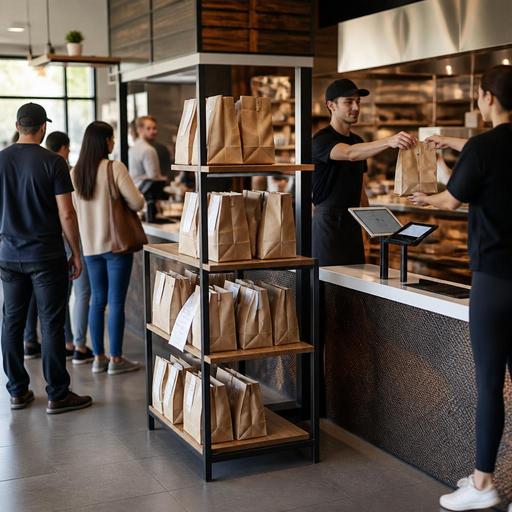
Pickup Shelf Workflow for Fast-Casual Restaurants With Digital Orders
Pickup shelf workflow for fast-casual restaurants with digital orders is no longer a small operational detail. In many U.S. fast-casual stores, the pickup shelf now sits at the center of takeout, direct online ordering, delivery app traffic, and front-counter flow. When it works, guests grab their meals quickly, staff spend less time answering "Is my order ready?" and the kitchen keeps moving. When it fails, operators see missing bags, cold food, crowded lobbies, refund requests, and frustrated team members.
For a burrito shop in Denver, a salad concept in Chicago, or a chicken tender chain with multiple suburban locations, the pickup shelf is really a handoff system. It has to connect the POS, online ordering, kitchen display system, expo station, packaging, and guest communication. The goal is simple: get the right order to the right person at the right time without slowing dine-in or drive-up business.
Design the pickup shelf around order types, not just available space
Many operators place a shelf near the door and assume that is enough. In practice, the shelf should reflect how your orders actually arrive and leave. A lunch-heavy fast-casual restaurant near a downtown office tower may have a burst of app orders between 11:30 a.m. and 1:30 p.m. A suburban sandwich shop may split volume between family takeout, curbside pickup, and third-party delivery drivers. A college-area bowl concept may see more walk-in pickup and late-night traffic.
Start by separating orders operationally:
- Direct online pickup orders placed through your own website or QR flow
- Third-party delivery app orders waiting for a driver
- Curbside pickup orders that should not sit too early
- Large group orders that need a staging table rather than a small shelf
- Orders with drinks, desserts, or sealed add-ons that require a final check before handoff
If all of these land in one open shelf, confusion follows. A practical setup is a guest-facing shelf for low-risk direct pickup, a staff-controlled zone for delivery app orders, and a separate marked area behind the counter for larger checks or high-theft items. A New York fast-casual rice bowl shop might keep standard lunch pickups on an open shelf, while bottled beverages and catering trays stay behind the counter until the guest confirms the name.
This layout also helps with ADA-minded access. Keep the pickup path wide, uncluttered, and easy to reach without requiring guests to navigate around stanchions, cleaning tools, or tightly packed waiting crowds. If you use digital notifications or QR ordering, make sure guests still have a clear non-confusing path to retrieve food or ask staff for help. Operators should verify current local accessibility requirements and facility guidance for their specific layout.
Reduce errors before the order reaches the shelf
Most pickup shelf problems begin upstream. If the kitchen display system, prep line, and expo station are not aligned, the shelf becomes the place where mistakes become visible.
Build a simple pre-shelf checklist at expo:
- Confirm guest name, order number, or both match the ticket.
- Verify modifiers such as no onions, gluten-sensitive requests, dressing on the side, or added protein.
- Check that hot and cold items are packed correctly.
- Attach utensils, napkins, sauces, and sealed drink labels as needed.
- Mark the order status in the POS or order management screen only when it is truly ready for handoff.
For example, a fast-casual Mediterranean concept in Phoenix may prepare a family meal with hot wraps, cold dips, and bottled drinks. If the kitchen marks the order ready before the drinks are added, the guest reaches the shelf and leaves with an incomplete bag. That creates a refund or remake that could have been prevented with one final expo confirmation.
Timing matters too. Do not place orders on the shelf too early just to clear the line. Fries, fried chicken sandwiches, and toasted flatbreads lose quality fast. Instead, use ready-stage signals on the kitchen display system so expo can hold the bag for a minute or two until the promised pickup window is close. This is especially important for airport concessions, hotel lobby outlets, and stadium food venues where guests may be delayed by traffic flow and crowding.
Control theft and mistaken pickups without creating friction
Open pickup shelves can speed service, but they also create risk. In many U.S. markets, operators report two common issues: a guest taking the wrong bag by mistake, or someone intentionally grabbing an unattended order. The answer is not always to eliminate self-serve pickup. Instead, match the control level to the order mix and store traffic.
Low-friction control options
- Use large, easy-to-read first names or initials plus order numbers on labels, while avoiding unnecessary guest data exposure.
- Keep delivery app orders behind the counter until the driver confirms the pickup details.
- Place high-value add-ons like shakes, alcohol, or premium desserts in a controlled handoff area.
- Train a front-of-house team member to greet waiting guests during peak periods and direct them quickly.
- Use status notifications so guests arrive closer to the actual ready time instead of crowding the shelf early.
If your concept serves alcohol to-go where permitted, or applies service charges for certain formats, make sure the handoff process aligns with current state and local rules, ID-check procedures where required, and your POS reporting setup. Because alcohol, payment, tips, sales tax, and service charge treatment can vary by jurisdiction and order channel, operators should confirm workflows with qualified advisors and official guidance.
For many fast-casual brands, a hybrid model works best: open shelf for standard pickup, staff handoff for app-driver orders and larger tabs. A sports bar with a takeout window may also use shelf cubbies during lunch but move to staffed handoff during game-day rushes.
Make the shelf visible inside your digital order flow
The pickup shelf should not be a surprise at the end of the process. Guests need clear expectations from the moment they place the order.
Include these details in your direct ordering flow and confirmation messages:
- Where to enter the store
- Whether the order will be on a pickup shelf or held at the counter
- What name or number the guest should look for
- Whether curbside pickup requires vehicle details or check-in
- What to do if an item is missing or the shelf appears empty
A Dallas fast-casual taco shop, for instance, might send a text that says the order will be placed on the shelf near the host stand, while curbside guests should tap an arrival link instead of coming inside. That one distinction reduces duplicate handoffs and avoids a staff member running outside while the same guest is already walking to the shelf.
For multi-location operators, standardize the message format but allow store-specific instructions. An urban storefront may use lobby pickup shelves, while a suburban end-cap unit may rely more on curbside pickup and a dedicated takeout parking spot. The order management system, POS stack, and guest messaging should reflect those differences without forcing each location to improvise.
Track the operational signals that show whether the shelf is working
You do not need complicated analytics to improve pickup shelf performance. Start with a few practical measures from managers, cashiers, and expo staff:
- How often orders are marked ready before they are complete
- How many remakes come from missing items at pickup
- How long completed bags sit before pickup
- How often delivery drivers wait because orders are not staged correctly
- How many guests ask staff where pickup orders are located
- How often the wrong guest or driver takes a bag
These are useful coaching signals for labor scheduling too. If lobby congestion spikes from 12:00 to 1:00 p.m., the answer may be one extra expo or runner, not just a bigger shelf. If your team constantly stops production to answer pickup questions, clearer signage placement, better notifications, or a more visible staging zone may create a bigger gain than adding another tablet.
Pickup shelf operations work best when they are treated as part of the full restaurant system, not as a piece of furniture. The strongest U.S. fast-casual operators connect digital ordering, kitchen timing, packaging, shelf staging, curbside logic, and guest communication into one repeatable workflow. Restomas helps restaurants organize those connected steps across ordering, POS integrations, and kitchen handoffs in a way that is easier to run day to day.
