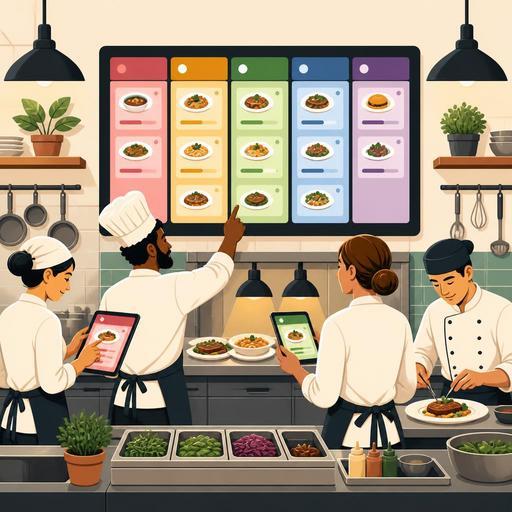
Reducing Kitchen Errors with Color-Coded Order Tracking in Restaurants
Color-coded order tracking is one of the most practical digital methods for reducing kitchen errors in restaurants. Seeing at a glance which stage an order is at allows problems such as incorrect preparation, leaving out an item, delayed table service, and mixed-up delivery packages to be spotted before they grow. Especially in kitchens where verbal communication isn't enough during peak hours, a color-based tracking structure simplifies coordination within the team and makes operations more predictable.
In many businesses, errors arise not from missing recipe knowledge, but from information not reaching the right person, at the right moment, and in the right order of priority. The server takes the order correctly, the register enters it correctly, the kitchen wants to produce it correctly; but if there's no visible flow in between, things get tangled. Color coding comes into play precisely here. When states like in preparation, waiting, priority, ready for service, at risk of delay, or canceled are each marked with a different color, the team can take immediate action by reading the screen.
Which errors does color-coded order tracking make visible in the kitchen?
A significant share of kitchen errors don't actually appear at the last moment; they give off small signals during the process. The problem is that these signals often go unnoticed. A color-coded structure makes the risky points in an order visible early.
- Priority error: An earlier order falling behind, or a product that should come out fast sitting and waiting.
- Station confusion: Unclear division of tasks among the grill, hot, cold, or drink areas.
- Missed modifier application: Overlooking notes such as no onion, not spicy, gluten-free bread, or extra sauce.
- Delivery and dine-in orders getting mixed up: Orders from different channels arriving at the same time entering the wrong sequence.
- A ready item waiting: A product is prepared but stays on the counter because it isn't visible on the service or courier side.
For example, consider a business that, during the lunch service, takes dine-in, delivery, and pickup orders all at once. If on the screen delivery orders appear orange, dine-in orders blue, those awaiting a courier purple, and those nearing the delay threshold red, the kitchen can answer not just "how many orders are there" but also "which one is critical right now." This makes a serious difference especially on shifts where teams of differing experience levels work together.
What logic should you use to build an effective color system?
The simpler color coding is, the better it works. Using too many colors can turn the system from explanatory into complicated. That is why the goal should be operational clarity, not aesthetics.
1. Define colors according to status
The first step is to identify the stages in the order flow that genuinely require a decision. Instead of producing a separate color for every small detail, focus on the situations that change team behavior.
- New order: It landed on the screen and hasn't been picked up yet.
- In preparation: The kitchen has taken on the order.
- Priority: Situations such as a kids' meal, an order with an approaching courier time, or a delayed table.
- Ready: Awaiting service or delivery.
- Problematic: An order requiring a check due to a cancellation, a missing product, an allergen warning, or a customer note.
The critical point here is that everyone reads the same meaning. If red is used for both "cancel" and "very urgent," the system breaks down. Each color must carry a single main message.
2. Think in terms of decisions, not channels
Some businesses separate all colors by order channel. This can be useful; but from the kitchen's perspective, a stronger approach is to highlight the risks that require a decision. Channel information can be supported with text or an icon; color should be reserved for priority and status. That way the team knows first what to intervene in.
3. Design the screen layout according to station flow
Colors alone are not enough. If the order screen has no station-based filtering or task separation, everyone sees everything but no one takes ownership. The grill station should be able to see its own work, cold prep its own flow, and the packing area the orders that are ready for delivery, all clearly. In systems like Restomas that make the order flow visible on a central panel, this visibility becomes far more functional when combined with color logic.
How is a color-coded tracking system applied in daily operations?
Setting up the system is as important as using it correctly during the shift. In successful businesses, colors aren't just markers sitting on a screen; they're part of the team's decisions.
For a good implementation, the following flow can be followed:
- Hold a short briefing at the start of the shift: The team should clearly know which products carry a stock risk that day and which color requires which action.
- Keep modifier notes outside the color system but visible: Information such as allergens, a special doneness level, or an ingredient to remove must stand out strongly.
- Define a delay threshold: An order exceeding a certain time should automatically shift to an attention-grabbing status.
- Add a second confirmation point for ready orders: Especially in delivery, a product being ready and being handed over should be seen as separate stages.
- Review the error types at the end of the shift: Look at which color saw the most congestion and at which station waiting occurred.
Let's give a concrete example: in an order made up of a burger, salad, and a drink, the kitchen may have completed the main product; but if the drink doesn't show as "ready" on the screen, the packing area should not hand the order over. This simple visibility prevents missing-item output. Similarly, when a kids' meal waiting at a table shifts to a priority color, service and kitchen see the seriousness of the situation at the same time.
Points where color coding alone isn't enough
The color system is powerful, but it isn't a miracle. If there's a poor menu structure, a scattered production flow, or a training gap, simply adding color won't solve the problem. That is why color coding should be thought of as part of a broader operational design.
The system weakens especially when it isn't supported in the following areas:
- Lack of standard recipes: If the team doesn't know the correct output of a product, color only shows the sequence.
- No clear division of tasks: Even if an order turns red, if it's unclear who will intervene, the delay continues.
- An out-of-date menu: If an out-of-stock product stays open in the system, cancellations rise and colors only show the symptom.
- Channel disconnection: If the QR menu, register, delivery platforms, and kitchen screen are disconnected from one another, the data flow is fragmented.
That is why businesses that want a good result must leave no disconnect between the channel where the order is received and the screen where it lands in the kitchen. When single-center visibility is provided across everything from menu updates to order routing, and from table service to the delivery flow, color coding shows its true power.
What steps can restaurant owners start with today?
If verbal tracking, paper-ticket stacking, or a "the chef knows" mentality still dominates in your business, you can start with a small pilot setup. Rather than changing the entire system at once, tackle the service segment where the most errors occur, for example the evening delivery rush or the weekend brunch service.
- List the error types from the last 2 weeks. Create headings such as missing item, late order, wrong table, and modifier error.
- Define 4-5 status colors corresponding to these errors. Each color should have a single meaning.
- Launch a pilot at one station. Try it first only at packing prep or the hot station.
- Give the team a one-page usage rule. Use a clear decision chart instead of lengthy training.
- Conduct a weekly review. Look at which orders frequently fall into the problematic color, and seek the reason in the process.
The aim here is not to put more load on the kitchen team; it is to simplify the decision moments. A well-designed color-coded order tracking system lets employees trust the system rather than their memory. This both eases the adaptation of new staff and helps maintain quality standards during busy services.
Restomas, with its structure that makes restaurant operations more visible and manageable from the QR menu to the order flow, makes it easier to integrate practices like color-coded tracking naturally into the business routine.
