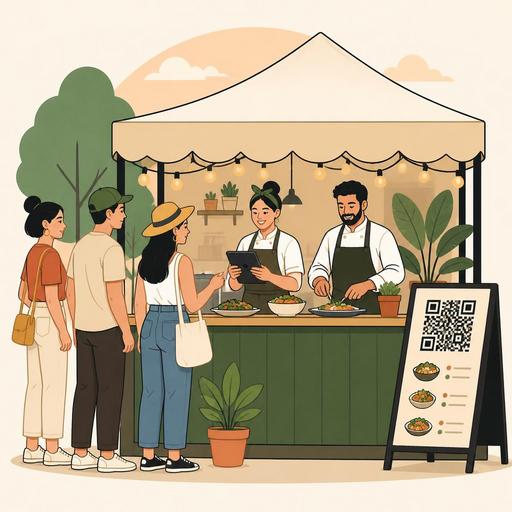
A Digital Readiness Guide for Restaurants Running a Festival Stand
A digital readiness checklist for a local festival stand is a topic that has a direct effect on speed, error rate, and customer experience on the ground. On festival day, putting out a good product isn't enough on its own; every step — from the menu flow to taking orders, from collecting payments to team communication — needs to be planned in advance. Especially for restaurants and cafés aiming for high-volume sales in a short time, digital readiness makes the stand operation more predictable and more manageable.
The festival environment is different from classic restaurant service. The customer's decision time is shorter, queue pressure is high, staff may be temporary, and there can be fluctuations in basic infrastructure like internet or electricity. For this reason, you should see digital systems not merely as a “convenience,” but as a layer of operational security. The guide below clearly lays out which digital steps you need to plan before setting up your stand.
Simplify the festival stand menu with a digital logic suited to the ground
The menu that succeeds at a festival isn't the broadest menu; it's the one that's produced fastest, explained most easily, and carries the lowest risk of error. Some products that work well in the restaurant can slow down the operation at a festival stand. For this reason, the first digital readiness step is to restructure the menu according to your production pace.
For example, a business serving gourmet burgers might work with eight different options in the restaurant. But at a festival stand, this variety lengthens the order time, creates extra modifications, and splits the production line. Instead, it may be more sensible to proceed with two main products, one vegetarian option, a single drink size, and a few clear add-ons. A digital menu infrastructure provides a big advantage here; you can quickly simplify products without waiting on printed materials, instantly deactivate out-of-stock items, and update prices from a single dashboard.
Check questions for menu simplification
- Can this product be prepared in 3–5 minutes under festival intensity?
- Does the product require too many modifications?
- Can stock tracking be done easily on the ground?
- Can a one-person order-taking team explain the product quickly?
- Can the product be understood without a photo or with a short description?
If you use a QR menu, it's important to strip product descriptions of unnecessary length. The customer makes decisions on their feet in the festival area; for this reason, a short name, clear contents, and allergen information where needed are enough. Instead of complex explanations, a structure that makes the decision easier should be preferred.
Design the order and payment flow before a queue forms
At a festival stand, the problem usually arises not from the number of orders, but from the uncertainty of the flow. Where will the customer order, when will they pay, where will the order be handed over, how will a ready item be called? If the answers to these questions aren't clear, even the best product gets lost in chaos.
One of the most practical methods is to separate the order-taking and pickup areas using a digital flow logic. Orders are gathered on a single screen or dashboard, the kitchen or prep area sees incoming items in order, and the pickup point focuses only on the ready order. This way, you prevent the same staff member from taking payment, hunting for the product, and attending to the customer all at once.
Let's consider a concrete example: a café selling cold coffee and sandwiches is setting up a festival stand. If the person at the register is simultaneously taking the order, printing the receipt, preparing the coffee, and handing it over, the queue grows quickly. By contrast, if the order lands digitally, the prep area sees items on a screen, and at the pickup point only the order name or number is checked, the flow moves more smoothly.
- Position the order-taking point in a single, visible spot.
- Decide on the payment method options in advance and align the staff on the same procedure.
- Keep the order screen the prep team sees simple.
- Physically separate the pickup area from the order-taking line.
- Define cancellation, change, and out-of-stock scenarios in advance.
For businesses using digital order management, the most critical point is to keep menu variations limited specifically for the festival and not to clutter the on-screen flow with unnecessary detail. On the ground, speed is more valuable than desktop flexibility.
Prepare a short but clear digital operation plan for temporary teams
The team working at festival stands is often a mix of the restaurant's core staff and support personnel. In this situation, the assumption that “everyone already knows” leads to serious errors. Digital readiness isn't just about setting up the system; it's about making sure everyone uses the system the same way.
For this, create a one-page operation plan. Who will have which device, who will check when an order lands, who will make menu changes when stock runs out, who will have the final say on a customer refund? The answers to these questions should be clear before the shift begins. Team members need clear role definitions, not long training videos.
What must be included in the pre-shift team briefing
- The main products on the festival menu and their contents
- Use of the order screen or dashboard
- Standard answers to the most frequently asked customer questions
- The steps to follow when stock runs out
- Who will take on which role during peak hours
For example, if when a product runs out one staff member tells the customer “it's finished” while another keeps taking orders, the problem grows. Deactivating the product via the digital menu or order dashboard so that the whole team sees the same information reduces this kind of contradiction. This approach is especially valuable at festival stands working with limited stock.
Don't go on the ground without connectivity, devices, and a backup plan
The most frequently neglected issue in the festival area is the possibility of a technical failure. Yet even the best plan can falter due to a connection drop, a charging problem, or a device malfunction. An important part of the digital readiness checklist is precisely about managing these risks.
Businesses often set up the menu and order system but don't make a backup plan. Working with a single tablet, a single phone, or a single internet source on the ground creates a fragile structure. Instead, you need to determine in advance the alternatives that will keep the basic operation running.
- Keep at least one backup device alongside the primary one.
- Test the power bank, extension cable, and charging adapters before the shift.
- Prepare mobile internet and an alternative connection option.
- Keep the product list and prices in a backup format accessible to the team.
- Determine who will make the technical decision in case of a basic failure.
The goal here isn't to return to the old way, but to be able to continue in a controlled manner when the digital flow is interrupted. Especially for businesses using a QR menu, an order dashboard, and a payment flow, a backup scenario is the insurance of the operation.
Evaluate the post-festival results based on data
Many businesses evaluate a festival stand only by that day's revenue. Yet the more valuable question is this: Which product moved fastest, at which hours did the queue grow, which product caused problems at ordering, which prep stage created a bottleneck? The answers to these questions are the foundation for working more profitably and more smoothly at the next event.
At the end of the festival, do a short operational review. Collect feedback from the team, note the items that ran out, and list the recurring themes in customer questions. If the order flow can be tracked through the digital system, seeing which products stood out provides a strong starting point for revising the menu.
For example, if your most popular product is also the hardest to prepare, you may need to simplify the recipe or change the prep plan for the next festival. Conversely, if a product you put a lot of effort into got almost no interest, it may be taking up space on the festival menu. A data-based evaluation makes decisions taken on intuition more solid.
In conclusion, running a local festival stand isn't just about serving good food; it's a small-scale but intense operational model where menu management, order flow, team coordination, and technical readiness work together. With the right digital preparation, your stand runs more smoothly, the team experiences less stress, and the customer gets faster service. Digital tools like Restomas can also offer businesses practical support in this process — in updating the menu, organizing the order flow, and managing the on-the-ground operation in a more controlled way.
