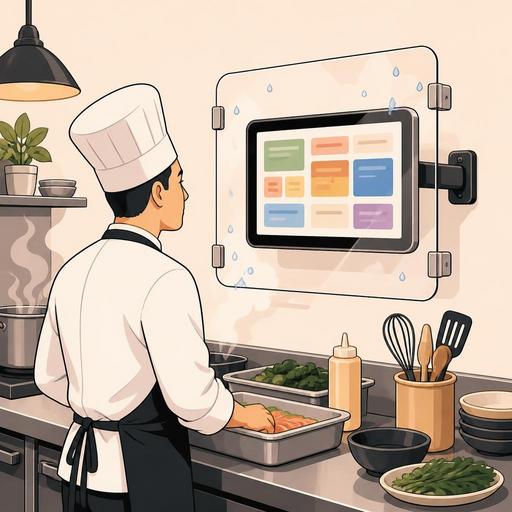
A Guide to Choosing an IP Protection Rating for a Digital Display in a Restaurant Kitchen
Choosing an IP protection rating for a digital display in a restaurant kitchen is not just a technical purchasing detail; it is a decision that directly affects the device's lifespan, the operational flow, and service continuity. In the kitchen, steam, grease, flour dust, water splashes, and an intensive cleaning routine all coexist. For this reason, when choosing the touch panel used at a kitchen display, order monitor, or prep station, the IP protection level should be evaluated as much as resolution or price. Especially for orders coming from the QR menu, slips dropping from the register integration, or the prep flow transferred to the kitchen display to proceed without interruption, the screen needs to be compatible with the physical environment it is in.
What is an IP rating and why is it critical in choosing a kitchen display?
IP, that is Ingress Protection, expresses a device's level of protection against solid particles and liquids. The first digit of the code describes resistance to solids such as dust, flour, and dirt; the second digit describes protection against liquid effects such as water drops, splashes, sprays, or brief intensive contact.
In a restaurant kitchen, the problem is often not whether the device "works" but how long it stays trouble-free under real working conditions. For example, a screen near the service line can encounter greasy air, sudden temperature changes, and frequent surface cleaning throughout the day. A terminal near the bar area, on the other hand, may be more exposed to liquid splashes. And screens around the dishwashing area face a higher humidity level. Even within the same business, choosing the same screen for every spot may not be correct.
For this reason, instead of settling for general phrases such as "water-resistant" when choosing a screen, you need to see the IP level stated in the product's technical documentation. If the protection rating is not clear, the purchasing decision has been made with incomplete information.
Which protection level should be considered for which area in the kitchen?
Each kitchen area has a different risk profile. To make the right choice, you first need to define where the screen will be used. The following approach makes the decision easier:
- Passage area or dry prep section: There is flour dust, light dirt, and limited contact. Basic dust protection is important in these areas.
- Hot line and near cooking: Steam, grease particles, and heat fluctuation are more pronounced. Not just the front surface but the overall body structure should be evaluated.
- Beverage prep or behind the bar: Liquid splashes are more frequent. How the touch surface behaves when wet also gains importance.
- Near the dishwashing area or spots with intensive cleaning: Humidity, splashes, and chemical cleaning are heavier. Cable inlets and connection points become critical.
Let's give a concrete example: the screen used at the pizza prep counter may be a device that employees touch with floured hands and that is occasionally wiped with a damp cloth. The screen standing next to the fryer line in the same business, on the other hand, is more exposed to greasy air and hot steam. Even though these two use cases look similar, the protection level expected from the device is not the same.
The important point here is to take into account not just the screen's front panel but its mounting method as well. The risk a wall-mounted screen is exposed to can differ from that of a screen placed on an open stand. Especially if there is a cable inlet at the bottom of the screen, the direction of liquid and the cleaning habit influence the choice.
Technical details that must be checked besides the IP rating
Although the IP value is important, it is not enough on its own. Restaurant owners and operations managers should evaluate the following details together before purchasing:
1. Surface material and cleanability
In the kitchen, it is not enough for the screen to be durable; it also needs to be cleaned quickly and safely. Frameless or low-recess surfaces can reduce grease and dirt buildup. Designs with deep edges lengthen cleaning time.
2. Touch performance
Whether the screen responds correctly during gloved use, damp-finger contact, or a fast order flow is important. A device that responds with a delay during order intensity disrupts the kitchen team's rhythm.
3. Heat management
For devices near the cooking line, not only liquid but also ambient heat is a determinant. The operating temperature range recommended in the technical document should be checked. Otherwise, the screen may shut down, freeze, or show a drop in performance.
4. Protection of connection points
HDMI, power inlet, network connection, or USB ports can be the weak link of the device. A screen that looks highly protected can in practice become more vulnerable when its connection points are left exposed.
5. Mounting and viewing angle
If the screen is not at the right height, staff make needless movements to see orders. This causes a loss of speed. Especially in a kitchen display solution, the screen's viewing angle, glare management, and the staff's natural working direction should be planned together.
A practical evaluation list for restaurant owners before purchasing
To avoid getting lost among technical terms, you can use this short checklist:
- Classify the area where the screen will be used: dry, humid, steamy, greasy, or high splash risk.
- Write down the cleaning routine: How many times a day is it wiped, which chemicals are used, is a cloth or a spray preferred?
- Determine the contact method: gloved use, wet hand, fast touch, single user or multiple users.
- Examine the cable and port location: No open connection should remain in the natural flow direction of liquid.
- Ask for a demo or field test: If possible, try it during actual service hours.
- Ask about spare parts and the service process: The intervention time after a fault is as important as durability.
For example, a small cafe may look for a compact, splash-resistant solution for the order screen behind the coffee bar; while a multi-station restaurant kitchen may plan different screen types for the prep, hot line, and packaging areas. Trying to solve all areas with a single product sometimes creates needless cost and sometimes inadequate protection.
Why is screen durability a matter of operational efficiency in the digital kitchen flow?
A kitchen-display failure is not just a hardware problem; it means the order sequence getting mixed up, prep delays, staff reverting to verbal confirmation, and the breakdown of service standards. Especially in businesses where orders are gathered in a single flow through the QR menu, in-table digital channels, takeaway, or POS integration, the screen's reliability becomes even more critical.
Here, the choice of screen and the software flow complement each other. Just as orders dropping to the correct station clearly and legibly in the kitchen matters, so does the device showing this flow being compatible with the environmental conditions. Otherwise, a well-designed digital process is interrupted because of physical-equipment weakness.
At this point, it is useful for restaurants to ask this question: Are we buying a screen, or are we building an uninterrupted workflow? The right answer is the latter. For this reason, the investment decision should be evaluated not solely on the screen's features but together with order management, kitchen coordination, and staff movements.
For example, if order visibility between the salad station and the hot line is weak during busy lunch service, staff revert to verbal communication. This increases the risk of error. Yet correctly positioned screens with a protection level suited to kitchen conditions keep the digital order flow visible and sustainable. When working with platforms focused on restaurant digitization, such as Restomas, planning the hardware choice to support the software flow significantly affects post-installation satisfaction.
The final decision: the most expensive screen, the cheapest screen, or the right screen?
When choosing a digital display for a restaurant kitchen, the safest approach is not getting stuck between "the highest protection just in case" and "the most budget-friendly model." The right approach is to evaluate together the IP protection rating suited to the area of use, the cleaning habit, the mounting method, and its role in the order flow.
A small but critical mistake, for example an exposed connection point or a screen choice unsuited to a steamy area, can create the need to reinvest in a short time. By contrast, a device chosen with the right analysis makes the kitchen layout more stable, increases the staff's trust in technology, and ensures that the digital order flow genuinely works within daily service.
If you are thinking about your QR menu, order management, and kitchen display processes together in your business, you can evaluate within a simple framework where to start in building a setup that will support your digital flow with Restomas.
