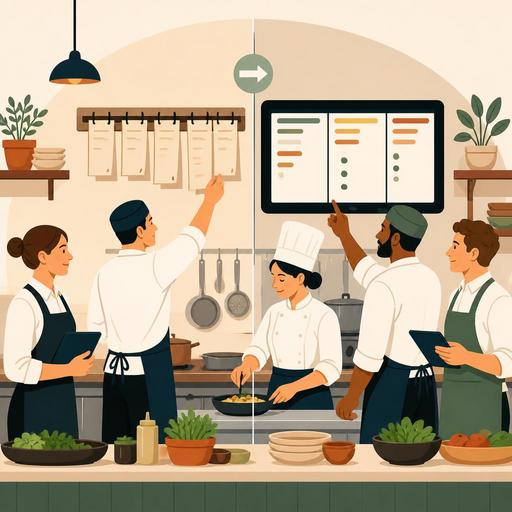
The First 30 Days of Switching from Paper Checks to a Kitchen Display in a Restaurant
Switching from paper checks to a kitchen display in a restaurant is not just a hardware change; it is an operational transformation that directly affects how orders drop into the kitchen, intra-team communication, and the pace of service. The first 30 days in particular determine how the team will adapt to the new order more than whether the system works technically. For this reason, the transition process should be handled not with a "the device is installed, the job is done" approach, but with a plan covering task distribution, screen flow, error management, and daily tracking.
In a paper-ticket setup, teams are most often accustomed to handwriting, verbal confirmation, and physical queue logic. On a digital kitchen display, orders become more visible, more trackable, and more standardized. This is a good thing; however, in the early days the new visibility can also create a sense of pressure in some teams. The key to a successful transition is to first make the technology compatible with the process, then gradually raise performance expectations.
1. The first 7 days: The period when old habits collide with the new system
The first week is usually the most critical stage. Most of the problems stem not from the system, but from habits. Even if the server enters the order correctly, the kitchen worker may still wait for paper. The chef may not want to start the order without verbal confirmation. If takeaway and dine-in orders appear in the same flow on the screen, priority confusion can arise.
The first thing to do during this period is to organize the screen by kitchen station. If there are sections such as grill, hot, cold, dessert, or bar, instead of everyone seeing the entire order, each person needs to clearly see the flow that drops into their own work area. Otherwise, information increases but focus decreases.
Let's consider a concrete example: during lunch service, a table order comes in containing a burger, a salad, and a beverage all at once. The flow that proceeds on a single ticket in a paper setup can, if not structured correctly in a digital system, turn into chaos where everyone tries to check the same task. Whereas in a station-based screen flow, the hot section sees the burger, the cold section the salad, and the service or bar section the beverage in their own queue. This way, the question of "who started, who is waiting?" decreases.
For the first week, the following approach is healthier:
- Test not all menu items, but the most frequently sold product groups first.
- Create a 5-minute screen-check routine at the start of each shift.
- Specifically rehearse cancellation, change, and extra-note scenarios.
- During peak hours, assign one responsible person to monitor the screen flow.
2. Days 8-15: Standardizing the order flow and making error points visible
In the second week, the team begins to no longer find the system "foreign." It is precisely at this point that many businesses relax too early. Yet the real efficiency gain begins when you standardize the order flow. The value of the digital screen is not only to display the order, but to reduce uncertainty.
For this, first simplify the language of order notes. Expressions such as "no onions," "spicy sauce on the side," and "cooked medium" should appear in a uniform way in the system. The same request being written sometimes short, sometimes long, and sometimes at staff discretion creates room for interpretation in the kitchen. Digitalization should be used not to increase free text, but to bind recurring tasks to a standard.
At this stage, it is useful to establish a small set of rules between the kitchen and dining-room teams:
- Every special request is entered into the system, not conveyed verbally.
- No item leaves for service until its ready status is updated on the screen.
- Cancelled items are additionally confirmed verbally in the kitchen.
- Takeaway, pick-up, and table orders are distinguished differently in the system.
For example, in a takeaway-heavy business, delivery-time pressure differs from that of dine-in orders. If these two flows are not distinguished on the digital screen, the kitchen may prioritize incorrectly. For this reason, a structure that makes order sources visible is important. In systems focused on order management and integration like Restomas, structuring this distinction correctly provides not only speed but also intra-team calm.
3. Days 16-23: Creating a measurement culture without applying performance pressure
In the third week, business owners and managers naturally begin to ask: "So have we really improved?" The answer to this question needs to be given by observation, not by feeling. The point to be careful of here is not to turn the digital screen into a tool that puts pressure on staff.
The healthiest indicators that can be tracked in the first 30 days are as follows:
- The change in the number of incorrectly produced items
- Examples of orders waiting even though they are ready
- The frequency of special notes being skipped
- The need for verbal confirmation within the kitchen during peak hours
- Situations requiring cancellation or re-preparation
The aim here is not to find "who made the mistake," but to see at which stage the error is most often produced. For instance, if the same item repeatedly comes out with the wrong garnish, the problem may not be the staff's carelessness, but that the product variation is not defined clearly enough in the system. In the paper-ticket era, these kinds of recurring problems look like personal errors; in a digital system, process flaws become more visible.
Another important matter for kitchen chefs is understanding whether the screen disrupts the rhythm of service. Some teams are accustomed to lining up tickets on the counter to physically establish the work order. In the digital setup, this habit is replaced by the status logic on the screen. If stages such as "waiting," "in preparation," and "ready" are not used in a disciplined way, the technology exists but the flow is not visible.
4. Days 24-30: Establishing a permanent order, closing training gaps, and writing a backup plan
In the fourth week, the time has come to leave temporary solutions behind and clarify the permanent way of working. Because decisions made in the early days with the thought "let's do it like this for now" can turn into new chaos a few months later. For this reason, a short operations review should be done at the end of the month.
Questions that should be asked in the end-of-month review meeting
- In which product groups is the screen flow clear, and in which is it muddled?
- Which order type most often requires verbal confirmation?
- At which stage do disagreements between the dining room and kitchen arise?
- During peak hours, are screen visibility and ease of use sufficient?
- Is a backup scenario defined against internet, device, or printer failures?
Here, the matter of a backup plan in particular should not be neglected. Switching to a digital system doesn't mean forgetting paper entirely; on the contrary, it means creating an emergency procedure. In situations such as a connection problem, a screen failure, or staff just starting on a shift, who will do what should be clear in advance. The best digital transitions are seen in businesses that plan not only the normal day but also the day things go wrong.
Also, training is not a one-time thing. The initial setup training most often teaches basic usage; but the real needs emerge during service. For this reason, you need to collect weekly feedback from shift leaders and address menu updates together with the kitchen flow. Especially if the QR menu, table ordering, reservations, and POS integration are used together, the kitchen display should be evaluated not on its own, but as one link in the entire operations chain.
How do you know the transition has been successful?
The sign of a successful transition is not only that orders appear on the screen. The real sign is a decrease in the following sentences within the team: "Where did this ticket go?", "Was this item cancelled?", "Who started this?", "Was a note written?" For businesses moving from paper checks to a digital kitchen display, the biggest gain is most often clarity before speed. As clarity comes, errors decrease, and as errors decrease, the pace becomes more manageable.
In short, the goal of the first 30 days is not perfection, but visibility and standardization. First make the order flow visible, then adapt team habits to the new order, and lastly focus on performance improvement. When you proceed this way, the digital kitchen display becomes not just a modern tool, but the foundation of a calmer and more controllable service order.
Restomas offers a simple starting point for businesses that want to structure the kitchen display, order management, and restaurant-digitalization processes under a single operational logic.
