Restaurant Waste Tracking in U.S. Kitchens: Prep, Spoilage, Returns, and Remakes
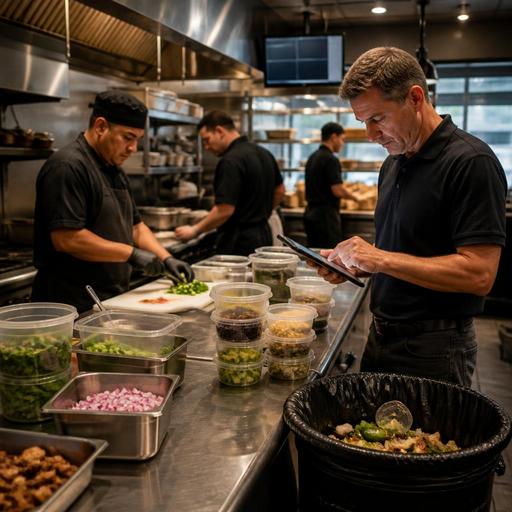
Restaurant waste tracking is one of the most practical ways for U.S. operators to protect margin without cutting quality. In a full-service restaurant, fast-casual line, hotel kitchen, food truck, or multi-unit brand, waste usually hides in four places: prep, spoilage, guest returns, and remakes. If you do not separate those buckets, your food cost report can look acceptable on paper while the kitchen keeps losing money on the line.
The goal is not to blame cooks, servers, or managers. The goal is to build a simple operating system that shows what was lost, where it happened, and what action should happen next. A neighborhood diner with a breakfast rush will track waste differently than an airport concession with grab-and-go sandwiches, but the discipline is the same: define categories, log incidents quickly, and connect the data to ordering, prep, menu decisions, and staff training.
Start with four waste categories your team can use during service
Many kitchens fail at waste tracking because the categories are too vague. If everything is entered as waste, nobody can tell whether the issue came from overproduction, storage problems, ticket errors, or guest complaints. Keep the categories simple enough for a shift lead to use during a busy lunch.
- Prep waste: trim loss, overportioned prep, batch items made but not needed, and mistakes during cutting, marinating, breading, or portioning.
- Spoilage: products that expired, lost quality, broke temperature standards, or became unusable because of storage or delivery issues.
- Returns: items sent back by the guest after delivery to the table, pickup handoff, or takeout fulfillment.
- Remakes: items cooked again because of modifier errors, wrong side, missed allergy note, wrong temperature, incorrect packaging, or expo mistakes.
For example, a Chicago burger bar may see high remake counts on medium-rare burgers during Friday dinner because the POS modifiers are unclear at the grill station. A Phoenix coffee shop may see prep waste from milk overpouring during morning rushes. A Dallas food truck may see spoilage from over-prepped slaw before a weather-disrupted event. These are different problems and need different fixes.
Build a logging workflow that works in real time
The best waste log is the one your team will actually use. A clipboard near the walk-in can work for a single-location cafe, but most operators need faster digital capture tied to the POS, kitchen display system, or manager shift review. If the logging step takes more than a few seconds, staff will skip it during peak periods.
A practical workflow for U.S. restaurants often looks like this:
- Define the item, portion size, and waste category.
- Record the reason using short standardized choices, not long free-text notes.
- Assign the station or channel: dine-in, bar, takeout, curbside pickup, direct online ordering, or delivery apps.
- Review waste by shift, daypart, and employee role during manager closeout.
- Turn repeated issues into prep, ordering, menu, or training changes.
Consider a fast-casual salad concept with direct online ordering and delivery marketplace orders. If remakes are much higher on third-party delivery tickets than on in-store orders, the issue may be packaging, ticket formatting, or menu modifier mapping between systems. If returns are low in-store but refunds rise on delivery apps, the kitchen may need better bag checks, sealed labeling, or a different pickup shelf workflow for drivers.
In a full-service steakhouse, servers can help identify whether a returned check item was a true cook issue, an expectation issue, or a communication issue. Was the steak temperature wrong, or did the guest expect a different cut? That distinction matters when retraining staff and adjusting menu descriptions. If your team adds service charges for banquets or large parties, keep those workflows and guest communication clear, and verify current local requirements on service charges, tips, and reporting with your payroll provider or qualified advisor.
Use waste data to improve prep, purchasing, and menu design
Waste tracking only matters if it changes the next decision. Once you have two to four weeks of clean logs, patterns usually become visible. The most useful questions are operational, not theoretical.
Prep waste questions
- Are batch sizes too large for slower dayparts?
- Are portions inconsistent between morning and night crews?
- Are knife skills or recipe specs causing excess trim loss?
- Are par levels based on habit instead of actual sales mix?
A brunch restaurant in Atlanta might discover that avocado prep spikes on Saturdays but drops sharply on Mondays. Instead of using one prep sheet all week, the kitchen can set day-specific pars. A multi-unit taco brand might find one location consistently over-preps pico de gallo because catering demand is being estimated manually instead of using prior sales history.
Spoilage questions
- Are deliveries being received without accurate quality checks?
- Is the walk-in organized for first-in, first-out rotation?
- Are low-volume ingredients attached to too many menu items?
- Are storage containers, labels, and station coolers supporting shelf-life control?
An airport concession may have spoilage on packaged yogurt parfaits because flight delays change passenger flow. A hotel restaurant may see spoilage in banquet prep when event guarantees shift late. In both cases, tighter production timing and better visibility between front-of-house commitments and kitchen prep can reduce loss.
Returns and remake questions
- Are menu descriptions setting the right expectations?
- Are allergy and modifier notes clearly visible on the kitchen display system?
- Are delivery and takeout packaging steps protecting food quality?
- Are expo, server, and pickup handoff checks consistent?
A sports bar might find that loaded nachos have low dine-in complaints but frequent takeout remakes because chips steam in closed containers. The fix is not retraining the cook alone; it may be packaging, venting, or separating toppings. A suburban family restaurant may find kids' meal remakes happen when sides are buried in the POS flow and missed on the line.
Set manager routines and staff accountability without creating fear
Waste tracking should support coaching, not punishment. If cooks believe every logged mistake will be used against them, the data will become incomplete. Managers should review waste in pre-shift and post-shift routines with a focus on repeatable fixes.
Useful routines include:
- Daily: review top waste items, note any unusual spoilage, and compare remakes to sales volume.
- Weekly: update pars, adjust prep sheets, and revisit menu items with repeated returns.
- Monthly: compare locations, channels, and dayparts to find process differences worth standardizing.
For multi-location operators, consistency matters more than perfection. One store may call an item a return while another logs the same issue as a remake. Standard definitions, shared manager training, and a common digital workflow make location comparisons much more useful.
Staffing also matters. If waste spikes during short-staffed shifts or handoffs between lunch and dinner crews, the root cause may be labor scheduling and station coverage, not just food handling. Operators should verify any labor, break, scheduling, or tip-related requirements under current state and local rules with qualified advisors or official guidance, but the operational lesson is straightforward: rushed handoffs create expensive mistakes.
Connect waste tracking to your tech stack and guest experience
Waste data becomes more valuable when it connects to the systems operators already use. POS reporting can show which items are frequently voided, discounted, or remade. A kitchen display system can reveal whether modifier visibility is causing ticket errors. Inventory tools can help compare theoretical usage against actual depletion. QR menus and direct ordering channels can reduce confusion by presenting cleaner item descriptions and modifier choices to guests.
For chains and larger operators, digital menu updates also help when item availability changes. If a sauce is 86'd, removing it from QR ordering and online ordering quickly can prevent remakes and guest disappointment. If your brand falls under menu labeling rules because of chain size or format, coordinate operational updates carefully and verify current FDA and local guidance before making compliance-related changes.
Accessibility matters too. If guests use digital ordering, make sure the experience is easy to navigate and does not force avoidable ordering errors. Clear modifier paths, readable layouts, and simple pickup instructions can reduce mistakes for everyone while supporting a more ADA-minded guest experience. Operators should confirm specific accessibility obligations with qualified professionals when needed.
Waste tracking is not just about saving ingredients. It improves ticket accuracy, protects guest satisfaction, and gives managers a cleaner picture of what is really happening in the kitchen. Restomas helps operators connect ordering, kitchen workflows, menu updates, and reporting so waste issues are easier to spot and act on.
