Order Speed and Profitability with Self-Service Kiosks in Fast Food Restaurants
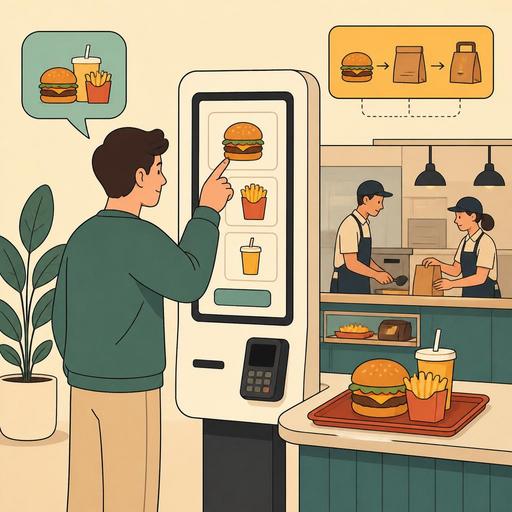
Using a self-service kiosk in fast food restaurants is not just a technology investment that shortens the line at the register; it is a transformation tool that standardizes the order flow, strengthens menu presentation, and makes operations more predictable during busy hours. Especially considering that every second matters in the quick-service model, a kiosk system, when designed correctly, directly affects both the customer experience and kitchen coordination. However, to get value, installing a screen alone is not enough; the menu structure, kitchen flow, payment step, and the distribution of staff roles must be considered together.
Why is a self-service kiosk so compatible with the fast food model?
Fast food operations are built on high repetition, limited decision time, and a standard product flow. This structure forms a natural foundation for a self-service kiosk. The customer selects their product on the screen, makes their customizations, completes their payment, and the order drops digitally to the kitchen or the prep line. This way, errors stemming from verbal communication during order-taking decrease.
For example, in a burger restaurant a customer's requests such as "no pickles, double cheese, large combo" can be entered incorrectly at the register during a rush. At the kiosk, however, the customer makes these selections step by step themselves. This not only increases accuracy; it also makes add-on suggestions more visible. Cross-selling opportunities such as upsizing the fries, adding extra sauce, or suggesting a dessert can be presented systematically, without depending on human initiative.
Another critical point is the psychology of decision-making. A customer with a line waiting behind them at the register often chooses from the menu in a hurry. On the kiosk screen, product images, the category layout, and the suggestion flow offer the customer a more controlled experience. This means a more deliberate choice and, often, a higher basket value.
The real value of a kiosk investment: not just speed, but an operational standard
In most businesses, a self-service kiosk first comes up with the goal of "reducing the line." Yet the real value emerges in the operational standardization it provides. Orders being taken with the same logic, campaigns being updated centrally, and the product flow being digitalized provide a major advantage, especially for brands with more than one branch.
Its impact is clear in the following areas:
- Order accuracy: Verbal misunderstandings decrease.
- Menu control: Out-of-stock products can be deactivated instantly.
- Campaign management: Time-based offers and combos are shown more easily.
- Peak-hour management: The pile-up at the register is not concentrated at a single point.
- Staff utilization: The workforce dedicated to taking orders can be shifted to welcoming, directing, and handover processes.
Especially for restaurants inside shopping malls, food court areas, busy branches near universities, and quick-service businesses operating late at night, the kiosk is an important tool for balancing peak-hour pressure. But a common mistake here is installing a kiosk and changing none of the existing processes. If the kitchen display, POS, payment infrastructure, and menu management do not talk to one another, the speed at the front end can create a new bottleneck at the back.
How should the menu and screen design be set up for a successful kiosk setup?
Kiosk performance largely depends on the on-screen experience. A crowded category structure, unclear product names, or unnecessary selection steps slow the customer down. For this reason, the kiosk menu should not be thought of as a digital copy of the printed menu; a separate user experience should be designed.
1. Simplify the categories
The main screen should be understandable at first glance. Clear headings such as burgers, chicken items, combos, drinks, and desserts are enough. Opening too many subcategories lengthens the decision time.
2. Bring the best sellers to the front
The products customers choose most often should appear on the first screen. Hiding popular products in deep menu layers makes kiosk use unnecessarily difficult.
3. Keep customization under control
Opening an unlimited selection area for every product can create confusion in the kitchen. The options offered on the kiosk should be limited to the choices the kitchen can genuinely sustain.
4. Show upsell suggestions at the right moment
Offering a drink, sauce, dessert, or size upgrade after the product is added to the cart is more effective. The customer does not want to see many offers before even choosing the main item.
5. Ensure visual and name consistency
Product names should be the same across the kiosk, QR menu, register screen, and kitchen system. If "Spicy Chicken Burger Combo" appears differently in one place and differently in another, reporting and operational tracking become harder.
At this point, centralized menu management becomes important. When menu content can be updated from a single panel, it becomes much easier to ensure consistency between the kiosk screen and the other digital order channels.
The staff role does not end with the kiosk; it changes shape
When a self-service kiosk arrives, some businesses think the need for staff will disappear entirely. In practice, however, the need does not vanish; job descriptions change. In a well-functioning kiosk setup, staff shift from being the person who takes the order to the person who manages the flow.
For example, at the entrance a team member can assist customers using the kiosk for the first time. This guidance can be critical, especially for older customers, foreign tourists, or families with children. At the handover point, orders need to reach the right customer quickly. In other words, the kiosk does not eliminate human contact; it moves it to a more useful point.
The right approach for managers is this:
- Before the kiosk goes live, map the peak-hour flow.
- Determine which part of the register staff will shift to welcoming and handover.
- Prepare a short on-site training for frequently asked customer questions.
- Track the kiosk usage rate daily in the first weeks.
- Create a clear procedure for order cancellations, wrong product selections, and payment problems.
When this planning is not done, the kiosks may sit empty while the register line continues. The problem is not the technology, but the lack of transition management.
Without kiosk, POS, and kitchen integration, the gains remain limited
The real power of a kiosk system comes not from operating on its own, but from being integrated with the other systems. The order must be transferred seamlessly from the kiosk to the POS system, the kitchen display, and the payment infrastructure. Otherwise, employees have to re-enter the orders; this creates both a loss of time and a risk of error.
Consider a concrete example: at a chicken restaurant busy at lunchtime, the customer orders at the kiosk, but the product information drops to the kitchen with a delay, or the promotional combo appears differently on the POS side. In such a scenario, even if the customer thinks they completed the transaction quickly at the front, operations slow down in the background. When the delivery time grows, the kiosk experience is also perceived negatively.
For this reason, businesses should ask the following questions:
- Are the kiosk menu and the POS menu managed from the same place?
- Are out-of-stock products reflected on the screen instantly?
- Does the order drop to the kitchen display automatically and in the correct format?
- Is data integrity preserved with other channels such as reservations, takeaway, and dine-in orders?
Digitalization here should be thought of holistically, not piece by piece. Restaurants get results when, in making a kiosk investment, they plan not only the device but also menu management, the order flow, and reporting together. This is exactly where platforms such as Restomas create value: bringing different digital touchpoints together within a single operational logic.
An actionable transition plan for restaurant owners
If you are considering a self-service kiosk in your fast food business, treat the investment not as "following a trend" but as process design. The following framework makes it easier to start:
- Collect data first: Map your busiest hours, best-selling products, and register bottlenecks.
- Simplify the kiosk menu: Prioritize not all products, but those with the most suitable flow.
- Run a pilot at a single branch: Observe usage behavior before rolling out across the whole chain.
- Reposition the staff: Clarify the welcoming, directing, and handover processes.
- Check the integration: Make sure POS, kitchen, payment, and menu updates work in a single flow.
- Read the reports regularly: Track which products are chosen more from the kiosk and at which step abandonment occurs.
A well-designed kiosk system is not just a technological showcase in quick-service restaurants; it is a powerful tool for more organized operations, more controlled menu management, and a smoother customer experience. Especially for brands that want to grow, this structure is one of the practical ways to create a standard across branches.
Restaurants that want to manage their menu, order, and operational flow more consistently from a single center can evaluate Restomas's digital tools in a way that fits their own processes.
