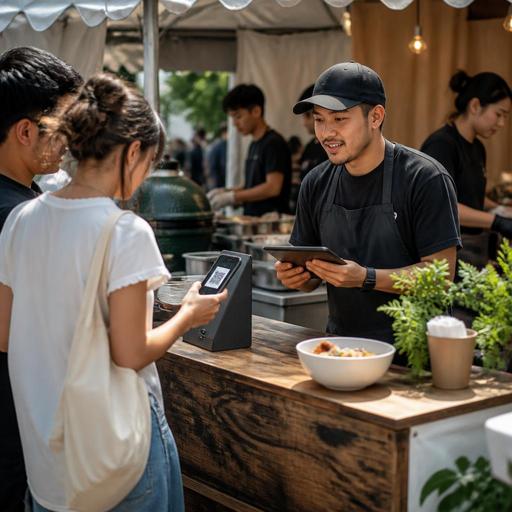
Digital Event Readiness Checklist for Restaurants at Local Festivals
Joining a neighborhood food festival, street fair, night market, or seasonal community event can bring strong visibility to a restaurant, but it also creates a very different operating environment. A digital event readiness checklist for restaurants at local festivals helps owners prepare for fast-moving demand, limited space, temporary staff setups, and guests who want quick decisions. When your menu, ordering flow, team communication, and guest information are organized digitally, you can serve faster, reduce confusion, and protect the guest experience even during short, intense service windows.
Start with an event-specific digital service plan
Many restaurants make the mistake of treating a festival booth like a smaller version of the main restaurant. In practice, event service is often closer to a pop-up operation with compressed decision-making and less room for recovery when something goes wrong. Before the event, define a separate digital plan for that specific setup.
Begin with the basics: what will be sold, how orders will be taken, where payments will happen, how the kitchen or prep team will receive tickets, and how guests will be informed about waiting times, allergens, or sold-out items. If your restaurant already uses digital menu tools, QR ordering, or POS integrations, adapt them to the event environment instead of copying the dine-in setup exactly.
For example, a burger restaurant joining a weekend street festival may decide to offer only three burger options, one side, and two drinks. That limited menu should have its own digital version, its own prep logic, and ideally its own category order so guests can choose quickly on a phone screen. A cafe at a local art fair may prioritize iced drinks and packaged pastries, while hiding slow espresso customizations that create line delays.
Your event plan should answer these questions:
- Which items are fast enough for event service?
- Which modifiers are essential, and which should be removed?
- How will sold-out items be updated in real time?
- Who monitors incoming orders and handoff status?
- What happens if internet access becomes unstable?
Clarity at this stage prevents operational stress later.
Build a festival menu designed for speed, visibility, and control
A festival menu should not simply be short. It should be easy to scan, easy to produce, and easy to explain. Digital menu management is especially useful here because event demand changes quickly. If one item is selling faster than expected, you need the ability to pause it, edit availability, or move attention to another item without reprinting materials.
Keep menu naming simple and guest-friendly. At events, people often order while standing, walking, talking with friends, or handling children. Long descriptions slow them down. Use clear item names, concise descriptions, obvious add-ons, and visible allergen notes where relevant.
A practical event menu structure often includes:
- Best-selling items first
- One or two high-margin combo options
- Limited modifiers only where they truly matter
- Fast beverage choices separated from food if service lines differ
- Clear sold-out handling and preparation notes
Imagine a fried chicken concept at a music festival. Instead of offering every sauce and side combination from the main restaurant, the event menu might present a sandwich combo, tender box, loaded fries, and canned drinks. Sauces could be limited to two options. This reduces ordering hesitation and makes kitchen execution more consistent.
Digital menus also help with guest trust. If an item contains nuts, dairy, or gluten, that information should be easy to find. At a crowded public event, staff may not have time to repeat the same answers all day. A well-structured QR menu can carry some of that communication load while keeping the team focused on service.
Set up order flow and payment to reduce bottlenecks
At festivals, revenue opportunities are often lost not because food quality is poor, but because the line feels confusing or too slow. Digital ordering and payment workflows can reduce this friction when they are designed for the actual physical layout of the event.
Map the guest journey step by step: see the menu, place the order, pay, wait, collect, and leave. Then identify where congestion is most likely. If guests crowd the front counter just to read the menu, a QR code displayed before the booth can help them decide earlier. If pickup becomes chaotic, use a simple handoff process tied to order names or numbers visible to staff. If your POS and order channels can sync, the team has a better chance of avoiding duplicated manual entry.
Consider these practical actions:
- Place QR menus where guests queue, not only at the register
- Use one payment process consistently instead of mixing too many exceptions
- Separate ordering and pickup zones when space allows
- Assign one staff member to monitor order status during peak periods
- Prepare a backup workflow for offline or delayed connectivity
A pizza operator at a local sports event, for instance, may take payment at the front, route orders digitally to a prep screen, and call guests by order name at a side pickup shelf. That is much smoother than having one person shout tickets into the booth while another searches for paper slips.
If your restaurant already works with digital order management, use the event as a chance to simplify rather than add complexity. The best event system is usually the one the team can understand instantly under pressure.
Train staff for temporary conditions, not ideal conditions
Festival staffing is different from normal restaurant service. Team members may work in heat, noise, tight spaces, or unfamiliar roles. Some may be part-time event help rather than regular in-house staff. That means your training must focus on short, repeatable digital routines.
Do not assume everyone will remember the event menu, modifier rules, or pickup process from a verbal briefing alone. Use digital references that are easy to access before and during service. A shared checklist, a menu cheat sheet, a station-based order flow note, or a simple prep sequence can reduce mistakes significantly.
Pre-event staff training should cover:
- How to use the event menu and what is intentionally excluded
- How orders are accepted, confirmed, and handed off
- How to mark items unavailable quickly
- How to answer common allergen and ingredient questions
- Who handles guest complaints, refunds, or delayed orders
For example, a dessert brand at a night market might train one staff member only on guest-facing order support, while another handles packaging and a third watches incoming digital tickets. This is a better use of labor than having every person do everything imperfectly.
It is also important to define communication rules. In loud event settings, verbal instructions get lost. Simple digital routing, visible status screens, or tightly structured handoff language can help the team stay aligned.
Use the event to capture insight for future growth
A local festival is not only a sales moment. It is also a live test of menu appeal, prep speed, guest behavior, and brand visibility. Restaurants that digitize event operations can learn much more from the experience than those relying only on memory at the end of the day.
After the event, review what happened operationally. Which items sold out first? Which products created the longest wait times? Which modifiers caused confusion? At what point did the line slow down? Were guests asking the same questions repeatedly? These observations can improve future event planning and even strengthen your main restaurant menu.
Concrete post-event review topics include:
- Best-performing items by demand and ease of production
- Items that looked attractive but slowed the line
- Common guest questions that should be answered in the menu
- Staffing gaps during setup, peak service, and closing
- Technical issues with payment, connectivity, or order tracking
Suppose a taco restaurant learns that guests consistently choose prebuilt combos over custom orders at outdoor events. That insight could shape future pop-up menus, catering packages, or even lunchtime offerings in the main branch. In the same way, if digital menu scans increase before peak periods, the business may decide to place QR access earlier in the queue next time.
Event participation works best when every appearance improves the next one. Digitization makes those improvements easier because menu edits, order flow changes, and staff guidance can be updated quickly rather than rebuilt from scratch.
Restaurants preparing for festivals and local events can benefit from tools that keep menus, orders, and service communication organized in one place, and Restomas supports that kind of practical digital coordination without adding unnecessary complexity.
