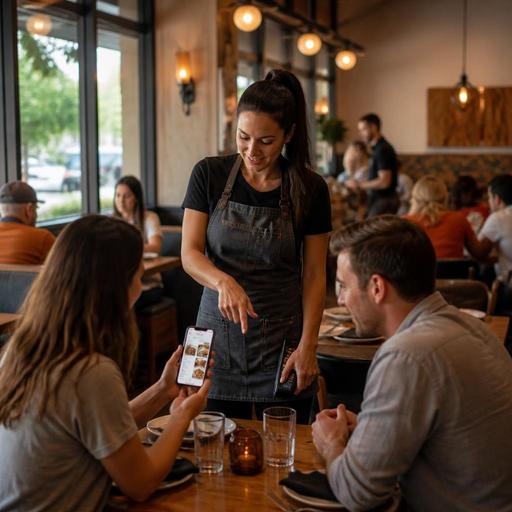
How U.S. Restaurants Use Table-Side Ordering Without Replacing Servers
Table-side ordering in the United States works best when operators treat it as a support tool, not a server replacement. For many restaurants, QR ordering, handheld ordering, and pay-at-table options can reduce wait times, cut order-entry mistakes, and help guests reorder another round without flagging down a server. But in a full-service dining room, hospitality still matters. The right setup supports servers, bartenders, and hosts instead of pushing guests into a cold, self-service experience.
For U.S. operators, the goal is simple: remove friction where technology helps, while keeping staff visible and in control of the guest experience. That matters in neighborhood diners, sports bars, hotel restaurants, airport concessions, family casual chains, and fast-casual concepts that blend counter service with table delivery.
Where table-side ordering fits best in U.S. service models
Not every restaurant needs the same workflow. A brunch cafe in Austin, a burger bar in Chicago, and a hotel lobby restaurant in Orlando will use table-side ordering differently. The strongest results usually come when operators match the tool to the service model instead of forcing one process on every table.
- Full-service restaurants: Let guests browse a QR menu, start with drinks or appetizers, and pay at the table, while servers still greet, guide, upsell, and course the meal.
- Sports bars and brewpubs: Make it easy to open a tab, add another beer or appetizer during a game, and reduce lines at the bar.
- Fast-casual dining rooms: Allow guests to order from the table after sitting down, especially during busy lunch periods when the counter line is long.
- Hotel restaurants: Support travelers who want a quick, quiet meal without waiting, while keeping staff available for menu questions and room-charge coordination where applicable.
- Airport and stadium venues: Speed ordering when guests are short on time, but keep staff focused on runners, problem-solving, and high-volume fulfillment.
A common mistake is rolling out table-side ordering as an all-or-nothing change. In practice, many U.S. restaurants do better with a hybrid model. Example: a suburban grill may use QR ordering only on the patio and during weekend rushes, while the main dining room keeps a traditional server-led flow.
What servers should still own
If technology takes over too much, operators can lose the very thing that drives repeat visits: human service. Servers should still own the moments that shape guest satisfaction and check growth.
- The greeting: A quick welcome sets expectations and confirms whether guests want traditional service or prefer to order from their phones.
- Menu guidance: Guests still ask about allergies, spice level, portion size, substitutions, and pairing suggestions. Digital menus help, but they do not replace judgment.
- Pacing and coursing: A server or floor lead should control when appetizers, entrees, and dessert fire, especially in full-service dining.
- Recovery: If an item is unavailable, a drink is delayed, or a guest is confused by the interface, staff must step in immediately.
- Hospitality and upselling: A well-timed suggestion for dessert, another round, or a limited-time special often works better person-to-person than through a screen.
Think of table-side ordering as a labor-support workflow. It can reduce repetitive trips for simple reorder requests, but it should free servers to do higher-value work, not disappear from the floor. In a busy Dallas Tex-Mex restaurant, for example, guests may use QR ordering to add queso and another margarita, while the server focuses on larger tables, birthday moments, and fixing issues before they become bad reviews.
Build the workflow around POS, payments, and tipping
Table-side ordering fails when it sits outside the real operating stack. U.S. restaurants need the flow connected to the POS, kitchen display system, payment processing, and reporting habits the team already uses. If digital orders drop into a separate tablet or require manual re-entry, the dining room gets messy fast.
Key setup points to review
- Menu sync: Prices, modifiers, item availability, and daypart menus should match the POS so guests do not order items that are 86'd.
- Station routing: Drinks, desserts, and food should route correctly to bar printers, kitchen display screens, or expo stations.
- Open checks and tabs: Make sure staff can see whether a table has ordered through a server, a handheld, or a guest phone so duplicate orders do not happen.
- Tip flow: Guests need a clear tipping experience whether they pay through a QR code, on a handheld, or with a printed check. Operators should train managers on how digital gratuities appear in reports and should verify current federal, state, and local tip reporting and payroll requirements with qualified advisors.
- Sales tax and service charge treatment: If your concept uses automatic gratuities, service charges, resort fees, or event dining charges, confirm how they display and how they flow through reports. Rules vary by jurisdiction and business model, so verify current requirements with your accountant, payroll provider, or legal advisor.
A practical example: a multi-location wing concept may allow guests to scan, order, and pay from the table, but managers still need one source of truth for live checks, voids, comps, and end-of-day reconciliation. Without that, staff confusion offsets the speed gains.
Accessibility, guest choice, and service recovery matter
Some guests love scanning a QR code. Others do not. A strong U.S. rollout keeps table-side ordering optional and easy to bypass. Operators should think about ADA-minded access in practical terms: readable menus, good contrast, clear navigation, and a simple path to get help from a human. If your restaurant is part of a chain with broader menu disclosure obligations, digital menu presentation may also intersect with FDA menu labeling context, so verify current official guidance and counsel for your setup.
At the floor level, guest choice matters more than novelty. A retired couple at a Florida diner may want a printed menu and a traditional check. A lunch guest at a San Francisco fast-casual spot may prefer to scan, order, and leave quickly. Both should feel equally welcome.
Simple safeguards that reduce friction
- Keep printed menus available.
- Train hosts and servers to offer both options naturally.
- Use table tents or QR placements that are visible but not intrusive.
- Make it easy for guests to request help, split the check, or close out a tab with staff assistance.
- Test the mobile flow on older phones, weak Wi-Fi, and common browser types.
Service recovery also needs a playbook. If a guest orders to the wrong table, cannot apply a modifier, or accidentally sends a duplicate order, managers should have a quick comp-and-correct process. This is especially important in high-turn settings like airport restaurants and food halls.
How to launch table-side ordering without hurting hospitality
The best rollout is narrow, measured, and heavily coached. Do not start by changing every table, every shift, and every menu category at once. Start where the pain is most obvious.
- Pick one use case: patio service, happy hour reorders, lunch rush, or late-night bar snacks.
- Define staff roles: who greets, who monitors incoming digital orders, who handles payment issues, and who watches for stalled tables.
- Limit the menu at first: begin with straightforward items and modifiers before adding complex coursing or heavy customization.
- Measure operational outcomes: watch ticket times, reorder frequency, server steps, voids, duplicate tickets, and guest complaints.
- Train the language: staff should say, You can order from me anytime, or scan here if you want to add another round quickly.
- Review after two weeks: identify where guests needed human help and improve the process before expanding.
For example, a neighborhood pizza-and-beer spot in Denver might begin with QR ordering only for drinks and shareables after 8 p.m. That reduces bar congestion without changing how families order dinner earlier in the evening. A hotel restaurant might use it at breakfast so solo business travelers can move quickly, while keeping full server interaction at dinner.
Used this way, table-side ordering does not replace servers. It protects hospitality by removing small delays that frustrate guests and staff alike. When the workflow is tied to your POS, kitchen, payment, and service standards, it becomes a practical operating tool rather than a gimmick. Restomas can help operators connect digital ordering, menu management, and service workflows in a way that fits real U.S. restaurant operations.
