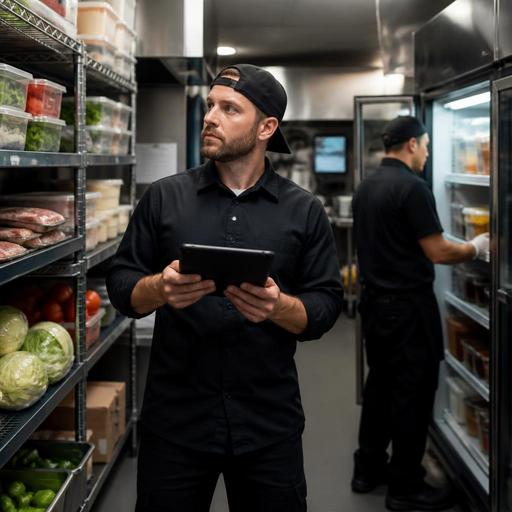
Faster Weekly Restaurant Inventory Counts for U.S. Operators
Weekly restaurant inventory counts are one of the most important habits for protecting margins, but they often get rushed, delayed, or done differently every week. For U.S. restaurant operators, the goal is not just to count faster. It is to make the count reliable enough to support better ordering, tighter prep control, cleaner food cost tracking, and fewer surprise shortages during service.
Whether you run a neighborhood diner, a fast-casual salad shop, a sports bar, a food truck, or a multi-location burger concept, the same problem shows up: inventory lives in too many places. Product sits in the walk-in, line coolers, dry storage, bar shelves, employee meal bins, prep containers, and sometimes in a second location or catering van. If the counting process is inconsistent, your numbers will be off before the week even starts.
The good news is that faster counts usually come from better workflow, not from asking managers to move faster with a clipboard. Here is how U.S. restaurants can make weekly counts more accurate without turning inventory day into an all-night project.
Standardize the count before you try to speed it up
The fastest inventory system is one that removes decisions during the count. If one manager counts cases, another counts individual units, and a third estimates partial pans by eye, the report will never be dependable. Start by defining one counting method for each item.
- Choose one unit of measure per item. For example, chicken breasts by pounds, fryer oil by jugs, canned tomatoes by each can, draft beer by keg fraction, and liquor by bottle fraction.
- Set a fixed par name and location. “Ranch dressing” should not appear as “ranch,” “house ranch,” and “dressing” in different lists.
- Use a storage-order count sheet. Count the shelves in the same order staff physically walk the building: freezer, walk-in, line, dry storage, bar, then back stock.
- Define partial-count rules. For example, half pan, quarter bottle, or opened case counted by inner packs.
A casual pizza restaurant in Ohio might count mozzarella in unopened cases, open bags, and line-bin pounds. A hotel restaurant in Texas may need separate count sections for banquet storage, breakfast line coolers, and the main kitchen. The point is not to make every business look the same. It is to make your own process repeatable.
Count at the right time and control movement during the process
Many inventory problems are timing problems. If deliveries arrive mid-count, bartenders restock while the bar is being counted, or prep cooks pull product during the walk-in count, you are mixing snapshots from different moments. That creates false variance and wastes management time later.
Pick one consistent inventory window each week. For many U.S. operators, that means after Sunday close, before Monday prep, or at a quiet mid-morning period when receiving is paused. In a QSR with late-night traffic, an early morning count before the lunch rush may work better. In an airport concession or stadium venue, counts may need to happen after event close with strict handoff notes.
Use these guardrails:
- Pause transfers and receiving during the count when possible.
- Finish all major prep entries first. If ten pounds of deli turkey became sandwiches, salad portions, and staff meal prep, record that movement before counting.
- Assign one person to each zone. Too many handoffs create duplicate counts.
- Note unusual events immediately. Catering pull, spoilage, a comped tray, or an emergency store-to-store transfer should not rely on memory.
This is especially important for operators balancing dine-in, takeout, third-party delivery apps, and direct online ordering. A fast-casual bowl shop can burn through high-cost proteins fast when digital orders spike. If your count happens after heavy curbside pickup but before all prep depletion is recorded, the numbers will mislead you.
Reduce counting errors with storage discipline and simple item design
Inventory gets slower when storage is messy. Every extra open case, unmarked deli container, or duplicate product name adds friction. If you want weekly counts to move faster, organize the building for counting, not just for service.
Practical ways to make inventory easier to count
- Keep like items together. Do not split the same fries across the walk-in freezer, line freezer, and a random hallway shelf unless the count sheet reflects that reality.
- Label prepped items clearly. Opened sauces, cut produce, batched cocktail mix, and portioned proteins need consistent names and dates.
- Limit duplicate pack sizes. Buying the same product in different pack formats can save money on paper but slow counting and ordering.
- Use visible shelf sequence. Left-to-right, top-to-bottom storage makes training easier for new managers.
- Separate non-inventory items. Cleaning chemicals, paper goods, and employee supplies should not be mixed into food count zones unless you intentionally track them.
A bar manager in Chicago, for example, can save time by standardizing open-bottle marks and keeping counted backup bottles separate from active service bottles. A food truck operator can speed up counts by using fixed commissary bins for tortillas, proteins, and disposable takeout packaging, then reconciling truck stock against commissary pull sheets.
For concepts using QR ordering and direct digital ordering, align menu item names with inventory naming where it helps operations. If the POS says “buffalo chicken wrap” but prep labels say “spicy chicken,” staff may miss depletion patterns when reviewing sales and inventory together.
Use sales, prep, and purchasing data together
Inventory counts become more reliable when they are not treated as a standalone task. The weekly count should connect to what you sold, what you prepped, and what you purchased. That is where many U.S. restaurants find the real time savings, because managers spend less time investigating mystery variance.
Look for operational mismatches such as:
- High sales but low depletion. This may point to recipe setup errors, unrecorded transfers, or over-ringing under the wrong menu button in the POS.
- Low sales but high depletion. This can suggest over-portioning, spoilage, staff meals, comps, or theft.
- Frequent emergency purchases. These often mean pars are wrong or counts are too late to support ordering.
- Consistent variance on one station. A fry station, bar rail, or dessert cooler may need tighter portion tools or better shift change logging.
For example, if a Southern breakfast diner sees sausage usage much higher than POS sales for breakfast platters, the issue might be oversized line portions or unrecorded substitutions. If a wing bar sees ranch cups disappearing faster than wing sales, the answer may be portion control, not vendor pricing.
Digital systems help here by connecting inventory visibility with order flow, POS reports, and kitchen production. Even simple integrations can reduce manual re-entry and make it easier to compare what was sold against what should be on hand. For multi-location operators, common item definitions across stores are critical if you want to compare variance fairly.
Build a weekly routine your team can actually keep
The best inventory process is the one your team can repeat during busy real-world operations. Make the routine short, trainable, and visible.
- Create a count checklist. Include receiving cutoff, prep completion, count assignments, recount thresholds, and order review timing.
- Train two backups. Do not let inventory knowledge live with one GM or chef.
- Set recount rules. For example, recount all high-cost proteins, liquor, and any item with a large week-over-week swing.
- Review the same day. A count that sits untouched until Thursday loses value.
- Track a few key exceptions. Focus on the handful of items that drive food cost and service risk.
If you operate in states or cities with specific labor, tax, alcohol, or recordkeeping rules, keep your process operational and verify current requirements with your accountant, attorney, payroll provider, or official local guidance. The same goes for accessibility and menu-labeling questions in chain settings. Inventory workflow should support compliance awareness, but it should not be treated as legal or tax advice.
Weekly inventory does not have to be a dreaded management chore. With standard units, cleaner storage, better timing, and connected sales and purchasing data, U.S. restaurants can count faster and trust the results more. Restomas supports operators who want tighter digital workflows across menus, ordering, POS-connected operations, and inventory visibility without adding unnecessary complexity.
