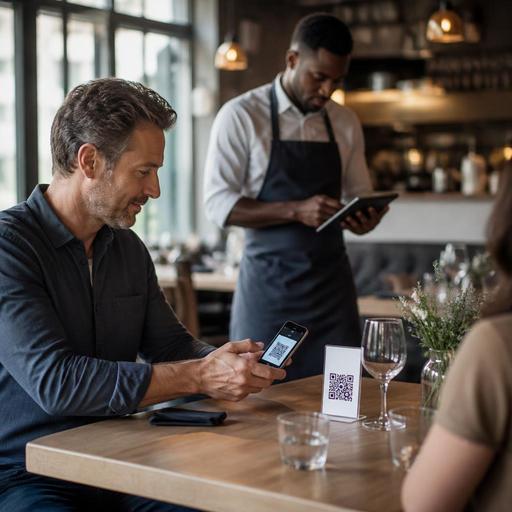
How Restaurants Can Integrate Virtual POS With QR Payments
Virtual POS and QR payment integration for restaurants can do much more than replace a card terminal at the end of the meal. When these tools are connected thoughtfully, they reduce payment friction, improve bill accuracy, shorten table turn times, and give operators a clearer view of service performance. For restaurant owners, the goal is not simply to add another payment option. The goal is to create a smoother path from menu browsing to ordering, billing, and reconciliation.
Many restaurants already use digital menus or table QR codes, but the payment step often remains disconnected. A guest scans a menu, places an order through staff, then waits for a paper bill and a card machine. That gap can slow down service, especially during lunch rushes, busy weekends, or in venues with limited front-of-house staff. A virtual POS connected to QR payment helps close that gap by linking the guest-facing experience with the operational system behind it.
What virtual POS and QR payment integration actually means
A virtual POS is a software-based payment setup that allows a restaurant to process payments through connected digital systems instead of relying only on a standalone terminal. QR payment integration means that a guest can scan a code, review the bill or order, and complete payment on their own phone through a secure payment page or wallet-supported flow.
In practice, this can work in several ways:
- A guest scans a table QR code, opens the live menu, orders, and pays before the order is sent.
- A guest scans a code at the end of the meal to view the final bill and pay without waiting for staff.
- A group scans one bill and either one person pays the full amount or the table splits payment by item or amount.
- A quick-service venue displays a counter QR code that sends guests directly to a payment-enabled ordering page.
The important point is integration. If QR payment exists outside the POS or order management system, staff may still need to check separate dashboards, re-enter items, or manually confirm paid orders. That creates exactly the kind of friction restaurants are trying to remove.
Where this setup improves restaurant operations
The biggest operational benefit is time. When guests can move from menu to payment with fewer handoffs, staff spend less time walking bills, fetching terminals, correcting payment misunderstandings, or handling simple split-bill requests. That time can be redirected toward hospitality, upselling, or faster table resets.
Consider a busy cafe during the morning rush. If guests order from a QR menu and pay immediately through a virtual POS flow, the cashier line becomes shorter and staff can focus on drink production and handoff accuracy. In a full-service restaurant, table-side QR payment can reduce the common delay between “Can we get the check?” and the actual payment moment.
There is also a reporting advantage. When menu items, modifiers, taxes, discounts, and payment status are aligned in one system, end-of-day reconciliation becomes cleaner. Managers can review which orders were paid digitally, which remained open, and where service bottlenecks appeared. This is especially useful for multi-shift teams where payment confusion often shows up during handover periods.
Typical pain points this can solve
- Long waits for the bill during peak service
- Staff carrying terminals back and forth across the floor
- Manual bill splitting that slows down table turnover
- Unclear payment status between floor staff and cash desk
- Errors caused by entering the same order into multiple systems
How to design the guest journey without making it feel impersonal
One common concern is that QR payments may make service feel cold or overly self-service. That usually happens when the digital flow is added without thinking about guest expectations. The better approach is to make digital payment available as a convenience, not a forced replacement for hospitality.
For example, in a casual dining restaurant, servers can greet the table, explain specials, and take the first order personally. At the end of the meal, guests can choose whether to pay through the table QR code or ask for traditional service. In a fast-casual setting, the entire flow may be digital from the start, but staff should still be visible and ready to help guests who have questions or prefer another payment method.
The interface also matters. The payment page should clearly show ordered items, quantities, any service fee, taxes where relevant, and the final amount. If guests cannot easily understand what they are paying for, they will call staff over anyway. Clarity supports trust.
Restaurants should also think about edge cases. What happens if a guest wants to remove an item after it has already been sent? What if one person at the table wants to pay for drinks and another wants to cover food? What if the internet connection is weak in the terrace area? Digital convenience only works when these real situations are planned for.
Implementation steps for restaurant owners
Before enabling QR payments, map your current service flow from seating to payment. Identify where delays happen, where staff repeat work, and where guests most often ask for help. Then build the digital process around those weak points rather than copying another venue's setup.
- Define the main use case. Decide whether you need pay-before-order, pay-at-table, or both. A bakery, a cafe, and a full-service bistro may each need a different flow.
- Connect menu data carefully. Item names, prices, variants, and availability should match across the digital menu and POS environment.
- Set clear payment status rules. Staff should know exactly how a paid order appears in the system and what action is required next.
- Train for exceptions. Teach staff how to handle split bills, failed transactions, voids, refunds, and guest questions without hesitation.
- Test with real service scenarios. Run trial shifts during slower hours before relying on the system during peak periods.
- Keep a fallback option ready. Traditional card and cash acceptance should remain available in case a guest prefers it or a technical issue occurs.
A good rollout is rarely about technology alone. It depends on signage, table communication, server scripts, and manager oversight in the first weeks. Even a strong system can fail if guests do not understand when to scan or staff are unsure how to verify payment.
What to monitor after launch
Once the integration is live, review performance weekly. Focus on practical signals rather than vanity metrics. Are tables closing faster? Are fewer guests waiting for card machines? Are staff spending less time on payment handling? Are there fewer disputes about bill accuracy?
It is also worth reviewing menu behavior. A QR-based payment flow can reveal where guests abandon the process, pause before checkout, or need help with modifiers. If certain items regularly create confusion, the issue may come from menu wording rather than payment itself.
For management teams, a connected platform is especially useful when it links digital menus, order handling, and payment status in one operational view. That kind of setup supports cleaner handoffs between front of house and back office, and it helps standardize service across multiple locations. Platforms such as Restomas can support this by bringing QR menu management and restaurant digitization tools into the same workflow, making it easier to keep service consistent without adding unnecessary complexity.
The best result is not that guests notice the technology. It is that they notice less waiting, fewer interruptions, and a more convenient experience. For operators, that translates into a service model that is easier to manage and more resilient during busy periods.
If you are reviewing your restaurant's digital flow, Restomas can help you connect QR menus, ordering, and payment-friendly service steps in a practical way.
