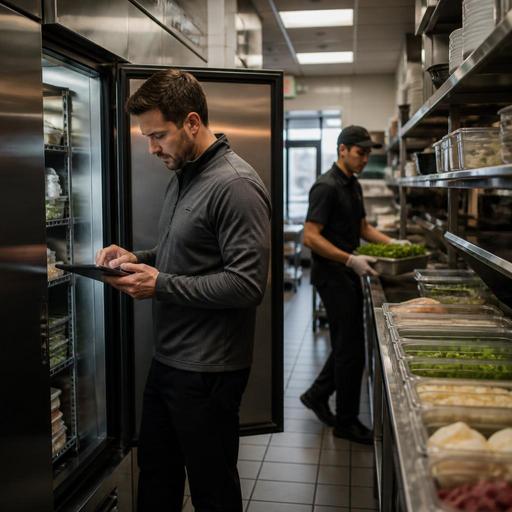
Cold Storage Alerts and Digital Inventory Habits for U.S. Restaurants
Cold storage alerts and digital inventory habits for U.S. restaurants can do more than prevent spoilage. They help operators catch small problems before they turn into product loss, prep delays, refund issues, or a rough health inspection conversation. Whether you run a neighborhood diner, a fast-casual salad shop, a hotel breakfast kitchen, or a multi-unit burger brand, better cold storage visibility gives your team a more reliable daily routine.
In many U.S. restaurants, food loss does not start with a dramatic walk-in failure. It starts with a reach-in cooler left slightly open during lunch rush, a line cook placing a new case in front of older product, or a manager discovering that the prep list assumed inventory that is no longer usable. Digital alerts and better inventory habits help close those gaps. The goal is not to make every kitchen feel corporate. The goal is to give busy teams simple prompts that protect product, speed decisions, and keep service moving.
Why cold storage alerts matter in real restaurant operations
Most operators already know refrigeration matters, but the operational value comes from speed and consistency. A cold storage alert system can notify the right person when a walk-in, prep cooler, undercounter unit, or freezer moves out of the expected range or when a door is left open too long. That matters because restaurant problems often happen between formal line checks.
Think about a U.S. fast-casual bowl concept during the lunch rush. The makeline cooler is opened constantly, and the expo station is focused on throughput. If product temperatures drift, the team may not notice until proteins, greens, or sauces are already at risk. Or consider a sports bar after a busy game night. The kitchen closes late, staff is tired, and a bar-back may not realize a beer cooler door did not seal properly. In a hotel restaurant, overnight staffing may be lighter, so remote visibility matters even more.
Alerts also improve handoff between shifts. Instead of a manager relying on memory or a paper note on the office desk, the issue can be logged, acknowledged, and followed up with a specific action. That could mean moving dairy to another unit, pausing prep, calling service, or adjusting the next morning’s order.
Operators should still verify food safety workflows against current local health department guidance and official recommendations. Digital alerts support the process, but they do not replace proper staff training, thermometer use, or documented procedures.
Build inventory habits that work with the realities of a U.S. kitchen
Inventory systems fail when they demand perfect behavior from teams working in imperfect conditions. A better approach is to create small habits that fit actual restaurant flow. Start with the storage points that create the most risk or cost: proteins, dairy, prepared sauces, cut produce, desserts, and any high-value item with short shelf life.
Practical habits worth standardizing
- Use one naming system for the same item across ordering, receiving, prep, and POS reporting. If one location says “chicken breast,” another says “grilled chicken,” and a third says “protein tray,” counts become messy fast.
- Log exceptions, not just counts. A note like “walk-in door open at close” or “case arrived warm, rejected at receiving” gives context that a simple quantity number cannot.
- Track open dates and prep dates consistently on items your team handles every day, such as house ranch, sliced tomatoes, cooked bacon, and cut fruit for brunch service.
- Separate full-case inventory from line-level inventory so managers know whether product is truly available or already committed to active prep stations.
- Assign ownership by shift so opening, mid, and closing teams each know which checks belong to them.
A food truck offers a good example. Space is tight, storage is limited, and the same person may cook, ring up orders, and restock. In that setup, digital habits need to be fast: a short opening count, a simple cooler check, and a clear alert if product needs to be moved before service starts. By contrast, a multi-location pizza chain may need centralized visibility so district managers can compare recurring cooler issues across stores and spot patterns in cheese or dough loss.
How to connect alerts with ordering, prep, and service recovery
Cold storage alerts become much more useful when they trigger an operational response instead of just creating another notification. If a freezer issue hits overnight, the next step should be obvious by the time the opening manager arrives. That means defining playbooks in advance.
- Confirm the issue. Check the unit, verify product condition, and make sure the alert was not caused by a brief door opening during stocking.
- Protect service. Move product if needed, 86 affected menu items in the POS or online ordering flow when necessary, and update the kitchen display system so the line is not building orders for unavailable items.
- Adjust purchasing. If product loss changes expected pars, update the day’s order rather than waiting for the weekly inventory count.
- Communicate across channels. If an item is unavailable, make sure front-of-house staff, pickup shelf runners, curbside pickup staff, and delivery app menus reflect the same reality.
- Document the incident. Record what happened, what was moved or discarded, and whether maintenance follow-up is needed.
Here is a simple U.S. example: a suburban cafe discovers at 6:30 a.m. that the pastry reach-in held overnight cream fillings above the expected range. The manager may need to pull affected items, update the QR menu and direct online ordering channel, brief counter staff before the morning rush, and reorder limited backup product. That response protects guests and prevents a cashier from selling an item the kitchen cannot serve.
This workflow also affects labor. If prep product is lost, the team may need to reprioritize tasks, rebalance station assignments, or simplify the menu for that shift. Operators should review local labor and break rules with qualified advisors when making schedule changes, especially across states or cities.
What multi-location operators should watch closely
For franchise groups and independent operators with multiple stores, the challenge is not just one bad cooler. It is inconsistency. One unit may log everything carefully while another only reacts when product is obviously compromised. Standard dashboards help regional leaders see where habits are strong and where they are slipping.
Useful review points include repeated alerts on the same unit, frequent overnight door-open events, recurring waste on a small group of ingredients, and gaps between theoretical usage and actual depletion. A chicken sandwich concept, for example, might compare raw chicken, pickle chips, and signature sauce across locations. If one airport concession and one street-side unit both show unusual variance, the causes may be different: delivery timing, storage layout, staffing, or demand spikes.
Multi-unit teams should also think about menu synchronization. If one store temporarily runs out of a refrigerated item, direct online ordering, third-party delivery apps, and in-store QR ordering should update quickly to avoid refunds and guest frustration. This matters even more for stadium venues, university dining outlets, and hotel operations where service windows are tight and guest expectations are time-sensitive.
Choose tools that reduce friction for the team
The best digital setup is usually the one your team will actually use during a busy shift. Look for tools that make it easier to spot issues, record actions, and connect inventory reality with the rest of the operation. That may include alerts tied to storage equipment, inventory visibility by location, menu item availability controls, and integrations with your POS or kitchen display workflow.
For U.S. operators, it helps when systems support common service models like takeout, curbside pickup, direct online ordering, and delivery marketplaces. If a cold storage problem affects one ingredient, your team should be able to update availability without creating confusion at the register, on the pickup shelf, or on third-party apps. ADA-minded digital access is also worth considering so guest-facing ordering flows remain usable for a wide range of customers. If your business is subject to specific federal, state, or local rules, including menu labeling or accessibility expectations, verify current requirements with official guidance and qualified advisors.
The real win is not the alert itself. It is building a calmer, more accurate operating rhythm: better receiving, cleaner prep decisions, fewer surprise stockouts, and faster response when something goes wrong. Restomas helps restaurants connect digital menus, ordering, and operational workflows so inventory changes are easier to act on across the business.
