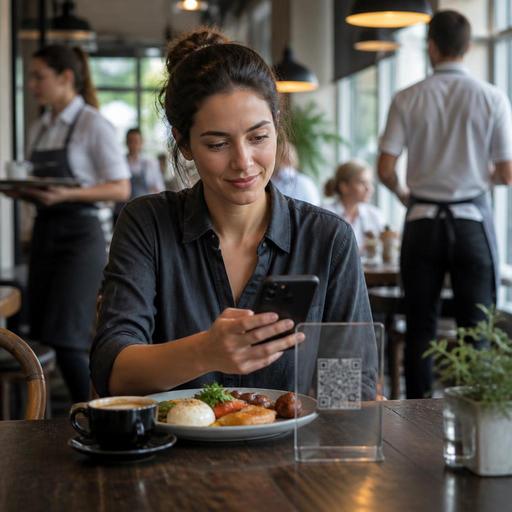
How Breakfast Restaurants Can Optimize QR Menus for Peak Morning Rush
The breakfast rush is one of the most time-sensitive service windows in food service. Guests are often on their way to work, school, meetings, or travel connections, which means every step between seating and payment matters. QR menu optimization for breakfast restaurants during peak hours is not just about replacing printed menus with a digital version. It is about reducing hesitation, guiding fast choices, preventing kitchen confusion, and helping staff move tables efficiently without making the guest feel rushed.
For breakfast-focused restaurants, cafes, brunch spots, and hotel dining rooms, the QR menu can become a practical operational tool. A well-structured digital menu helps guests find the right meal quickly, helps servers avoid repeating the same explanations, and helps the kitchen receive cleaner tickets during the busiest part of the day.
Design the QR menu for speed, not for browsing
Many digital menus are built as if the guest has plenty of time to explore. Breakfast service is different. During peak morning hours, most guests want to make a decision fast. The menu should support that behavior from the first screen.
Start by shortening the path to the most common orders. Instead of forcing guests through long category lists, place high-demand breakfast choices first. For example, a neighborhood breakfast restaurant might open with sections such as quick breakfast plates, coffee and tea, egg dishes, and grab-and-go add-ons. This is more useful at 8:00 a.m. than leading with low-frequency items or large photo galleries.
Use item names that are instantly understandable. A guest in a rush should not need to tap into every item to understand what comes with it. If a plate includes eggs, toast, and a side, say so in the short description. If a sandwich can be served on bagel, sourdough, or gluten-free bread, make that choice easy to see before the guest starts customizing.
It also helps to reduce visual clutter. Too many badges, long stories, or decorative category names can slow the decision process. Keep the breakfast QR menu clean, direct, and mobile-friendly. Since many guests scan with one hand while holding a bag or coffee, readability matters more than creativity during peak hours.
Practical menu layout choices
- Put best-selling breakfast items near the top of the first view.
- Create a dedicated section for fast combinations such as coffee plus pastry or omelet plus juice.
- Use short, clear descriptions focused on ingredients and included sides.
- Group modifiers logically, such as egg style, bread choice, side choice, and drink add-on.
- Limit unnecessary taps between scanning and ordering.
Build modifier logic that prevents morning bottlenecks
Breakfast menus often look simple, but operationally they can create many order variations. Eggs can be scrambled, fried, poached, or boiled. Toast can be white, whole grain, rye, or gluten-free. Guests may remove cheese, swap bacon for avocado, or ask for dressing on the side. If the QR menu does not handle these choices clearly, the kitchen receives messy tickets and staff spend valuable time clarifying details.
The best approach is to structure modifiers in the same order the kitchen thinks about preparation. For example, if a guest orders a breakfast plate, the menu flow might ask for egg style first, then meat or vegetarian side, then bread, then optional extras. This keeps the ordering process intuitive for the guest and readable for production staff.
Clear modifier rules also help control unrealistic requests during peak periods. If your operation cannot support every substitution during the busiest hour, the QR menu should reflect that. You can allow standard swaps while limiting open-ended notes. This protects speed without creating conflict at the table.
A brunch cafe, for example, may offer a build-your-own breakfast sandwich. Without structured options, guests may type long custom requests that delay service. With a better digital setup, they can select bread, protein, egg style, cheese, and sauce from predefined choices. The result is faster ordering and fewer remakes.
Use the QR menu to guide demand toward operationally efficient items
Peak-hour optimization is not only about making the guest faster. It is also about steering demand toward items your team can execute consistently under pressure. Some breakfast dishes are highly profitable and easy to produce in volume. Others may slow the griddle, tie up the fryer, or require extra plating steps.
Your QR menu can support better flow by highlighting items that fit your kitchen capacity during the morning rush. That does not mean hiding signature dishes. It means being intentional about what gets the most attention when the restaurant is at full speed.
For instance, if your kitchen can produce breakfast burritos, yogurt bowls, and standard egg plates quickly, feature those prominently. If a specialty item requires more assembly or frequent modifications, place it lower in the menu or present it with tighter customization rules. This is a subtle but powerful form of menu management.
You can also create sections that match guest intent:
- Need it fast for guests with limited time.
- Classic breakfast for familiar plates.
- Lighter options for health-focused orders.
- Coffee and bakery for quick add-on sales.
This structure helps guests self-select into the right ordering path. It reduces the mental load of scanning a long breakfast menu while improving ticket flow in the kitchen.
Support staff with a digital system that matches service reality
Even the best QR menu will fail if it creates extra work for the floor team. Breakfast restaurants often operate with rapid table turnover, frequent refills, and short guest dwell time. Staff need a digital ordering setup that helps them intervene when needed, not one that traps them in troubleshooting mode.
First, make sure table identification is simple and reliable. If guests order from a QR menu at the table, the kitchen and runners must know exactly where the food belongs. Confusion here can erase any time saved during ordering.
Second, align the QR menu with service scripts. If hosts or servers know the likely questions, the menu should answer them clearly. Examples include whether coffee refills are included, whether sides can be upgraded, how spicy a breakfast wrap is, or whether pancakes are served with syrup automatically.
Third, use the digital menu to reduce repetitive staff explanations. If guests regularly ask which breakfast items are vegetarian, high-protein, or suitable for children, these details should be visible in the menu structure or item descriptions. This frees staff to focus on hospitality rather than repeating the same operational details.
Platforms like Restomas can support this kind of practical restaurant digitization by helping operators update menu structure, item availability, and ordering flow quickly when service conditions change.
Review the breakfast rush weekly and adjust the QR menu continuously
Breakfast demand patterns are rarely static. Monday commuter traffic may differ from weekend brunch traffic. Hotel breakfast guests may behave differently from local regulars. A QR menu should be treated as a living operational tool, not a one-time setup.
Set a weekly review habit around peak-hour performance. Ask questions such as:
- Which items created the most clarification requests?
- Where did guests abandon the ordering flow or take too long?
- Which modifiers caused kitchen delays?
- Which items sold well without disrupting production?
- Were any sections hard for staff to explain quickly?
Then make small, focused changes. Rename unclear sections. Reorder categories. Simplify modifiers. Temporarily hide low-availability items. Add a breakfast combo section during weekdays if guests are rushing. Add richer descriptions on weekends if guests browse more slowly.
A practical example: if many weekday guests order only coffee and a pastry, place that path at the top with as few taps as possible. If family brunch guests on Sunday often need more detail, improve descriptions and side selection clarity for larger plates. The QR menu should match the service moment.
Breakfast restaurants do not need a flashy digital menu to improve performance. They need a menu that reflects real guest behavior, real kitchen limits, and real staff workflows. When the QR menu is structured around speed, clarity, and execution, it becomes a useful tool for both guest experience and operational efficiency.
If you are refining your breakfast service flow, Restomas can help you organize digital menus and ordering processes in a way that fits the pace of real restaurant operations.
