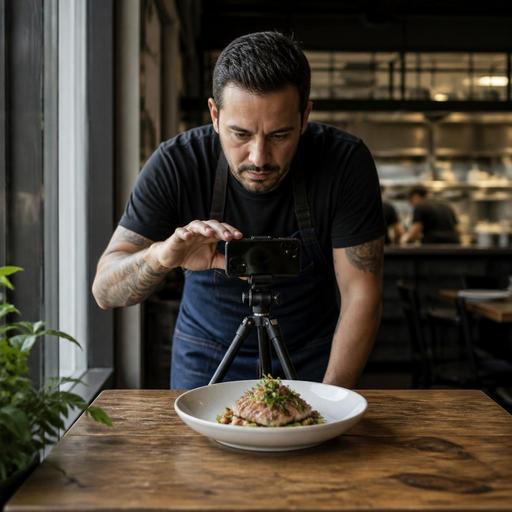
DIY Food Photography for Restaurant Menus That Drives Orders
Strong DIY food photography for restaurant menus can help guests decide faster, set accurate expectations, and make your digital menu feel more trustworthy. You do not need a full studio or an agency to improve your menu photos. Many restaurants can produce clear, appetizing images in-house by building a simple process, choosing a consistent visual style, and connecting those images to the places where guests actually order.
This guide is for restaurant owners, cafe operators, chefs, and managers who want practical results. Instead of chasing dramatic food magazine shots, focus on menu photography that supports ordering. The goal is simple: make each item easy to recognize, appealing, and consistent across your QR menu, website, delivery channels, and social media.
Start with the job your menu photos need to do
Before taking a single picture, decide what success looks like. Menu photography is not only about beauty. It is about clarity, confidence, and consistency. A guest scanning a lunch menu on a phone screen needs to understand the dish quickly. If the image is too dark, too crowded, or too stylized, it may look artistic but still fail to help the sale.
For example, a burger restaurant may need photos that clearly show bun size, patty thickness, cheese melt, and side options. A cafe may need bright overhead shots that make pastries and drinks easy to compare. A fine dining concept may prefer fewer photos overall, using selected hero dishes while keeping the rest of the menu text-led. The right style depends on your concept, price point, and ordering channel.
Ask these questions before the shoot:
- Which items sell best and deserve priority?
- Which dishes are often misunderstood and need a photo for clarity?
- Will guests mostly view these images on mobile screens?
- Do you need square photos for digital menus and social posts?
- What visual style matches your brand: bright and clean, warm and rustic, or modern and minimal?
When you define the purpose first, it becomes easier to make practical shooting decisions later.
Build a simple in-house photo setup
You can get strong results with basic equipment if your setup is repeatable. The most important factor is usually light. Natural window light often works better than harsh ceiling lighting because it gives food texture and shape. Place a small table near a window, turn off mixed overhead lights if possible, and use a plain reflector such as a white foam board or clean white menu board to bounce light back onto the dish.
A practical starter setup includes:
- A recent smartphone with a clean lens
- A tripod or phone stand to keep framing steady
- A table near indirect natural light
- One or two simple backgrounds such as wood, stone, or matte neutral surfaces
- White cards or foam boards for light control
- Basic editing on your phone for brightness, contrast, and white balance
Keep the setup modest and consistent. If every photo is taken in a different corner of the restaurant with different lighting, your digital menu will look uneven. Guests may not notice the technical reason, but they will feel the inconsistency.
Choose two or three shooting angles and stick to them. Overhead works well for pizza, salads, mezze, and coffee table scenes. A 45-degree angle is often best for burgers, pasta, cakes, and plated mains because it shows height and structure. Straight-on can work for drinks, layered desserts, and sandwiches. Limiting the angle choices also speeds up future shoots when seasonal specials or new items are added.
Style dishes for honesty, consistency, and speed
Food styling for restaurant menus should make dishes look their best without misleading guests. If a guest orders a chicken wrap because the photo shows a side salad and sauce pot, but those are not included, disappointment begins before the first bite. Accurate styling protects trust.
Create a simple plating guide for photo days. This is especially useful when multiple cooks or shifts prepare the same items. Write down what plate to use, garnish placement, sauce amount, and the angle that best represents the dish. This turns photography into an operational process rather than a one-time creative project.
Here are practical styling rules that help:
- Photograph the sellable version of the dish. Use the actual portion, the actual plate, and the actual included sides.
- Keep garnishes intentional. A few herbs, crumbs wiped from the rim, or a clean drizzle can improve the image without changing the product.
- Shoot fresh and fast. Fries soften, herbs wilt, ice melts, and sauces skin over. Prepare the camera setup before the dish arrives.
- Show texture. Cut into a grilled sandwich, angle a spoon through a dessert, or pour sauce only if it reflects the real serving experience.
- Reduce clutter. Too many props distract from the item guests are deciding on.
Suppose you run a brunch cafe. Instead of styling avocado toast with extra toppings that are not included, photograph the standard dish on the plate guests receive, then add only realistic touches such as fresh lemon, neat microgreens, and a clean table setting. The result still looks premium, but it stays honest.
Create a repeatable shooting workflow for your team
The biggest challenge with DIY photography is not taking one great photo. It is maintaining quality over time as menus change. A repeatable workflow solves this problem and reduces dependence on one person with a good eye.
1. Plan the shot list
Group items by station, plating style, or ingredient overlap. If your kitchen is already prepping burger garnishes, photograph all burgers in one block. If desserts are plated at a different pass, schedule them separately. This reduces disruption during service.
2. Shoot during quiet hours
Late morning or mid-afternoon often works better than service periods. The kitchen has more breathing room, and the team can reset plates without pressure. You will also have more control over the dining area if you are using window light.
3. Standardize file naming and selection
Name image files by item and date, such as grilled-chicken-wrap-june-2026.jpg. Save one approved hero image per menu item and keep alternates in a separate folder. This matters more than many operators expect. Once you start updating QR menus, website galleries, and social channels, poor file organization creates delays and mistakes.
4. Edit lightly
Correct brightness, crop consistently, and adjust white balance so plates look natural. Avoid heavy filters that make ingredients look unreal. The aim is appetizing accuracy, not visual effects.
5. Review on mobile before publishing
A photo that looks good on a desktop may fail on a phone if the focal point is too small. Check whether the dish remains clear when displayed in a small menu card or ordering tile.
Restaurants using digital menu tools should also think about where each image appears. Some items need a strong thumbnail crop. Others need a wider image for promotions or category banners. Keeping an organized image library makes those updates easier when prices, seasonal dishes, or availability change.
Use your photos beyond the menu without creating extra work
Good menu photos can support much more than the menu itself. The key is to capture them in a way that allows reuse. One clean hero image of a signature pasta can appear on a QR menu, a reservation confirmation page, an Instagram post, or a limited-time promotion. This improves consistency across guest touchpoints.
To get more value from every shoot, think in content sets:
- One tight hero shot for the menu listing
- One wider contextual shot for social media
- One vertical crop for stories or reels cover images
- One group shot for category pages such as breakfast, desserts, or cocktails
This does not mean turning every shoot into a marketing production. It simply means framing a few extra variations while the dish is already plated.
There is also an operational benefit. When your menu photos are organized and current, your team can update guest-facing channels more confidently. If a seasonal tart replaces a regular dessert, you can swap the image quickly. If a new combo meal launches, you can add a photo without waiting for an outside vendor. Platforms that centralize digital menus and item presentation make this process smoother because the content is easier to maintain in one place.
DIY menu item photography works best when it becomes a routine, not a special event. Start with your top sellers, create a small visual standard, and improve one shoot at a time. Over a few months, you can build a useful image library that supports better ordering decisions, stronger brand consistency, and a more polished guest experience. If your restaurant is managing digital menus through Restomas, a well-organized photo library makes menu updates and item presentation much easier to keep consistent across channels.
