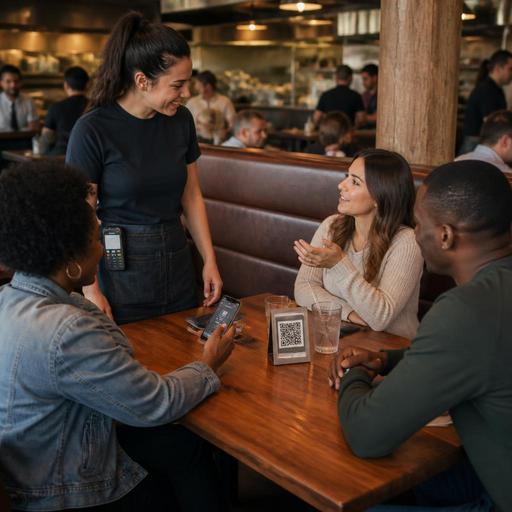
How Table-Side Ordering Supports U.S. Servers Without Replacing Them
Table-side ordering in the United States works best when operators treat it as a support tool, not a server replacement. For most full-service restaurants, diners, hotel outlets, brewery taprooms, and fast-casual concepts with dining rooms, guests still want hospitality, menu guidance, and a human who can solve problems. The winning approach is to use QR ordering and handheld ordering workflows to remove friction from routine steps while keeping servers focused on upselling, pacing, guest recovery, and check management.
Why table-side ordering works better as a support layer
Many U.S. operators first look at table-side ordering as a labor-saving move. That can help at the margin, but the stronger operational case is service flow. A server in a neighborhood grill can spend less time making repeat trips for another round of iced tea, an appetizer add-on, or a side of ranch. A sports bar can let guests on an active tab order another beer and wings during the game without waiting for a pass-by. A hotel restaurant can give business travelers a fast way to reorder coffee or close out when they are heading to the airport shuttle.
In these examples, the technology handles the low-friction parts of the experience. Staff still matter because guests ask questions about allergies, substitutions, doneness, spirit pours, happy hour rules, or whether the kitchen can split a dish. Families with kids may want quick control over timing. Older guests may prefer a printed menu and a server-led check. Table-side ordering should expand choice, not force one path.
That distinction matters in U.S. dining because hospitality is still tied to the guest relationship, not just transaction speed. If the system reduces wait time but makes guests feel abandoned, operators may see more complaints, lower repeat visits, and confusion around tipping expectations.
Where table-side ordering helps most in real U.S. service
Not every concept benefits in the same way. Operators should map table-side ordering to the moments where delays are common and labor is stretched.
- Casual dining: Let guests add drinks, desserts, and extra sides from the table while servers manage larger sections.
- Fast-casual with dining room service: Use QR ordering for second orders after the initial counter transaction, especially for families and groups.
- Bars and taprooms: Keep tabs open and allow repeat food and drink ordering from a phone, with age-verification and alcohol service workflows still handled by staff according to local rules.
- Food halls, stadium clubs, and airport lounges: Reduce line pressure by letting seated guests order without leaving the table.
- Hotel restaurants: Support travelers who want speed at breakfast while preserving server interaction for higher-touch dinner service.
- Multi-location brands: Standardize menu presentation, modifier logic, and order routing while allowing each store to match local staffing patterns.
A family diner in Ohio might use table-side ordering only for coffee refills and pie add-ons. A Texas barbecue restaurant might use it to reduce register lines during lunch. A Chicago sports bar might use it heavily on game day but keep traditional service during slower weekday shifts. The point is not full automation. The point is targeted relief where it improves throughput.
How to protect hospitality, tips, and the guest experience
The biggest mistake is deploying table-side ordering without redefining the server role. If guests scan, order, and pay with no clear staff touchpoints, the dining room can feel unsupported. Instead, create a simple service script. For example: greet within one minute, explain that guests can order from the QR menu or directly through the server, check back after food lands, and handle issues or special requests in person.
Operators should also think carefully about tipping workflows. In the United States, guests are used to different tipping moments depending on service style. If a guest orders from the table on a phone, then receives full dining room service, the tip prompt should match the experience and be easy to understand. If the concept uses a service charge for certain events or large parties, that needs to be operationally clear on the guest-facing flow and in staff training. Because tip handling, service charges, reporting, and payroll treatment can vary by jurisdiction and business model, operators should verify current requirements with their POS provider, payroll team, and qualified advisors.
Accessibility matters too. QR ordering should not be the only option. Keep printed menus available, make sure staff can take orders normally, and review whether digital menus are easy to navigate for guests using assistive technology. Operators should confirm current ADA-related expectations and practical accessibility standards with qualified guidance, but from an operational standpoint the rule is simple: never create a dead end for a guest who cannot or does not want to use a phone.
Operational setup: POS, KDS, pacing, and payment details
Table-side ordering succeeds or fails in the back end. If orders from the dining room hit the kitchen display system without clear routing, pacing can break fast. A burger order placed by a guest from table 14 must land in the same production logic as an order entered by a server. Modifiers, seat positions, allergy notes, and hold-fire timing need to be consistent.
Before rollout, U.S. operators should test these workflows:
- Menu sync: Make sure 86ed items disappear promptly so guests do not order unavailable dishes.
- Order routing: Confirm dine-in QR orders go to the correct prep stations and print or display with table identifiers.
- Pacing: Decide whether guests can send appetizers, entrees, and desserts at once or in separate rounds.
- Payment flow: Check whether guests can split checks, save a card on an open tab, or combine table-side orders with server-entered items.
- Pickup logic inside the dining room: Define whether runners, servers, or expo own food delivery for QR-originated tickets.
- Tax and fee display: Review how sales tax, service fees, and optional gratuity prompts appear before payment. Operators should verify local requirements and disclosure practices with official guidance.
This is especially important for chains and larger groups. A 12-unit fast-casual brand may want one digital menu structure across stores, but local realities still differ. One suburban location may emphasize curbside pickup and direct online ordering, while an urban location may rely more on delivery apps and smaller dine-in parties. Table-side ordering should fit into the broader channel mix, not compete with it.
A practical rollout plan for restaurant owners
Start small. Choose one use case, one shift, and one part of the dining room. A good pilot might be weekday lunch in a casual restaurant, patio service at a brewery, or breakfast at a hotel outlet. Measure operational signals rather than chasing hype: average time to first order, drink reorder speed, dessert attachment, server steps saved, guest complaints, voids, and check-close time.
Train staff to present the tool as a convenience. Guests should hear something like, You can order from me anytime, or use the QR menu if you want to add another round quickly. That framing keeps hospitality intact and prevents the system from sounding like a labor substitution.
Owners should also prepare for edge cases. What happens when a guest scans but wants to pay cash? What happens if a six-top wants separate checks after a mix of server-entered and self-entered items? How does a server monitor an open tab when guests reorder from the table? What is the recovery path if Wi-Fi fails on a busy Friday night? These details matter more than the launch announcement.
For operators subject to menu labeling or other chain-related rules, or those managing alcohol service, labor scheduling, tip reporting awareness, or local payment disclosures, the safest approach is to build the workflow with current official guidance and professional advice in mind. The technology should support compliance, but setup decisions still need local verification.
Used well, table-side ordering does not replace servers. It removes friction, gives guests more control, and helps dining rooms handle modern expectations around speed and convenience without giving up hospitality. Restomas can help operators connect QR menus, POS workflows, kitchen routing, and payment steps into one practical service flow.
