How U.S. Restaurants Can Handle Large Group Orders Without Kitchen Chaos
Large group orders can boost sales, but they can also overwhelm the line, delay regular tickets, and create mistakes that hurt the guest experience. For U.S. operators, managing large group orders without kitchen confusion means building a clear workflow from the first inquiry to the final check, pickup shelf handoff, or table drop. Whether you run a neighborhood diner, fast-casual bowl shop, sports bar, hotel restaurant, or food truck handling office catering, the goal is the same: make big orders predictable for the front of house, kitchen, and guest.
Start With a Separate Intake Process for Large Orders
One of the biggest causes of kitchen confusion is treating a 20-person order like a normal takeout ticket. Large orders need their own intake rules. That does not mean making the process complicated. It means gathering the right details before the kitchen ever sees the order.
For example, a fast-casual salad brand in Chicago may take everyday online orders through its standard menu, but route office lunches of 15 or more through a catering form or a dedicated ordering path. A full-service Tex-Mex restaurant in Dallas might let a server or manager confirm buffet pans, allergy notes, pickup time, utensils, and whether the guest needs individual labels for boxed meals. A sports bar near a suburban business park may ask whether the order is for dine-in, takeout, curbside pickup, or delivery through a third-party courier.
Your intake process should capture:
- Guest name, phone number, and preferred contact method
- Order type: dine-in group, takeout, catering pickup, curbside pickup, or delivery
- Exact ready time, not just arrival window
- Packaging needs, labels, utensils, condiments, and beverage setup
- Allergy or dietary notes and who is responsible for confirming them
- Payment method, including whether the guest wants one check or separate checks where operationally possible
- Any service charge or gratuity handling your business uses, with local rules verified as needed
If you use QR ordering, direct online ordering, or a POS-integrated catering form, create a threshold where large orders trigger extra review. That review can be a manager callback, an automated prep-time buffer, or a printed confirmation for the kitchen lead. If your restaurant handles tips, service charges, or tip reporting workflows, keep those steps clear in the POS and verify current federal, state, and local requirements with your accountant, payroll provider, or legal advisor.
Break the Order Into Kitchen-Friendly Production Steps
The kitchen does not get confused because the order is large. It gets confused because the order arrives as one giant block with no production logic. The fix is to convert the guest order into a prep sequence the line can execute.
A breakfast diner in Ohio serving a 12-person after-church table should not fire every plate at once if the grill and egg station cannot support it. Instead, the expo or kitchen lead can group tickets by station, hold toast until the last practical minute, and stagger pancakes so they land hot. A California burger counter handling a 25-boxed-lunch pickup should separate grill items, cold sides, drinks, and bag labeling into distinct steps. A hotel restaurant preparing a team meal for a conference room may batch salads, then proteins, then desserts, with one staff member assigned to final verification.
Useful production tactics include:
- Create large-order menu bundles. Limit customizations on high-volume items so the kitchen can produce consistently.
- Use timed firing rules. Set when each station should begin based on promised handoff time.
- Assign one expeditor. One person should own assembly, bag counts, and final accuracy.
- Label by guest or package. This matters for boxed lunches, family meals, and allergy-sensitive orders.
- Separate regular service from bulk prep. If possible, use a secondary make line, prep table, or staging rack.
A kitchen display system can help by routing items to the right station instead of printing one long paper ticket that everyone interprets differently. If you operate multiple locations, standardize how large orders appear on screens, how modifiers are abbreviated, and who is allowed to override prep timing.
Protect Your Core Service During Rush Periods
Large group orders often create problems not because they are difficult, but because they collide with lunch rush or game-day volume. A downtown cafe may accept a 30-sandwich office order for 12:15 p.m., then realize it lands in the middle of its busiest register line. An airport concession may get hit with a gate-related surge while also preparing a preordered crew meal. A stadium stand may have to manage bursts tied to inning breaks or halftime.
To protect regular service, define capacity rules before you need them. For example:
- Set cutoff times for same-day large orders
- Block certain pickup windows during peak rushes
- Offer a reduced large-order menu during high-volume periods
- Use prep lead times that reflect your actual line capacity, not best-case speed
- Schedule labor around known large-order patterns when possible
This is especially important for fast-casual and QSR operators balancing drive-thru, counter, direct online ordering, and delivery apps. If delivery marketplaces are live during your heaviest large-order windows, consider throttling availability, adjusting prep quotes, or pausing selected channels temporarily. The point is not to turn off sales. It is to prevent one big order from wrecking 40 smaller ones.
For labor planning, cross-train one or two team members on packing, labeling, and curbside pickup handoff. If your team includes tipped staff, clarify when servers support large takeout or catering orders and how your internal workflow handles tips or service charges. Since labor and pay rules vary by state and city, operators should verify current requirements with qualified advisors and official guidance.
Build a Clear Handoff for Pickup, Delivery, or Dine-In Groups
The last five minutes of a large order are where many restaurants lose control. Food is ready, but bags are missing sauces, cold drinks are getting warm, or the guest cannot tell which trays belong to which part of the order.
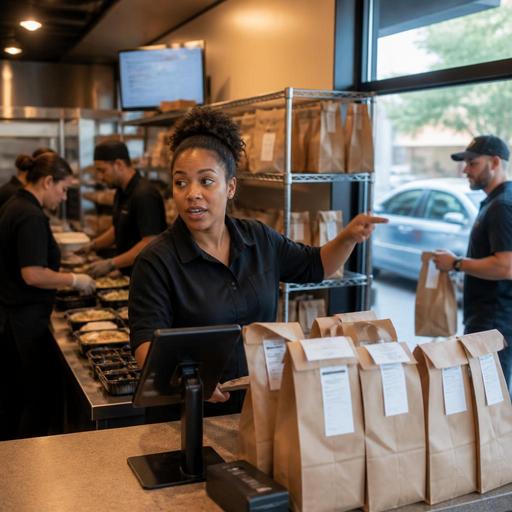
Create a handoff checklist for each fulfillment type. For a takeout shelf at a New York fast-casual location, that may mean staging hot food separately from chilled items and keeping the pickup shelf organized by promise time. For curbside pickup at a suburban family restaurant, it may mean confirming vehicle details, assigning a runner, and using a final bag count before the order leaves the building. For a dine-in birthday party at a Florida seafood restaurant, it may mean coursing appetizers and entrees so the server team is not dropping 18 plates into a crowded aisle at once.
Delivery needs extra care. If the order goes through delivery apps, make sure packaging, sealing steps, and item counts are documented. If you offer direct delivery or use in-house drivers, define who confirms the address, who checks drinks and desserts, and what happens if the guest changes the drop-off point. In every case, one person should sign off operationally before handoff.
ADA-minded access also matters in practical ways. If guests are using QR ordering for a large table, provide an easy alternative for anyone who cannot comfortably use a phone-based menu. If pickup involves a curbside workflow or a lobby shelf, make sure the path and communication method work for different guest needs. For accessibility requirements, confirm current standards and local expectations with official guidance or qualified professionals.
Review the Order After Service and Improve the Next One
The best large-order system is built from post-shift review. After a big office lunch, team dinner, school booster pickup, or hotel banquet-style takeout, ask a few simple questions:
- Did the kitchen receive the order in a usable format?
- Which station got backed up first?
- Were modifiers and allergy notes clear?
- Did the promised ready time match reality?
- Were the check, sales tax treatment, and any service charge explanation handled clearly for the guest?
For chains and multi-location operators, this is where consistent reporting matters. Track common failure points by store: late firing, missing labels, bag count errors, delivery handoff issues, or dine-in course timing. If your brand is subject to menu labeling or other regulatory requirements because of size or format, keep those workflows documented and verify current obligations with official sources and advisors rather than relying on old assumptions.
Large group orders do not need to create kitchen chaos. With a separate intake path, production-friendly ticket routing, realistic capacity controls, and a disciplined handoff process, U.S. restaurants can turn big orders into repeat business instead of stressful exceptions.
Restomas can help operators organize digital ordering, kitchen routing, and pickup workflows so large orders are easier to manage across one location or many.
