Using Digital Order Signals to Improve Restaurant Labor Scheduling
Using digital order signals to improve restaurant labor scheduling is one of the most practical ways U.S. operators can move from reactive staffing to better daily control. If your restaurant already receives orders through a POS, QR ordering, direct online ordering, delivery apps, phone orders entered at the counter, or hotel in-room dining systems, you already have demand signals. The challenge is turning those signals into staffing decisions for servers, cashiers, line cooks, expo, bartenders, runners, and prep teams without overstaffing slow periods or getting crushed during rushes.
For restaurant operators in the United States, labor scheduling is rarely just about sales by hour. You also have to think about tipped staff coverage, curbside pickup handoff, pickup shelf monitoring, third-party delivery timing, multi-channel order surges, and the difference between dine-in and takeout labor needs. The goal is not a perfect forecast. The goal is a schedule that matches real order behavior closely enough to protect service speed, check accuracy, and team morale. As always, labor, wage, break, predictive scheduling, tip, and reporting rules can vary by state and city, so operators should verify current local requirements with qualified advisors or official guidance.
Start with the digital demand signals you already have
Many operators look at weekly sales totals and stop there. That misses the operational detail hidden inside order flow. A better approach is to review which digital signals actually change labor demand in your restaurant.
- Order channel mix: dine-in, direct online ordering, delivery apps, call-in takeout, QR table ordering, kiosk, and catering.
- Order timing: when orders hit the system, not just when checks close.
- Item complexity: a burger-and-fries ticket loads the kitchen differently than six customized salads, espresso drinks, or family-style trays.
- Fulfillment type: dine-in, curbside pickup, pickup shelf, counter handoff, room service, or delivery driver pickup.
- Modifier volume: high customization usually means more prep friction and longer line time.
- Large-order concentration: office lunch drops, team catering, airport rushes, and post-game spikes can distort labor needs.
For example, a suburban fast-casual bowl concept may see steady lunch volume in total dollars, but the labor picture changes if more guests shift from in-store ordering to app-based pickup. Fewer front-counter interactions may be needed, but expo, bagging, and pickup shelf organization become more important. A neighborhood sports bar may have similar Friday sales week to week, yet one Friday might lean heavily toward delivery apps during a storm, which increases packaging, timing coordination, and driver handoff labor more than server coverage.
Match schedules to order patterns, not just revenue
Revenue is useful, but labor should be scheduled around operational workload. A $2,000 hour with mostly draft beer tabs is not the same as a $2,000 hour filled with split checks, appetizers, custom entrees, dessert pacing, and curbside pickup.
Start by mapping your dayparts with a simple question: what kind of labor does this order pattern require? In a U.S. diner, the Sunday breakfast rush may need more hosts, coffee support, bussers, and short-order line coverage than the same revenue level on a weekday lunch. In a food truck near office buildings, mobile pre-orders can create a compressed pickup wave from 11:45 a.m. to 12:20 p.m., meaning labor should be loaded before the rush, not after the line forms.
Useful scheduling triggers often include:
- When digital orders begin stacking before opening or before peak.
- When average ticket modifications rise enough to slow the line.
- When direct pickup orders overlap with delivery app demand.
- When dine-in seating, bar traffic, and takeout all peak together.
- When late-night ordering shifts from table service to takeout and delivery.
A practical example: a multi-location burger brand may notice that one urban store gets heavy delivery app volume from 9:00 p.m. to midnight, while a suburban store sees stronger family takeout from 5:30 p.m. to 7:30 p.m. Using the same labor template at both locations creates avoidable stress. One store needs stronger late expo and packaging coverage; the other needs earlier front-of-house and curbside support.
Build channel-specific staffing plans for U.S. service models
Different restaurant formats need different scheduling logic. Digital ordering does not reduce labor in the same way everywhere.
Fast-casual and QSR
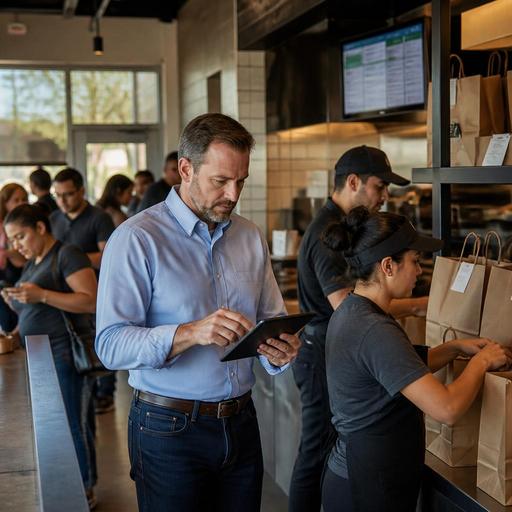
These operators often benefit from separating production labor from guest handoff labor. If online orders spike, you may need one person focused on bagging, labeling, and managing the pickup shelf so the line is not interrupted. In locations with heavy curbside pickup, assign clear handoff ownership by shift instead of making everyone partially responsible.
Full-service restaurants and bars
Digital demand affects servers and bartenders differently than it affects the kitchen. QR ordering at the table may reduce some routine steps, but guests still need hospitality, payment support, and issue resolution. Bar managers should watch whether game-day or weekend app orders pull attention away from in-house guests. If they do, create separate takeout assembly coverage instead of asking bartenders to do everything from tabs to to-go bags.
Hotels, airports, and stadium venues
These environments often face compressed demand windows. A hotel restaurant may get a burst of room service breakfast orders, while an airport concession may see a gate-driven rush with little warning. A stadium stand can go from quiet to slammed in minutes at halftime. In these settings, digital timestamps are especially valuable because they show when demand actually arrives and how long fulfillment takes.
Use a weekly operating review to improve the next schedule
The best labor scheduling systems are not built once. They improve every week. Hold a short review using POS and order-management data with your GM, kitchen lead, and front-of-house manager.
Look at questions like these:
- Which dayparts had the biggest gap between scheduled labor and actual order load?
- Where did ticket times rise because of order channel overlap?
- Did pickup shelf congestion create remakes or guest confusion?
- Were curbside arrivals clustered at times with no dedicated runner?
- Did delivery app surges pull kitchen capacity away from dine-in guests?
- Which locations handled direct online ordering smoothly, and why?
This review is also a good time to check whether your systems are creating extra manual work. If staff are re-entering orders, chasing printer tickets, or walking between disconnected screens, the schedule may look like a labor problem when it is really a workflow problem. A kitchen display system, integrated order management, or clearer QR ordering flow can reduce avoidable labor strain by making the same team more coordinated.
For chains subject to menu labeling rules or locations handling alcohol, service charges, tips, or mixed payment methods, digital workflows should also be reviewed for accuracy and clear team training. Operators should confirm current federal, state, and local requirements with qualified advisors and official sources, especially where labor reporting, sales tax treatment, service charges, accessibility, and payment handling may differ.
Practical actions restaurant owners can take this month
If you want immediate progress, keep it simple and operational.
- Pull 4 weeks of hourly order data by channel, not just total sales.
- Mark your true bottlenecks: grill, fry, bar, espresso, expo, bagging, curbside handoff, or host stand.
- Create one labor template per daypart instead of one generic schedule for the whole week.
- Assign ownership for pickup and delivery handoff during peak windows.
- Compare ticket time spikes to staffing gaps and note whether the issue was skill mix, headcount, or workflow.
- Review location-level differences if you operate multiple units; do not force one pattern on every store.
- Check ADA-minded access in digital ordering flows and make sure guests still have a workable ordering path if they do not use QR or mobile tools.
The strongest schedules come from connecting labor to demand signals early enough to act. When digital orders are visible across channels, managers can prep sooner, stagger clock-ins better, protect dine-in hospitality, and avoid turning every rush into a staffing emergency.
Restomas helps operators bring QR ordering, order flow, POS-connected visibility, and kitchen coordination into one clearer operating picture so labor decisions can be based on what demand is actually doing.
