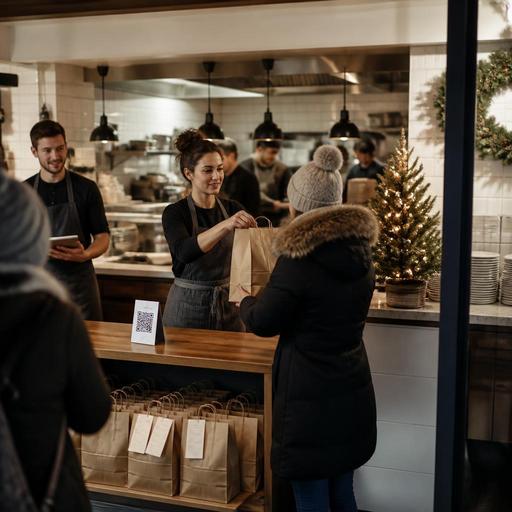
Holiday QR Menu and Preorder Strategy for U.S. Restaurants
Holiday QR menu and preorder strategy for U.S. restaurants can help operators handle seasonal demand without turning the line, the kitchen, and the phone into a bottleneck. Whether you run a neighborhood cafe taking pie orders for Thanksgiving, a fast-casual brand offering family meal bundles in December, or a hotel restaurant selling Christmas brunch seatings, the goal is the same: make ordering easier for guests and more predictable for your team.
In the U.S., holiday traffic often comes from several channels at once: dine-in, takeout, delivery apps, direct online ordering, catering inquiries, and walk-in guests asking about specials. A QR menu and a clear preorder window can organize that demand before it hits your expo line. Instead of relying on handwritten notes, voicemail, or a server trying to remember every modification, operators can publish a seasonal menu, limit pickup times, control item availability, and route orders into the POS and kitchen display system in a more consistent way.
The right setup will look different for a suburban diner, a food truck, a bar selling game-day catering trays, or an airport concession with tight labor windows. But the operating principles are similar: simplify the offer, define the promise, and make guest instructions impossible to miss.
Build a holiday menu that is easy to order and easy to produce
Holiday menus fail when they are exciting on paper but chaotic in service. Before you upload anything to a QR menu, review each special item from prep through handoff. Ask whether the dish travels well, whether it needs a last-minute garnish, whether it can be packaged quickly, and whether it creates a choke point at one station.
For example, a U.S. bakery-cafe offering Thanksgiving preorder packages may do better with fixed bundles like a turkey sandwich platter, two pie choices, and a reheating-friendly soup add-on instead of a fully customized spread. A sports bar selling Super Bowl wings can separate preorder packs by sauce style and quantity rather than allowing endless mix-and-match notes that slow the fry station. A hotel restaurant promoting holiday brunch can use timed reservations plus a QR menu preview to reduce questions at check-in and help guests decide before they are seated.
Strong holiday menus usually include:
- Core seasonal items with high demand and strong margins
- Bundles or family packs that raise check average while simplifying production
- Add-ons like desserts, bottled drinks, or retail sauces that do not burden the line
- Clear pickup or dine-in timing so guests know what is available and when
- Short, plain-language descriptions that reduce staff explanation time
If your operation serves alcohol, holiday cocktails or wine bundles may be part of the plan, but availability, packaging, age verification, and off-premise rules vary by state and local jurisdiction. Keep the workflow clear and verify current requirements with qualified advisors or official guidance before launch.
Use QR menus to control guest choices before the rush starts
A holiday QR menu should do more than display specials. It should guide guests toward the items, timing, and ordering channel you want them to use. In practice, that means separating seasonal offers from the everyday menu, labeling preorder deadlines, showing pickup instructions, and removing sold-out items fast.
Consider a multi-location fast-casual operator running holiday meal kits across three suburban stores. If one store has less cold storage or fewer prep hours, that location may need different item caps or earlier preorder cutoffs. A digital menu lets the brand keep the promotion consistent while adjusting availability by unit. The same applies to food trucks doing office holiday catering in downtown business districts, where parking access and pickup windows are different from normal lunch service.
Make the QR path simple for guests:
- Scan the code and land on a holiday collection first
- See pickup, curbside pickup, or dine-in options immediately
- Choose from a limited set of seasonal items or bundles
- Select an available date and time window
- Pay or place the order based on your workflow
- Receive clear confirmation and pickup instructions
This is also where ADA-minded access matters. A QR menu should not be your only way to communicate important ordering details. Keep a staff-assisted ordering path available and make sure digital menu text is readable and logically organized. Operators should review accessibility expectations for their setup and verify current requirements with qualified advisors or official guidance when needed.
Set preorder windows that protect the kitchen, not just sales
Many operators treat preorder windows as a marketing tool, but they are really a production control tool. The window should reflect purchasing lead times, prep labor, cold storage, packaging supply, and handoff capacity. If your team can comfortably stage thirty family meal pickups every fifteen minutes, do not open sixty slots just because demand exists.
For a neighborhood restaurant selling Christmas Eve takeout trays, a practical setup might include an order cutoff one or two service days before pickup, limited modifications, and staggered time slots. For a QSR brand testing New Year party platters, the preorder window may need to shut earlier for large orders so commissary prep and driver dispatch can be planned. For a stadium venue or airport concession, holiday traffic may be tied to event schedules or flights, so the timing logic should match those peaks.
As you set windows, think through:
- Lead time for purchasing and prep
- Capacity by station such as grill, fry, pastry, or cold line
- Packaging inventory for family packs and large-format orders
- Pickup shelf or curbside flow so guests are not crowding the host stand
- Staffing coverage for phones, runners, expediting, and guest questions
If your system takes deposits, prepayment, or service charges for special events, be precise about what the guest is paying and how it appears on the check or receipt. In the U.S., sales tax treatment, gratuity, service charges, and tip reporting implications can differ by state and workflow. Keep the guest-facing language clear and confirm details with your POS provider, accountant, payroll partner, or legal advisor as appropriate.
Coordinate POS, kitchen, pickup, and labor before launch
A great holiday menu can still fail if the back-of-house and front-of-house setup is messy. Before you publish the QR menu, run a short operational test. Place mock orders, confirm they hit the right POS categories, check that the kitchen display system prints or routes tickets correctly, and verify that pickup labels match the promise shown to the guest.
For example, a diner offering pumpkin pie preorders should make sure the pastry station sees future-dated orders clearly and that the pickup shelf is separated from regular takeout bags. A coffee shop doing holiday cookie boxes may need a dedicated prep table and a runner assigned during the morning rush. A bar with office party platters may want one manager reviewing all large preorders daily so missing items or timing conflicts are caught early.
Labor planning matters just as much as menu design. Holiday demand often creates spikes at odd hours: early morning packaging, midafternoon pickup surges, and last-minute walk-in traffic. Build schedules around those handoff points, not just normal meal periods. Train servers, cashiers, and hosts on the exact script for preorder questions, substitutions, cutoff times, and curbside pickup steps. The fewer exceptions your team creates manually, the smoother service will be.
Communicate clearly with guests and review results after the holiday
Holiday execution improves when guests know exactly what to expect. Use your QR menu, direct ordering page, confirmation messages, and in-store prompts to answer the most common questions: when to order, when to pick up, where to park, how to use curbside pickup, what reheating instructions apply, and which items are limited. If you also sell through delivery apps, keep holiday-only items and timing rules aligned as much as possible so your staff is not juggling conflicting promises across channels.
Chain operators should also review menu labeling obligations if they apply to their concept size and service model. If your business falls under FDA menu labeling rules or similar state requirements, confirm how seasonal items are displayed and communicated before rollout.
After the holiday, do a short debrief:
- Which items sold early and should have had tighter caps or more inventory?
- Which pickup windows created backups?
- Did direct online ordering reduce phone interruptions?
- Were QR menu updates fast enough when items sold out?
- Did the team spend too much time on modifications or guest confusion?
The best holiday system is one you can repeat and improve. A well-structured QR menu and preorder workflow can help U.S. restaurants protect service quality, raise average checks, and reduce last-minute chaos across dine-in, takeout, and multi-location operations.
Restomas can help operators organize QR menus, ordering flows, and service handoffs in a way that fits real restaurant operations.
