Restaurant Automation That Still Feels Warm: A Practical U.S. Guide
Restaurant automation does not have to make service feel robotic. For U.S. operators, the real goal is simpler: use technology to remove friction so servers, cashiers, bartenders, hosts, and kitchen teams can spend more time on hospitality. Whether you run a neighborhood diner, a fast-casual salad shop, a food truck, a hotel restaurant, or a multi-location QSR brand, the best automation choices are the ones guests barely notice because the experience feels smoother, faster, and more personal.
Start by automating the parts guests do not value
Most guests do not walk into a restaurant hoping to wait for a host to find a paper list, repeat their order three times, or stand at a takeout counter wondering whether their food is ready. Those are strong candidates for automation because they are operational tasks, not hospitality moments.
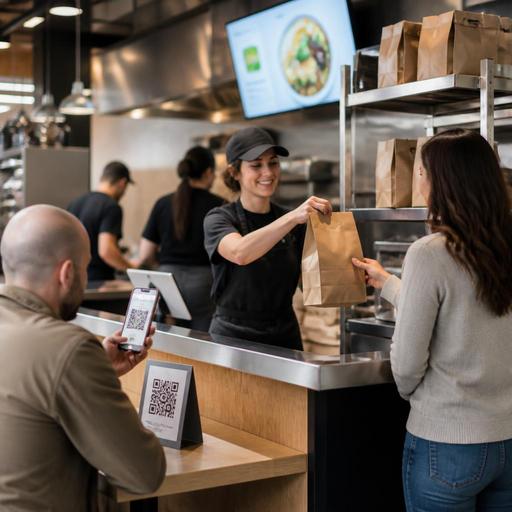
In a U.S. full-service restaurant, that might mean digital reservations with waitlist updates, QR menus that reduce reprints, and handheld POS devices that let servers close a check tableside. In a fast-casual restaurant, it could mean self-serve ordering for simple lunch orders, automated order routing to the kitchen display system, and a pickup shelf for app and direct online orders. In a sports bar, it may be a digital tab workflow that helps staff manage drink rounds during a game-day rush without losing the personal back-and-forth guests expect at the bar.
A good rule is this: automate the delay, not the welcome. Let technology handle repetitive tasks, but keep people visible where warmth matters most, such as greeting, recovery after a mistake, menu guidance, and upselling based on real guest preferences.
Choose hospitality moments that should stay human
Operators often get better results when they decide in advance which parts of service should never feel outsourced. This is especially important in U.S. restaurants where tips, regulars, and personal recognition are tied closely to the guest experience.
- First greeting: Even if guests join a waitlist online or scan a QR code at the table, a quick in-person welcome sets the tone.
- Menu coaching: A kiosk can list modifiers, but a trained server can explain spice level, portion size, allergens, or the difference between two signature dishes.
- Issue recovery: When an order is late, missing, or incorrect, guests want a person who can take ownership.
- Special occasions: Birthdays, anniversaries, business dinners, and hotel guest dining often benefit from human attention more than speed alone.
- Checkout clarity: In the U.S., guests may need a clear explanation of service charges, tips, split checks, or sales tax presentation depending on the concept and local practice.
For example, a brunch spot in Chicago might use QR ordering during the weekend rush, but still station a floor lead to greet tables, answer questions about add-ons, and check on guests before the check is paid. A Texas barbecue restaurant may automate takeout text alerts and expo coordination while keeping a staff member near the pickup shelf to confirm large family meals and avoid handoff mistakes.
Payment workflows deserve extra care. If you use QR pay-at-table, self-checkout, or counter service terminals, make sure the process still feels transparent and guest-friendly. Tip prompts, receipts, and service charge communication should be easy to understand. Because rules and expectations around tipping, tip reporting, and service charges vary by jurisdiction and setup, operators should confirm current requirements with payroll providers, accountants, counsel, or official guidance.
Use automation to support staff, not replace judgment
The fastest way to make technology feel cold is to deploy it as a barrier between employees and guests. The better approach is to use automation behind the scenes so staff can work with less stress and more consistency.
Where automation helps the team most
- Order accuracy: Direct entry from QR ordering, online ordering, or kiosks can reduce misheard items and modifier mistakes.
- Kitchen pacing: A kitchen display system can route dine-in, takeout, curbside pickup, and delivery app tickets by station and timing.
- Labor coordination: Forecasting and scheduling tools can help managers staff for lunch rushes, game nights, airport peaks, or hotel breakfast waves. Managers should still review schedules with local labor rules and break requirements in mind.
- Inventory visibility: Low-stock alerts help prevent 86 situations that frustrate guests and staff.
- Channel control: Syncing direct online ordering with third-party delivery apps reduces menu mismatches and tablet chaos.
Think about a five-unit fast-casual bowl concept. If each store has a different process for takeout, in-store ordering, and delivery marketplaces, hospitality suffers because staff are always in recovery mode. But if all channels flow into one POS-connected system with clear kitchen routing and pickup timing, team members can focus on greeting guests, checking bag accuracy, and keeping the line moving.
For a food truck, automation may be less about self-service and more about speed under constraints. A simple digital menu, contactless payment, and text notification workflow can reduce crowding at the window while still letting staff joke with regulars and answer questions. In a hotel restaurant, reservation notes and POS-integrated room charge workflows can help hosts and servers personalize service rather than chase details manually.
Design digital experiences that feel easy, clear, and inclusive
Cold technology often feels cold because it is confusing. If guests need too many taps, cannot read the menu on their phone, or do not understand where to pick up an order, the problem is not automation itself. It is poor experience design.
Keep digital touchpoints simple. A QR menu should load quickly, work on common mobile devices, and present categories in a way that makes sense during service. If guests can order from the table, show clear modifier logic, sold-out items, and a visible path to ask for help. ADA-minded access matters here too. Operators should think about readable layouts, contrast, device independence, and non-digital alternatives so guests are not excluded. Accessibility expectations can vary by context, so it is wise to review current guidance with qualified advisors.
For chains and multi-location groups, menu consistency matters beyond branding. If you operate at a scale where FDA menu labeling or other disclosure rules may apply, build workflows that keep item data organized across channels and locations, then verify your obligations with official guidance or counsel. The same goes for alcohol menus, age-gated ordering steps, and state or local service rules.
Physical flow matters too. A pickup shelf should be obvious without blocking dine-in traffic. Curbside pickup should have a clean handoff process so guests are not calling the store repeatedly. At an airport concession or stadium stand, automation should shorten lines and make order status visible, while staff remain available to direct guests and solve exceptions quickly.
Build an automation plan around service standards
Before buying another tool, define what better hospitality looks like in your concept. Then choose automation that supports that standard.
- Map the guest journey: From discovery to order, pickup, dine-in, payment, and follow-up, identify friction points.
- Separate high-touch from low-touch tasks: Keep personal interaction where it drives loyalty and tips.
- Train for language, not just buttons: Staff should know how to introduce QR ordering, explain digital receipts, and help guests who prefer a traditional check.
- Measure recovery, not just speed: Track voids, remakes, missed modifiers, and pickup confusion along with ticket times.
- Keep a backup path: If Wi-Fi fails, a tablet freezes, or a guest cannot use mobile ordering, staff need a fast manual fallback.
A family diner in Ohio may decide that regulars should always be greeted by name and offered coffee before any tech appears. A California fast-casual brand may prioritize direct online ordering and curbside pickup to reduce commission pressure from delivery apps. A New York bar may use QR tabs during peak hours but keep bartenders focused on recognition and pace. Different concepts need different balances, but the principle stays the same: automate operational friction so your people can deliver the feeling guests remember.
Restomas helps U.S. restaurant teams connect QR menus, ordering, POS workflows, kitchen coordination, and multi-location operations in a way that can support speed without losing the human side of service.
