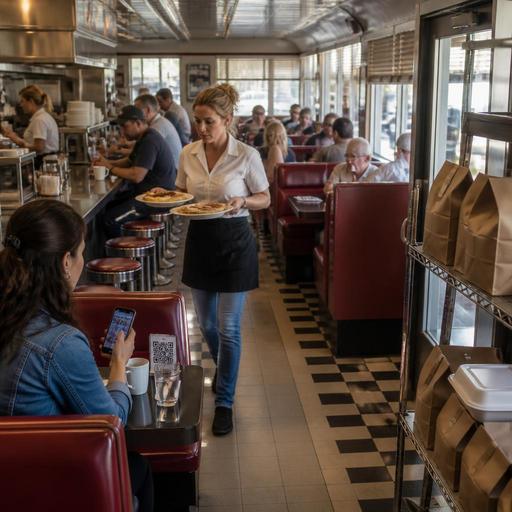
How U.S. Diners Can Use Digital Ordering Across Booths, Counter, and Takeout
Digital ordering for U.S. diners works best when it supports the traffic you already have: booth service during the breakfast rush, counter orders for solo guests, and steady takeout moving through a pickup shelf or curbside spots. For diner operators in the United States, the goal is not to replace hospitality. It is to reduce order friction, keep checks accurate, and help the kitchen handle pancakes, burgers, coffee refills, and takeout bags without chaos.
A classic American diner has a unique mix of service styles. One party may sit in a booth and expect full table service, another guest may grab a quick counter stool for coffee and eggs, and a third customer may place a mobile order for a tuna melt on the way home from work. That mix creates operational pressure on hosts, servers, cashiers, expediters, and the kitchen display system. A good digital ordering setup should match each path clearly instead of forcing every guest into the same process.
Map ordering by traffic type inside the diner
Start by separating your main order flows: booth, counter, and takeout. Each flow needs different prompts, timing, and payment options.
Booth service
For booth guests, QR ordering can work as a flexible layer rather than a hard replacement for the server. Many U.S. diners do well with a QR menu that lets guests browse, reorder coffee, add pie, or pay the check without waiting. Servers still greet the table, answer questions, and manage hospitality. This is especially useful during weekend brunch when guests are ready to order before a server can circle back.
Example: a suburban diner with 20 booths can let guests scan to view the menu, see breakfast add-ons, and send an order directly to the POS and kitchen display system. The server then focuses on refills, allergy questions, and pacing instead of handwritten tickets.
Counter traffic
Counter guests usually want speed and clarity. If your diner has a front register plus a pastry case or grab-and-go cooler, digital ordering should shorten the line, not add another decision point. A self-order QR code near the waiting area or a small kiosk-style tablet can help guests build simple orders before they reach the cashier. Keep modifiers tight: egg style, side choice, toast type, drink selection. Overcomplicated screens slow down a guest who just wants hash browns and coffee.
Takeout and pickup
For takeout, your direct online ordering flow should clearly separate pickup times, curbside instructions, and delivery app orders. If your diner already uses third-party delivery apps, make sure your in-house ordering channel offers obvious benefits like easier repeat ordering, better menu control, and cleaner guest communication. A pickup shelf near the entrance can work well for sealed bags, but only if staff can verify names quickly and the shelf does not block dine-in traffic.
Build a menu that fits diner ordering behavior
Diners often have large menus, and that can create friction on small mobile screens. Digital ordering only helps if guests can find what they want fast.
- Group by daypart: breakfast, lunch, dinner, late-night, dessert, and beverages.
- Use familiar diner language: two eggs any style, country fried steak, club sandwich, side of bacon, bottomless coffee if that matches your offer.
- Limit modifier sprawl: do not bury guests under too many choices for every item.
- Highlight high-frequency combos: breakfast platters, soup-and-sandwich lunch specials, burger add-ons, pie and coffee.
- Flag off-premise packaging needs: gravy on the side, syrup cup, utensils on request, sealed drinks, extra napkins.
For multi-location diner groups, keep the core menu structure consistent across stores while allowing local differences such as regional specials or alcohol where permitted. If one location inside a hotel or airport concession has a tighter menu due to labor or equipment limits, reflect that digitally instead of forcing a one-size-fits-all menu.
If your business is subject to menu labeling or accessibility requirements, treat the digital menu as part of your operational process and verify current federal, state, and local guidance with qualified advisors or official sources. The same applies to alcohol sales, allergy communication, and local consumer disclosure rules.
Connect digital orders to the line without slowing the grill
The diner kitchen is built around rhythm. Digital ordering should protect that rhythm. If online tickets print in one place, server tickets in another, and delivery app orders appear on a separate tablet, the result is missed items and ticket-time spikes.
The practical fix is to route all orders into a connected workflow. When possible, send booth QR orders, counter orders, direct online orders, and delivery marketplace orders into the same POS stack and kitchen display system with clear source labels. The grill cook does not need five systems. The expo just needs to know whether an order is dine-in, takeout, curbside, or delivery.
Example: a busy highway-side diner can configure the kitchen display so dine-in omelets fire immediately, takeout burgers show packaging prompts, and delivery app orders display hold times during the lunch rush. This helps the line stage food correctly and reduces remake risk.
Also think about pacing rules. A booth order for appetizers and entrees may need coursing, while a counter order should fire all at once. A milkshake for curbside pickup should not melt while the sandwich is still on the flat top. Digital ordering is not just about input; it is about timing logic.
Handle payment, tips, and front-of-house workflows carefully
U.S. diners often blend tipped table service with quick counter transactions, so payment design matters. If a guest orders from a booth by QR, decide whether they can open, review, and close the check on their phone or whether a server still presents the final check. If counter guests pay before food is ready, make pickup names and order numbers easy for staff to call or verify without creating confusion.
For tips, use clear prompts that fit the service model. Booth service, counter pickup, and curbside handoff are not identical guest experiences. Whatever tipping workflow you use, make sure reporting and payroll processes align with your POS records and that managers understand the difference between tips, service charges, and sales tax treatment. Requirements vary by state and city, so operators should confirm current rules with their accountant, payroll provider, attorney, or official guidance.
ADA-minded access also matters. Not every diner guest wants to scan a code, use a smartphone, or navigate small text. Keep printed menus available, train staff to assist without friction, and make sure digital menus are readable and straightforward. Accessibility is both a hospitality issue and a compliance consideration, so verify current requirements for your locations.
Use digital ordering to improve labor and guest flow
The biggest operational win is often not higher sales by itself. It is smoother labor deployment. When guests can self-start simple orders, your team can spend more time on hospitality, accuracy, and speed of service.
- Review peak periods: breakfast rush, after-church Sunday traffic, late-night takeout, and commuter coffee windows.
- Assign one owner for each channel: dine-in QR, counter, direct online ordering, delivery apps, and curbside pickup.
- Create packaging stations: separate dine-in pass from takeout bagging to avoid expo congestion.
- Train staff on exception handling: item 86s, substitutions, split checks, refunds, and delayed drivers.
- Measure practical outcomes: ticket errors, voids, average pickup wait, server steps saved, and abandoned online carts.
For example, a neighborhood diner near a high school may use direct online ordering to absorb the afternoon takeout rush while keeping booths open for regulars. A downtown diner can use curbside pickup during bad weather without stacking guests at the host stand. A diner inside a hotel can let travelers order breakfast from the lobby and route the ticket to the same kitchen line as dining room checks.
Digital ordering should make your diner easier to run, not more complicated. Start with the guest paths you already have, simplify menu decisions, connect every order source to the kitchen, and keep human service where it matters most. Restomas can help diner operators bring QR menus, online ordering, POS-connected workflows, and pickup management into one practical operating system.
