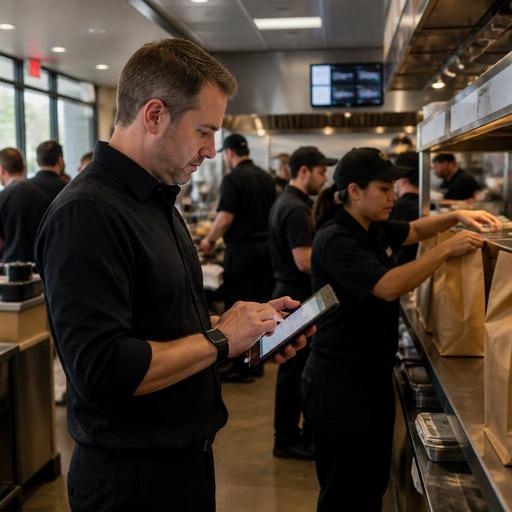
How U.S. Restaurants Use Digital Order Signals to Build Smarter Labor Schedules
Restaurant labor scheduling with digital order signals is becoming a practical advantage for U.S. operators who are tired of building weekly schedules on instinct alone. If your restaurant already collects orders through a POS, direct online ordering, QR menus, delivery apps, reservations, or a kitchen display system, you already have demand clues that can help you staff more accurately. The goal is not to replace manager judgment. It is to give your managers better timing, better station coverage, and fewer expensive surprises during lunch, dinner, late night, and weekend rushes.
For a neighborhood burger spot, that may mean seeing a spike in app-based pickup orders between 11:15 a.m. and 12:00 p.m. before the dining room fills. For a suburban coffee shop, it may mean recognizing that mobile orders jump ten minutes before the local commuter wave. For a hotel restaurant, it may mean adjusting breakfast staffing when in-house occupancy, banquet activity, and room-service demand all point to a heavy morning. Digital demand signals give operators a way to schedule for what is actually happening, not just what happened last month on the same day.
Which digital signals matter most for restaurant scheduling
Not every data point deserves equal weight. The most useful scheduling signals are the ones that show when demand arrives, how guests order, and which stations will feel the pressure first. In most U.S. restaurants, that means combining front-of-house and off-premise data instead of treating them as separate worlds.
- Direct online ordering: Watch order count by 15-minute interval, average prep time, and pickup vs delivery mix.
- Delivery marketplaces: Review marketplace order surges separately from first-party orders, since third-party demand often lands in bursts and can hit the kitchen without adding dining room traffic.
- QR table ordering: Track whether guests place rounds faster, especially in bars, patios, food halls, and fast-casual dining rooms.
- POS check patterns: Look at open-check timing, item mix, modifiers, voids, and payment rushes to understand where bottlenecks start.
- Reservations and waitlist flow: Use booked covers, turn assumptions, and large-party timing to avoid stacking hosts, servers, and expo too late.
- Kitchen display system data: Review ticket volume by station, fire times, and order routing to spot where one extra line cook changes the whole shift.
A fast-casual chicken concept in Texas may find that delivery app volume peaks at 6:00 p.m. while dine-in traffic peaks at 6:30 p.m. That 30-minute gap matters. It may justify putting an extra expediter or bagging position on the line before the front counter gets busy. A diner in Ohio may discover that Sunday breakfast demand shows up first through online waitlist joins and then through in-person families, which changes when the host stand and server sections need support.
Turn order data into staffing decisions by station, not just by shift
One of the biggest scheduling mistakes is staffing by total headcount only. Ten people on the clock can still produce a bad service if they are in the wrong places. Digital orders are useful because they often point to station-level needs.
Kitchen and expo
If online orders carry lots of modifiers, family bundles, or combo meals, your prep and expo pressure rises faster than your guest count suggests. A wing shop with strong takeout may need an earlier expo setup and dedicated bagging support on Friday nights. A salad-and-bowl concept may need more cold-line coverage than grill coverage during office lunch hours.
Front counter, pickup, and curbside
Direct ordering can reduce order-taking labor but increase handoff labor. If your pickup shelf fills between 12:10 p.m. and 12:40 p.m., someone still has to confirm names, manage missing items, and handle curbside pickup handoffs. In a busy urban takeout store, one employee assigned to pickup staging can prevent the cashier from getting buried.
Servers and tipped staff
In full-service restaurants, digital ordering changes table touch patterns. If guests use QR ordering for appetizers or drinks, servers may spend less time entering orders and more time on upselling, running food, and service recovery. Managers should review how digital ordering affects check timing, guest questions, and tip patterns. Operators should also make sure any changes to tipped workflows, service charges, or tip reporting processes are reviewed with payroll partners or qualified advisors based on current federal, state, and local requirements.
Bar and beverage stations
Sports bars and airport concessions often get hit by short demand waves tied to game times, flight banks, or event intermissions. If digital orders show a flood of beer, cocktails, or fountain drinks within a narrow window, the answer may be a barback, not another server.
A simple weekly process for building schedules from demand signals
You do not need a data science team to do this well. Most independent restaurants and multi-location operators can build a repeatable workflow using reports they already have.
- Start with last four to eight comparable weeks. Separate weekday lunch, weekday dinner, weekend brunch, and late-night periods instead of averaging everything together.
- Split demand by channel. Dine-in, direct online ordering, delivery apps, phone takeout, and catering should each be reviewed on their own.
- Map each channel to labor impact. A $300 catering order does not affect labor the same way as twenty individual pickup tickets arriving in ten minutes.
- Identify the first pinch point. Is the problem the fryer, the sandwich make line, the host stand, the curbside runner, or the bartender?
- Adjust start times before adding total hours. Often the best fix is moving a cook from 5:00 p.m. to 4:30 p.m. or bringing in a pickup lead for the lunch crush.
- Review actual versus scheduled after each rush. Compare ticket times, guest complaints, labor cost, and missed sales opportunities.
A food truck can use the same method. If office park pre-orders hit from 10:45 a.m. to 11:15 a.m., prep must be complete before the truck opens the window. If a stadium stand sees halftime spikes, staffing should be built around that burst, not spread evenly across the event.
Watch the operational blind spots that distort scheduling
Digital demand is powerful, but it is easy to misread if your systems are fragmented. A few common blind spots show up across U.S. operations.
- Marketplace orders not synced cleanly with the POS: Managers may think sales are soft while the kitchen is underwater.
- No distinction between placed time and promised time: This can hide when labor is truly needed.
- Ignoring item complexity: Ten smoothie orders are different from ten black coffees.
- Not accounting for local events: High school football, convention traffic, weather shifts, and nearby office schedules can change demand fast.
- Forgetting accessibility and guest support: QR ordering may speed service, but some guests still need staff assistance, printed options, or accessible ordering support. Operators should verify current ADA-related expectations and practical accommodations with qualified advisors and official guidance.
Chain operators also need consistency across locations. If one store codes curbside as pickup and another codes it as dine-in, scheduling reports become less useful. Standard channel definitions, menu categories, and station routing help multi-location teams compare stores fairly. For larger brands, menu labeling workflows, tax treatment, and service charge setups may also vary by concept or jurisdiction, so operational changes should be checked against current official guidance and professional advice where needed.
What owners should do this month
If you want better labor scheduling without a full system overhaul, start small and focus on one daypart. Pick your busiest lunch or dinner period and answer three questions: when does demand actually begin, which channel creates the first bottleneck, and which station falls behind first? Then rebuild next week’s schedule around those answers.
For example, a five-unit fast-casual group might create a standard report showing order volume by 15-minute interval, broken out by dine-in, direct ordering, and delivery apps. A neighborhood cafe might compare mobile coffee orders to register lines and move one barista earlier on weekdays. A full-service suburban grill might use reservation pacing plus off-premise order volume to decide when to add a host, food runner, or expo.
The best schedule is not the one with the fewest hours on paper. It is the one that protects throughput, guest experience, and team sanity during the moments that matter most. Digital order signals help you see those moments earlier and staff with more confidence.
Restomas helps restaurants bring ordering, service flow, and operational visibility into one place so managers can make scheduling decisions with clearer demand signals.
