Digital Receipts for U.S. Restaurants: Better Guest Experience and Cleaner Records
Digital receipts for U.S. restaurants are no longer just a nice add-on at the register. Guests now expect flexible receipt options whether they are dining in, grabbing takeout, picking up from a shelf, ordering curbside, or paying at a fast-casual counter. For operators, digital receipts can also tighten operational records, reduce paper clutter, and create a cleaner connection between the POS, payment flow, and guest communication. The key is to design the workflow so it works for both hospitality and back-of-house accuracy.
Why digital receipts matter in everyday U.S. restaurant operations
In many American restaurants, the receipt is more than proof of payment. It can affect tipping, expense reimbursement, dispute resolution, loyalty follow-up, and guest trust. A lunch guest at a downtown fast-casual salad shop may want a texted receipt for work reimbursement. A family at a suburban diner may still want a printed check presenter at the table but appreciate an emailed final receipt after they tap to pay. A hotel restaurant may need itemized records that match room charge or banquet workflows. A food truck at a brewery pop-up may prefer digital receipts because wind, weather, and limited printer space make paper less practical.
Digital receipts can also help operators reduce common friction points. When a guest says they never received their takeout bag, a timestamped receipt tied to the order channel can help staff confirm what was ordered, when it was marked ready, and which payment method was used. When a bar guest questions a tab total, the itemized digital receipt may make it easier to review rounds, modifiers, and service charges if used. If a multi-location brand wants more consistent records across stores, digital receipts can standardize what guests receive and what managers can retrieve later.
Operators should still account for guests who prefer paper. A practical U.S. approach is to offer both options and train staff on when each format fits the service style.
Where digital receipts fit across service models
The best receipt workflow depends on how the restaurant sells. A full-service restaurant, a coffee shop, and an airport concession do not all need the same setup.
Full-service dining rooms
Servers often present a check before payment and then a final receipt after the card is closed. If you use pay-at-table devices or QR pay, digital receipts can be sent by text or email after the guest signs or completes a tip. Make sure the process is clear so the guest knows when the final tipped total is available. This matters in U.S. dining rooms where tip adjustments may occur between authorization and final settlement.
Fast-casual and QSR counters
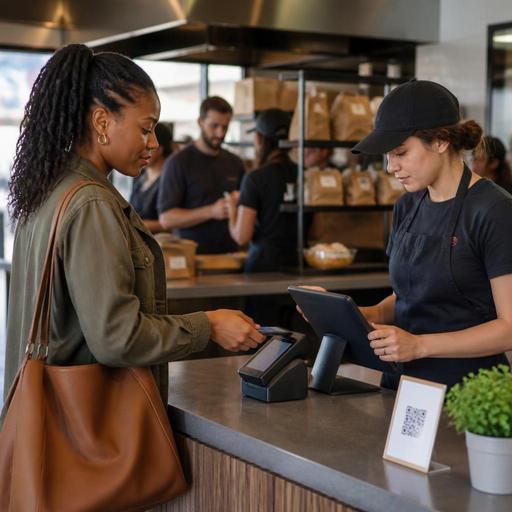
At a burrito line, burger counter, or cafe register, speed matters. Asking every guest to spell an email address can slow the line. A better workflow is to let guests choose from a quick print, SMS receipt, email receipt, or no receipt option on the customer-facing screen if your POS supports it. During lunch rush, the shortest path wins.
Takeout, pickup shelves, and curbside pickup
Digital receipts are especially useful when orders come from direct online ordering, apps, or QR ordering. The receipt can confirm pickup time, order contents, and payment status without adding another paper slip into the bag. For curbside, a texted receipt can pair naturally with arrival notifications. For pickup shelves, staff can use order-ready messages and digital proof of purchase to reduce handoff confusion.
Delivery and third-party marketplaces
For delivery app orders, operators should be careful about what receipt the guest receives and what the restaurant sees internally. Marketplace orders may include platform fees, taxes, tips, or adjustments that are displayed differently from direct orders. Operationally, staff should know which system is the source of truth for order detail, refunds, and guest communication. Verify how your POS and ordering integrations store receipt records so managers are not searching across multiple dashboards during a complaint or chargeback review.
What a good digital receipt workflow should include
A digital receipt is only useful if it is easy to send, easy to retrieve, and accurate. Restaurant owners should map the receipt path from order entry to final settlement.
- Clear itemization: Menu items, modifiers, discounts, taxes, fees, and service charges should display in a way staff and guests can understand.
- Tip visibility: In tipped-service environments, make sure the final receipt reflects how the tip was added and settled. Train managers on how to retrieve pre-tip and post-tip versions if your system stores both.
- Channel labeling: Distinguish dine-in, takeout, curbside, direct online ordering, and delivery app orders so reporting is easier later.
- Time stamps: Include order time, payment time, and fulfillment status where available. This helps with guest questions and internal reviews.
- Store identity: Multi-location brands should ensure the correct location, contact information, and transaction source appear on each receipt.
- Easy resend tools: Staff should be able to resend a receipt without manager-level friction when a guest asks later that day.
For example, a three-unit pizza group offering dine-in, direct delivery, and pickup shelf service may want one standard receipt template, but different trigger points. Dine-in receipts may send after the tip closes. Pickup receipts may send when payment is completed. Delivery receipts may need separate internal and guest-facing versions depending on the order source.
Operational recordkeeping, disputes, and reporting
Digital receipts can improve recordkeeping when they connect cleanly to the POS and kitchen workflow. Managers often need to look up a transaction because of a refund request, a missing item claim, a tipped check question, or an end-of-day cashout discrepancy. Searching email inboxes or digging through paper copies wastes time. A centralized receipt history tied to the transaction record is much more practical.
Consider a neighborhood sports bar during Sunday games. Tabs stay open, guests move seats, split checks happen late, and bartenders may close multiple cards at once. In that environment, digital receipts help managers verify who paid, when the tab closed, and whether the final total included a tip or service charge. In a hotel restaurant, the receipt trail may need to connect with room charges, event billing, or folio review. In a food truck, digital records can simplify reconciliation when mobile connectivity is spotty and the team needs to sync transactions after service.
Receipts can also support internal control workflows:
- Review voids, discounts, and remakes against transaction records.
- Match online orders to payment and fulfillment status.
- Resolve chargebacks with cleaner transaction detail.
- Support guest service when someone needs a copy for reimbursement.
When digital receipts include payment and tax-related information, operators should treat setup carefully and verify current federal, state, and local requirements with qualified advisors or official guidance. That includes differences between sales tax and service charges, tip reporting awareness, alcohol rules where applicable, and any record-retention expectations tied to your business type or location. For larger chains, menu labeling and related receipt practices may also need review against current official guidance.
Guest experience, accessibility, and rollout tips
The guest should never feel forced into a clumsy receipt process. Ask for contact details only when there is a clear reason, and keep the prompt short. If you collect phone numbers or email addresses for receipt delivery, make sure staff can explain the purpose in plain language. Operationally, it is smart to separate receipt delivery from marketing consent so guests do not feel tricked.
Accessibility also matters. QR-based receipt access may work well for many guests, but not all. ADA-minded service means offering practical alternatives, such as printed receipts on request, verbal assistance, readable screen flows on customer-facing devices, and staff support for guests who prefer non-QR options. Specific accessibility expectations can vary, so operators should review current requirements and best practices with qualified advisors when needed.
For rollout, keep it simple:
- Start with one or two receipt options per service channel.
- Train cashiers, servers, and managers on resend and lookup steps.
- Test the workflow during lunch rush, dinner peak, and curbside handoff.
- Audit how receipts appear for direct orders versus marketplace orders.
- Check that your POS, payment system, and kitchen display workflow all reference the same order record.
A strong digital receipt setup should reduce confusion, not create another tech layer for the team. For U.S. restaurants, the best systems support tipped service, takeout growth, direct ordering, and cleaner reporting without slowing down hospitality. Restomas can help operators connect QR ordering, POS-linked order flows, and guest-facing digital touchpoints into a more organized receipt and recordkeeping process.
