Digital Tipping in U.S. Restaurants: Clear Guest Prompts and Staff Workflows
Digital tipping in U.S. restaurants is no longer limited to the countertop tablet at a coffee shop. Guests now encounter tip prompts on QR ordering pages, handheld payment devices, online checkout for takeout, curbside pickup links, and delivery flows tied to your POS. For operators, that creates a real challenge: how do you make tipping feel clear, fair, and consistent for guests while keeping internal reporting understandable for servers, bartenders, cashiers, runners, and managers? The answer is not just choosing percentages. It is building a workflow that matches service style, payment channel, and staff expectations.
Why digital tipping needs an operations plan, not just a payment screen
In many U.S. restaurants, guests move across multiple order channels in the same week. A regular might grab drip coffee at the counter on Monday, place a takeout order from your direct online ordering page on Wednesday, and sit down for table service on Saturday. If your tip prompts look different in every channel, guests notice. Staff notice too.
Consider three common examples:
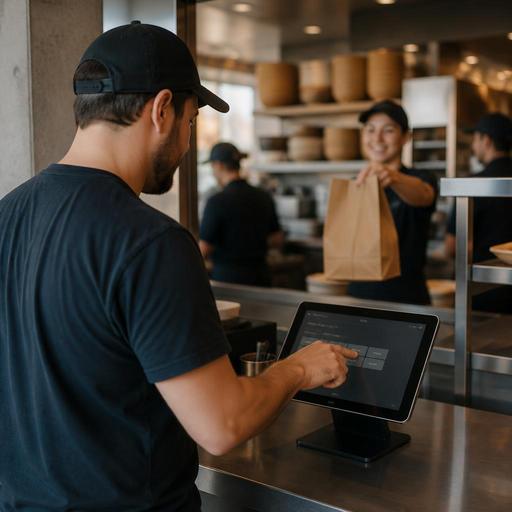
- Neighborhood cafe: A guest orders a latte on a POS tablet and sees preset tip buttons before tapping a card.
- Fast-casual salad shop: A lunch guest scans a QR code at the table, orders on their phone, and pays without speaking to staff until food is dropped.
- Full-service diner: A server closes a check on a handheld device and the guest adds a tip at the table after traditional service.
These are all valid tipping moments, but they are not the same service experience. Operators should define what each channel is for, how the prompt appears, and how the collected tips are reviewed and communicated internally. If you run a food truck, airport concession, hotel restaurant, or stadium stand, this channel-by-channel approach matters even more because guest expectations change by venue and speed of service.
Match the tip experience to the service model
The best digital tipping setup reflects the type of hospitality the guest actually received. A one-size-fits-all prompt can create friction, especially if the guest thinks the request appears too early or does not match the level of service.
Counter service and coffee shops
For cafes, bakeries, ice cream counters, and quick breakfast spots, tip prompts often appear before or at payment. Keep the screen simple. Guests should understand whether they are tipping before the drink is made, after a customization-heavy order, or as part of a quick grab-and-go interaction. If your team rotates between register, bar, and handoff, managers should be able to explain how tip pools or distributions are tracked. Staff trust drops fast when no one can answer basic questions about where digital tips go.
Fast-casual, QSR, and QR ordering
In fast-casual and QSR settings, digital tipping can appear on self-service kiosks, QR menus, or direct online ordering pages. A burrito shop with a pickup shelf may use one approach for in-store ordering and another for scheduled takeout. A wing shop may accept tips on a direct web order while also receiving separate marketplace delivery orders through third-party apps. Operators should decide whether guests see the same suggested options across channels or whether the prompt changes based on service level, such as dine-in drop-off versus pickup-only.
Full-service restaurants and bars
For table service, handheld payment devices and digital checks should support a smooth closeout without making the server explain the screen awkwardly. In bars, tabs add another wrinkle. If a guest opens a tab, closes it later, and receives a digital receipt, the tip flow should be easy to follow and easy for staff to reconcile by shift. If your concept uses automatic service charges in some situations, such as large parties or banquet-style events, make sure the guest-facing flow clearly distinguishes those charges from optional tips, and verify current local rules and disclosure expectations with qualified advisors.
Reduce guest confusion with clear wording and accessible design
Many tipping complaints are not really about tipping. They are about confusion. Guests may not know whether they are tipping for counter pickup, whether sales tax is included before the tip prompt appears, or whether a service charge has already been added. Clean design matters.
- Use plain labels. Avoid vague language. If the screen asks for a tip, say tip. If there is a service charge, label it separately.
- Show the order context. A guest checking out for curbside pickup should clearly see that they are paying for pickup, not dine-in service.
- Keep the no-tip or custom-tip option visible. Hidden choices create frustration and can hurt guest trust.
- Make screens readable. ADA-minded digital access is practical, not optional. Think about contrast, font size, touch targets, and how easily a guest can complete payment on a phone or device. For accessibility requirements, verify current guidance for your setup and location.
- Separate taxes, fees, and gratuity lines clearly. In the U.S., guests are used to seeing sales tax and tip as different items. If your checkout combines multiple charges without explanation, expect questions.
This is especially important for multi-location brands. If one location presents a QR checkout one way and another handles it differently, guests may assume the business is inconsistent or hiding fees. Standard templates across locations can help, while still allowing local managers to adjust for service style.
Build internal trust with better reporting and payout workflows
Digital tipping is not only a guest-experience issue. It is a staff-confidence issue. Servers, bartenders, hosts, cashiers, and counter staff want to know what was collected, through which channel, and how it will appear in shift reports or payroll-related records.
A practical workflow often includes:
- Channel-level visibility: Separate dine-in, takeout, direct online ordering, QR ordering, and delivery app transactions where possible.
- Shift-level review: Managers should be able to compare payment totals, tips, voids, refunds, and closed checks before approving end-of-day numbers.
- Role-based logic: A sports bar may route tips differently from a food truck or a hotel lobby cafe. Define who participates in any tip sharing workflow and document the process internally.
- Clear payout timing: Staff should know whether digital tips are paid out daily, on payroll, or through another approved process.
Operators should also remember that tip reporting, payroll treatment, service charges, and related labor rules can differ based on facts and location. Keep your systems organized, but verify current federal, state, and local requirements with payroll professionals, accountants, legal counsel, or official agency guidance before changing policies.
If you run multiple units, standardized reporting is a major advantage. A franchise group with ten fast-casual stores should not rely on each GM to manually piece together tablet tips, QR tips, and direct web-order tips from separate exports. Central visibility helps spot unusual patterns, train managers, and answer staff questions faster.
Practical steps to improve digital tipping this quarter
If your current setup feels messy, start with a short audit rather than a full rebuild. Walk through every guest payment path yourself on a phone, a POS terminal, and any handheld devices.
- Map every tip prompt: counter, QR table ordering, direct online ordering, curbside pickup, pickup shelf orders, handheld checkout, and delivery app orders.
- Check wording consistency: make sure tip, service charge, and other fees are not blended together.
- Review staff questions: ask managers what employees most often ask about digital tips and reporting.
- Test guest friction points: look for screens that feel rushed, confusing, or hard to read.
- Align POS and back-office reports: confirm that managers can trace tip activity by order source without extra spreadsheet work.
- Train on guest-facing language: give staff a short, neutral script for questions at the register or table.
For example, a suburban pizza shop might keep a tip option on direct pickup orders but simplify the prompt and train cashiers not to pressure guests at the counter. A brunch restaurant using QR ordering might present tipping at final payment rather than at the start of the order so the guest connects it to actual service. A hotel restaurant may need one setup for breakfast grab-and-go and another for dinner table service.
Digital tipping works best when it feels predictable to guests and transparent to staff. When your ordering, payments, POS, and reporting tools are connected, it becomes much easier to create that clarity across dine-in, takeout, and multi-location operations. Restomas helps operators organize those digital guest and staff workflows in one place.
