ADA-Friendly QR Menu Design for U.S. Restaurants
ADA-friendly QR menu design for U.S. restaurants is not just a design project. It is an everyday service workflow that affects how guests read your menu, place an order, ask questions, and pay the check. Whether you run a neighborhood cafe, a fast-casual counter, a sports bar, a hotel restaurant, or a food truck, your QR menu should be easy to read, easy to navigate, and backed up by staff who can help without slowing service. Accessibility questions can involve federal, state, or local rules, so operators should verify current requirements with qualified advisors and official guidance. Operationally, the goal is simple: give every guest a practical way to access the menu and complete the dining experience.
Start with readable design, not just a working QR code
Many operators launch a QR menu by focusing on speed: upload the menu, print the table tent, and move on. But a QR code that opens a hard-to-read menu can create friction at the table. ADA-minded design starts with readability on a phone screen, because that is where most guests will actually view it.
Use clear, high-contrast text and avoid light gray copy on white backgrounds. Small decorative fonts may look stylish in a wine bar or chef-driven concept, but they often make item names, modifiers, and allergy notes harder to read. Choose simple typefaces, strong contrast, and enough spacing between lines and buttons so guests are not forced to zoom in constantly.
For example, a diner with an all-day breakfast menu may have long sections for omelets, sides, and add-ons. If every modifier is packed tightly together, guests can miss options or order the wrong item. A fast-casual salad shop with build-your-own steps should separate base, protein, toppings, and dressing into clean blocks. A hotel restaurant serving breakfast, lunch, room service, and bar bites should avoid putting everything on one endless page. Break the menu into logical sections that reduce scrolling and confusion.
Also think about glare and lighting. Guests in a sunny patio, airport concession, or stadium club area may struggle with faint colors and tiny text. Test your QR menu on older smartphones, not just the newest devices used by your management team.
Make menu language simple, descriptive, and easy to navigate
Accessible design is also about language. Guests should be able to understand what each item is, what major choices are available, and how to move through the menu without guessing. Overly clever category names or vague modifier labels can create unnecessary barriers.
Use plain section names such as appetizers, sandwiches, kids menu, cocktails, desserts, and gluten-sensitive options when relevant. If your menu includes local specialties, explain them clearly. A Texas barbecue restaurant can still use regional language, but it helps to clarify whether a plate includes sides, bread, sauce choices, or pickup packaging for takeout. A New England seafood spot can describe whether a roll is served hot with butter or chilled with mayo. Clear wording reduces both guest frustration and kitchen remakes.
If your operation serves multilingual communities, think carefully about language access. In many U.S. markets, guests may be more comfortable reading Spanish or another commonly used language. While not every restaurant can support multiple full menu translations, many can at least provide core guest-facing information in the languages most relevant to their neighborhood. If you do offer translated menus, keep them updated whenever prices, ingredients, or limited-time items change.
For chains and larger operators, consistency matters across locations. If one store calls a service charge a fee and another uses different wording, guests may be confused when reviewing the check. If alcohol, calories, or other disclosures apply to your concept, build a review process so updates are handled centrally and then checked locally. Regulatory topics can vary by concept and jurisdiction, so confirm current requirements with appropriate advisors.
Build a backup plan for guests who cannot or do not want to use QR ordering
The biggest accessibility mistake is assuming the QR menu is the only path. An ADA-minded setup includes a reliable backup plan that staff can offer immediately and comfortably. This is not just about compliance language. It is about hospitality.
Your backup plan can include:
- Printed menus kept clean, current, and easy to read
- Large-print versions for guests who need bigger text
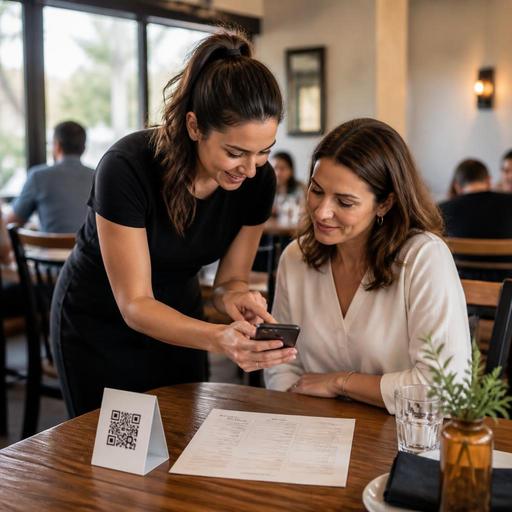
- A staff-assisted ordering process where a server or cashier reads options aloud when needed
- A host or counter script so employees know how to offer help without making the guest ask repeatedly
- Accessible payment alternatives if the QR flow also handles the check or tab
Consider real U.S. service situations. In a full-service neighborhood restaurant, a server can greet the table by saying printed menus are available on request and can also walk guests through specials. In a fast-casual burger shop using table QR ordering, a team member should be ready to take the order at the counter if a guest prefers not to use a phone. In a food truck, where space is tight and lines move fast, a clearly posted verbal ordering option can be just as important as the digital menu. In a sports bar, where lighting is dim and phones are competing with the game on screen, staff should know how to step in quickly before the guest gives up.
Backup plans should also cover internet and device issues. If your guest Wi-Fi is inconsistent or cell service drops in a basement bar, hotel lobby restaurant, or stadium venue, the staff needs a non-digital path that keeps the line moving.
Train staff on accessibility as a service routine
Even a well-designed QR menu can fail if the team does not know how to support guests. Accessibility should be part of opening training, pre-shift reminders, and manager observation, just like upselling, food safety, and handling takeout rushes.
Train hosts, servers, bartenders, and cashiers to recognize common friction points:
- The guest cannot scan the code because the print is damaged or placed poorly
- The menu opens, but the text is too small or the contrast is weak
- The guest does not understand how to find modifiers, allergy notes, or checkout
- The guest wants to split the check, tip, or pay another way outside the QR flow
- The guest simply prefers a human interaction instead of mobile ordering
Create short scripts so staff can help naturally. For example: “I can bring a printed menu right away,” or “If you prefer, I can take your order here and enter it in the POS for you.” This matters in full-service dining, but it also matters in QSR and fast-casual operations where labor is lean and pickup shelves, curbside pickup, and delivery app tablets already compete for attention.
Managers should also test the workflow from the guest side. Sit in a booth, scan the QR code, try to enlarge text, place an item with modifiers, add a tip if the flow allows tipping, and complete payment. Then do the same while standing at a crowded counter or outdoors near a food truck. If the process is frustrating for your team, it will be frustrating for guests too.
Connect QR menu accessibility to the rest of your operation
A QR menu is not a standalone tool. It affects ordering accuracy, kitchen pacing, check average, and guest satisfaction. If the menu is hard to read, guests may abandon direct online ordering and choose third-party delivery apps instead. If modifiers are unclear, the kitchen display system may receive bad tickets. If guests cannot easily review items before paying, staff may spend extra time fixing checks at the POS.
Operators should review QR menu performance the same way they review prep times or voids:
- Check whether guests can complete orders without staff rescue at every daypart.
- Review which menu sections create the most questions or order errors.
- Confirm printed backup menus match current digital pricing and item availability.
- Make sure tables, counter signs, and patio stands place QR codes where guests can actually reach and scan them.
- Update staff scripts when workflows change, especially for payment, tipping, or pickup.
For multi-location brands, assign one owner for menu accessibility standards and another for location-level checks. A suburban family restaurant, an airport unit, and a hotel outlet may use the same platform but still need different backup routines based on traffic, lighting, and guest expectations.
The best ADA-minded QR menu is one that works in real service, not just in a demo. Clear text, strong contrast, plain language, and trained staff create a better guest experience for everyone, including guests who never mention accessibility at all. Restomas can help operators organize QR menus, ordering flows, and menu updates in a way that supports smoother service across channels.
