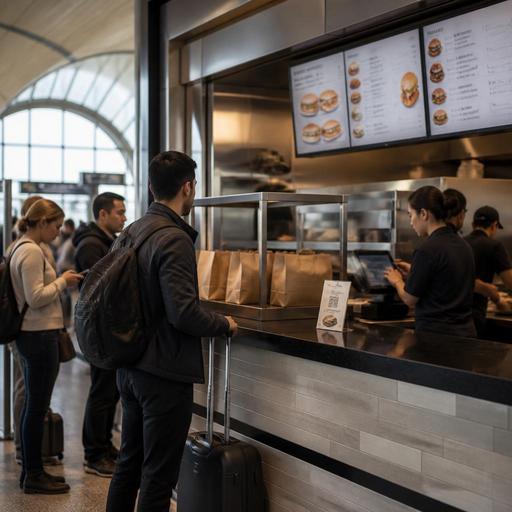
Airport Concession Menu Strategy for Faster, Clearer U.S. Service
Airport concession menus have to do more than list food. In a U.S. terminal, the menu is part wayfinding tool, speed-of-service system, and compliance checkpoint all at once. Travelers are often rushed, carrying bags, watching boarding times, and ordering in a noisy environment. For airport restaurant operators, that means the menu must help guests decide fast, reduce order errors, and fit the realities of POS workflows, pickup zones, and shift-based labor in a high-pressure setting.
Whether you run a coffee counter in a regional airport, a bar near a major hub concourse, a fast-casual burger concept in a terminal food court, or a branded grab-and-go inside an airport hotel connection, the same rule applies: menu clarity is operations. A confusing board slows the line, creates remake risk, and puts extra pressure on cashiers, expediters, and kitchen display system screens. A clear menu supports better throughput without making the guest feel rushed.
Design the menu for rushed travelers, not leisurely diners
Airport guests do not browse like neighborhood restaurant guests. They scan. They want to know what is fast, what travels well, what fits breakfast versus late-night demand, and what can be picked up quickly before boarding. Your menu should reflect that behavior.
Start by separating high-speed choices from slower or more customizable items. For example, a breakfast counter in Dallas or Atlanta may highlight three fast combinations first: breakfast sandwich plus coffee, yogurt parfait plus bottled juice, and burrito plus hash browns. A sports bar in a large hub may place draft beer, canned beer, wings, and handhelds in the easiest-to-read zones because those are common pre-flight decisions. A salad bowl with many modifiers may still belong on the menu, but it should not dominate the first view if it slows ordering during peaks.
- Lead with top sellers: Put the most common terminal-friendly items first.
- Group by decision speed: Ready now, made to order, and grab-and-go can be clearer than long culinary categories.
- Use concise modifier choices: Too many add-ons create line backups and POS entry delays.
- Show pickup logic: If guests order at kiosk, by QR, or at the counter, make the pickup path obvious.
- Match menu wording to the kitchen: Use names your cashiers and line cooks recognize instantly.
A terminal coffee shop, for instance, may benefit from a QR menu that mirrors the physical menu board and lets travelers review ingredients while still in line. That can cut repeated questions at the register and help guests with dietary preferences make faster decisions before they reach the cashier.
Build for operational compliance without turning the menu into clutter
Airport concession operators deal with multiple layers of rules and landlord standards. Depending on concept size, brand footprint, and location, menu labeling, alcohol service disclosures, payment workflows, and accessibility expectations may all affect how the menu is presented. The practical goal is to organize required information so it supports service instead of overwhelming the guest.
For chain operators, FDA menu labeling context may be relevant, especially if the concept meets the applicable threshold for covered businesses. Operators should confirm current federal requirements and airport-specific standards with qualified advisors and official guidance. Operationally, this means keeping a reliable source of truth for item names, recipe data, and any required calorie display so menu boards, QR menus, kiosks, and third-party ordering channels stay aligned.
Accessibility matters too. In a terminal, ADA-minded access is not just about the physical counter. It also touches digital readability, color contrast, logical navigation, and whether a guest can review menu details without standing in a crowded line for several minutes. If you use QR ordering, provide a clear non-QR ordering path as well. If you use self-order kiosks, make sure staff know how to assist without creating friction. Operators should verify accessibility expectations for their specific setup with qualified advisors and current official guidance.
Alcohol adds another layer. A full-service airport bar in Chicago or Phoenix may offer beer, wine, and cocktails, but digital menus and POS prompts should support ID-check workflows and any airport or local service rules. The menu should never create the impression that age-restricted items can move through the same frictionless path as a bottled water or breakfast taco without required staff review.
Connect menu structure to POS, kitchen display, and pickup flow
In airports, speed problems often look like menu problems but are actually system problems. If the menu category order does not match the POS screen, cashiers slow down. If modifiers are buried, tickets become inconsistent. If the kitchen display system receives vague item names, the expo station hesitates. The best airport concession menus are built backward from execution.
Map each item through the full workflow:
- How the guest sees it on a board, QR menu, kiosk, or delivery-style tablet for in-terminal ordering
- How the cashier or guest selects it in the POS
- How the kitchen display system routes it to hot line, cold prep, or bar
- How the order is staged on the pickup shelf or handoff counter
- How the guest can identify the order quickly without crowding the pass
Consider a fast-casual chicken concept in an airport food hall. If the menu says crispy combo but the POS says chicken sandwich meal and the kitchen display abbreviates it differently, training gets harder and errors rise. Standardized naming across channels reduces confusion for new hires, temporary staff, and multi-shift teams.
Pickup design matters just as much. In many U.S. terminals, guests want to order, step aside, charge a phone, and grab the order when called. A clearly organized pickup shelf or staging area can reduce crowding, but it must be secure and easy to monitor. Some concepts may prefer counter handoff only, especially for alcohol, higher-check tabs, or theft-sensitive packaged items.
Plan for peak periods, dayparts, and labor reality
Airport menu strategy should change with the clock. A menu that works at 2:00 p.m. may fail at 6:30 a.m. or during weather delays. Build daypart versions that simplify production without disappointing guests.
For example, a bagel and coffee unit near early-morning gates may limit custom hot sandwiches during the first departure wave and lean on prebuilt breakfast items, drip coffee, and fast bakery choices. A concourse bar may narrow late-night food to shareables, flatbreads, and packaged takeout-friendly items after kitchen staffing drops. An airport hotel restaurant connected to the terminal may offer a fuller dine-in menu while still promoting a compact takeout list for travelers heading upstairs or catching a shuttle.
Labor scheduling should follow this logic. If your line regularly spikes right after security backups clear, your staffing plan should anticipate order surges at the register, expo, and beverage station. Tipped staff, service charges, and checkout workflows may differ between full-service airport venues and quick-service counters, so managers should train supervisors on how tips, service charges, and sales tax are presented on checks and digital payment screens. Because rules and practices vary by jurisdiction and business model, operators should confirm setup details with payroll, tax, and legal advisors before changing workflows.
- Create peak-hour menu versions with fewer modifiers and clearer bundles.
- Use 86 controls in real time so sold-out items disappear quickly from digital channels.
- Train staff on one-sentence explanations for common traveler questions.
- Set pickup expectations such as where to wait and how names are called.
- Review remake reasons weekly to find menu wording that causes confusion.
Use digital menus to improve clarity across terminals and locations
For multi-location airport operators, consistency is hard. One unit may be in a high-volume hub with kiosks, another in a smaller regional terminal with mostly counter service. Digital menu management helps keep core items, allergen notes, pricing structure, and item availability organized while still allowing location-specific adjustments.
A strong setup can help operators update breakfast cutoffs, hide alcohol during restricted hours where required, route online pickup orders differently by terminal layout, and maintain cleaner menu visibility across POS-connected channels. If your concession also appears on airport marketplace ordering, direct online ordering for employee meal pickup, or limited delivery app programs inside large terminals, synchronized menus become even more important.
The practical win is not just technology for its own sake. It is fewer mismatches between what the guest sees and what the team can actually produce. For an airport concession, that means shorter lines, clearer checks, smoother handoff, and less stress on staff during rushes.
Restomas can help airport concession operators organize QR menus, ordering flows, POS-connected updates, and multi-location menu control in a way that supports faster service and clearer guest decisions.
