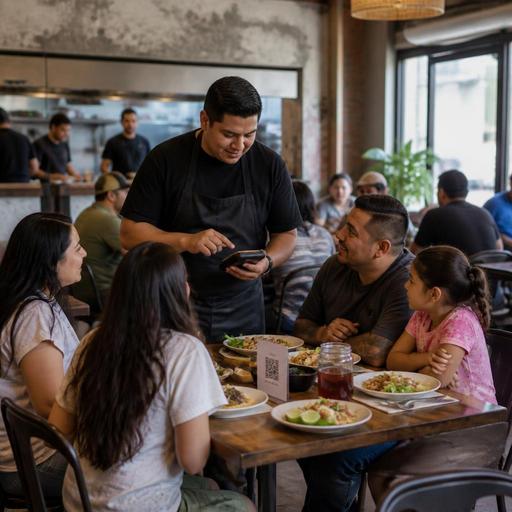
Bilingual Restaurant Menu Workflows for U.S. Spanish-Speaking Guests
Bilingual restaurant menu workflows can do much more than translate dish names. For U.S. operators serving Spanish-speaking neighborhoods, mixed-language family groups, tourists, airport travelers, hotel guests, and bilingual staff teams, the real goal is smoother ordering, fewer mistakes, faster service, and better guest confidence across dine-in, takeout, pickup, and delivery.
In practice, that means treating Spanish and English as an operations workflow, not a one-time design project. A neighborhood taqueria in Houston, a fast-casual bowl concept in Los Angeles, a diner in Chicago with weekend family traffic, and a food truck in Miami all face the same challenge: guests need clear choices, staff need consistent item names, and the POS, kitchen display system, QR menu, and delivery app listings all need to match.
Start with one source of truth for menu language
The biggest bilingual menu mistake is letting every channel say something different. A printed menu may say one thing, the QR menu another, and the delivery apps a third version. That creates avoidable confusion for guests and staff.
Build a single menu master that includes:
- Primary item name used in the POS and kitchen workflow
- Guest-facing English name
- Guest-facing Spanish name
- Short description in both languages
- Modifier names such as protein choice, salsa level, side options, and add-ons
- Allergen or dietary notes written clearly and consistently
- Pack-out instructions for takeout and delivery when relevant
For example, a fast-casual burrito shop in Phoenix may keep the internal POS item as grilled chicken bowl, while the guest sees English and Spanish versions in the digital menu. The key is that the line cook, expo, cashier, and online ordering channel are all referencing the same underlying item and modifier set.
This matters even more in multi-location groups. If one location uses steak quesadilla and another uses quesadilla de carne asada without a shared item structure, reporting, inventory mapping, and staff training can drift quickly.
Design bilingual menus for speed, not just accuracy
A bilingual menu should help guests order faster. Long side-by-side text blocks can slow scanning, especially on phones. Instead of duplicating every line in a cluttered format, decide where guests need full translation and where they need quick support.
Best places for full bilingual detail
- Main menu categories
- Signature items
- Modifiers that affect the final order
- Pickup and curbside instructions
- Payment and tipping prompts in digital ordering flows
Best places for simpler bilingual support
- Short dish descriptors
- Preparation notes like grilled, fried, spicy, or chilled
- Condiment and salsa selections
Consider how this works in a real U.S. setting. A San Antonio breakfast spot with tacos, plates, and coffee may use category headers in both languages, then keep familiar food terms that guests already recognize. Meanwhile, a hotel restaurant near Orlando may need fuller bilingual descriptions because guests are less familiar with the menu and may be ordering through room service QR links.
For QR menus, let guests switch language with one tap rather than forcing them to scroll through mixed-language item blocks. For printed menus, use clean grouping so a family can find sections quickly while sharing one menu at the table. If your operation uses ADA-minded digital access, make sure the language switch is easy to locate and that screen-reader behavior is tested. Accessibility expectations can vary by situation, so operators should review current official guidance and confirm local requirements with qualified advisors when needed.
Train staff around bilingual ordering moments
Even an excellent menu can fail if the service workflow is inconsistent. Staff should know how bilingual ordering works at the host stand, counter, table, phone line, and pickup shelf.
Focus training on the moments where mistakes happen most often:
- Greeting and language preference: Teach staff to identify whether a guest seems more comfortable in English or Spanish without making the interaction awkward.
- Modifier confirmation: Repeat back choices like meat temperature, tortilla type, combo side, drink size, and spice level.
- Name and order matching: Make sure takeout bags, tabs, and pickup shelf labels follow a consistent process, especially when guest names are spelled differently across channels.
- Phone orders: Keep a short script for high-risk items and combo builds to reduce remakes.
- Delivery handoff: Standardize packaging labels so the kitchen and third-party driver can identify orders quickly.
A food truck in Southern California, for example, may take orders in both languages at the window, then send tickets to a kitchen display system using one standardized item set. That prevents confusion during a lunch rush when one cashier says an item in Spanish and another says it in English.
For full-service restaurants, bilingual workflows also affect the check. Servers should know how to explain specials, substitutions, service charges, and tipping screens in a clear, respectful way. Because service charges, gratuities, tip reporting, and tax treatment can differ by state or city and by service model, operators should verify current requirements with their payroll provider, accountant, attorney, or official agency guidance.
Align QR ordering, POS, and delivery apps
If your Spanish and English menu only works in the dining room, you are leaving money and consistency on the table. U.S. guests move across channels: they scan a QR code at lunch, reorder from home later, and then use a delivery app on a busy night.
Your bilingual setup should align these systems:
- POS: Internal item mapping must stay consistent across languages.
- QR menu and direct online ordering: Guests should be able to browse and order in their preferred language with the same pricing and modifier logic.
- Delivery marketplaces: Keep item names, photos, and descriptions aligned so guests do not think they are ordering different products on different apps.
- Kitchen display system: Use standardized production language for speed and ticket clarity.
- Reservations or waitlist notes: If relevant, note language preferences for repeat guests or large parties.
A bar and grill in Las Vegas might use English-forward language on delivery apps for visitor traffic, while still offering Spanish support on direct ordering and in-house QR menus for local regulars. A multi-unit chicken concept in Texas may standardize every modifier in both languages so franchise locations do not improvise translations that break reporting or kitchen flow.
If you operate a chain large enough to fall under federal menu labeling rules, bilingual presentation should still keep required menu information consistent across channels. Operators should confirm current FDA guidance and any related state or local expectations before changing menu displays.
Build a rollout plan and measure what changes
Do not launch a bilingual menu everywhere at once without testing. Start with one revenue-critical channel or one high-volume location, then refine.
A practical rollout plan looks like this:
- Audit every guest touchpoint: printed menus, QR ordering, direct online ordering, delivery apps, catering menus, phone scripts, and pickup shelf labels.
- Choose naming standards: decide which terms remain in Spanish, which are translated, and which need short explanations.
- Test with staff: have servers, cashiers, expo, and managers place mock orders in both languages.
- Watch real friction points: missed modifiers, voids, remakes, longer order times, and guest questions.
- Update by channel: fix the menu master first, then push changes into POS, QR, and delivery systems.
For example, a New York quick-service lunch shop might discover that bilingual combo descriptions reduce register questions, while a family-owned restaurant in El Paso might learn that curbside pickup instructions need clearer Spanish wording than the dine-in menu does.
Measure operational outcomes, not just guest comments. Are there fewer order errors? Do guests complete direct online orders more easily? Are staff spending less time explaining the same items? That is where bilingual menu work becomes profitable, not just polite.
Restaurants that serve U.S. bilingual communities well usually treat language as part of service design, menu engineering, and digital operations all at once. Restomas can help operators keep QR menus, ordering flows, and menu updates more consistent across channels as those workflows evolve.
